Sit down, grab a cup of coffee, and let’s clear this up. You’ve probably seen HDR plastered across TV boxes and OLED plastered across glossy ads, and it’s easy to think they’re the same thing. They’re not.
HDR stands for High Dynamic Range and is a way of encoding video so bright highlights and deep shadows carry more detail. OLED is a screen technology — the physical way a display makes light and color. One is a format for content; the other is the hardware that shows it. That difference matters when you’re choosing a TV, monitor, or phone.
In plain terms: HDR tells a screen what it should try to show. OLED is one way a screen might show it. Sometimes OLED is great for HDR because of the perfect blacks and contrast. Other times, a bright LCD with local dimming will make HDR photos and movies pop more because it can hit higher peak brightness.
I’ve spent years comparing TVs and monitors while building and testing tools for whatismyscreenresolution, and one of the most common points of confusion I see is HDR vs OLED. In this article, I’ll walk you through what HDR actually does, what OLED actually is, and how they work together in real-world viewing.
You’ll also see QLED mentioned in comparisons, so I’ll briefly explain how HDR, OLED, and QLED fit together and where each one makes the most sense.
Also Read: What is 2K Resolution: The Smart Middle Ground for Your Screen
HDR vs OLED — What’s the Real Difference?
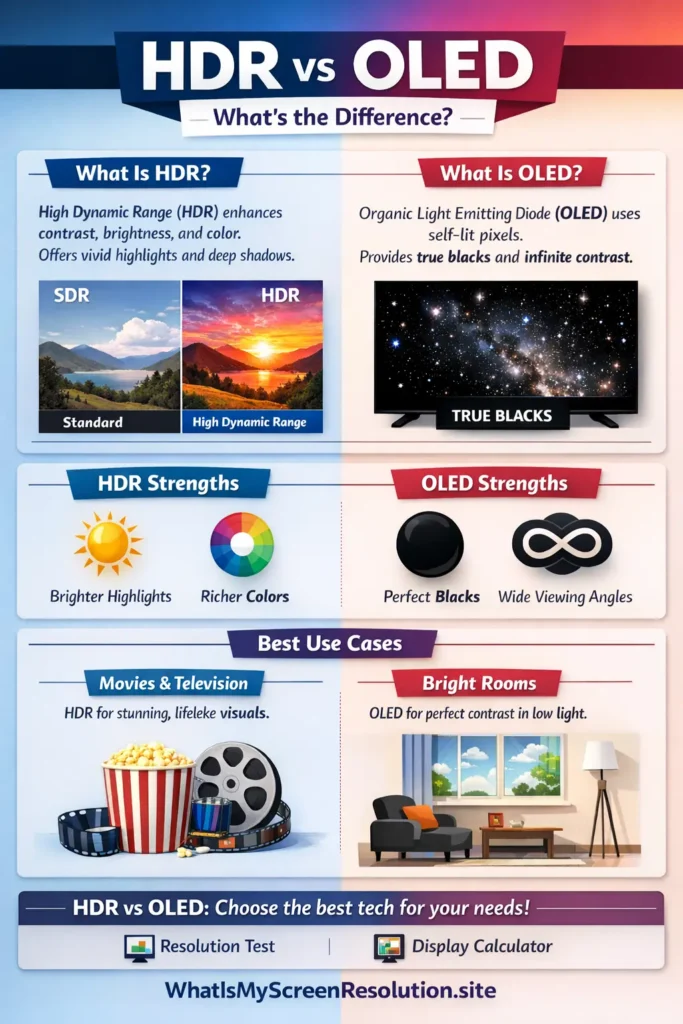
HDR (High Dynamic Range) is a content format that defines how bright, dark, and colorful an image should be. OLED is a display technology where each pixel produces its own light. HDR describes the signal; OLED describes the screen. An OLED display can show HDR content, but they are not the same thing.
What is HDR (High Dynamic Range)?
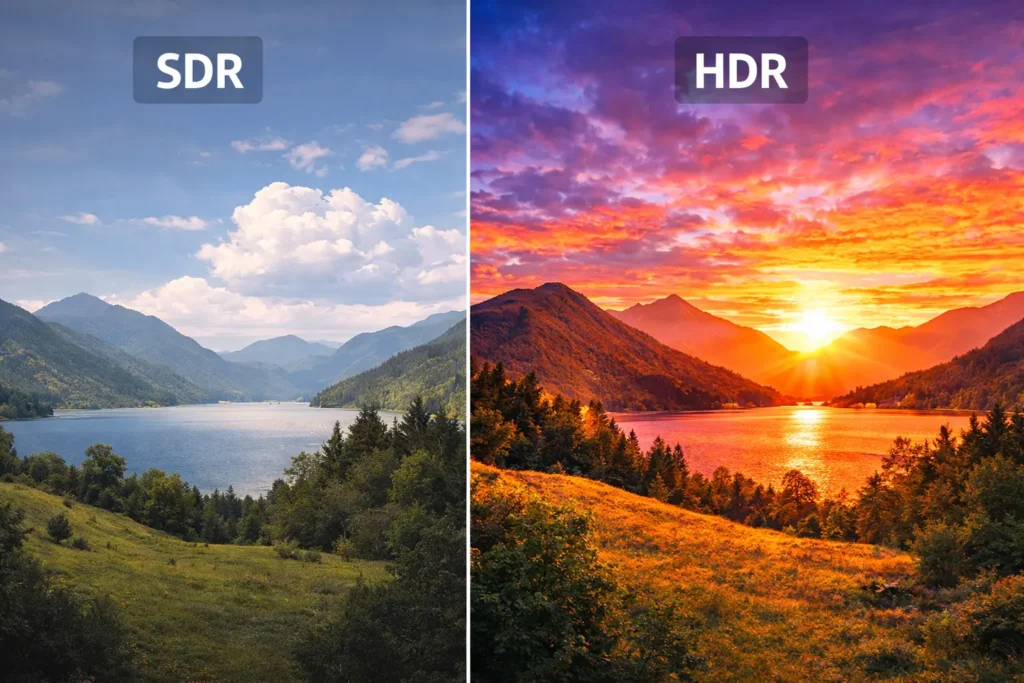
HDR, or High Dynamic Range, is a video and image format that holds more information about brightness and color than older formats like SDR. Think of taking a photo of a sunset. With SDR, either the sky looks right and the foreground is too dark, or the foreground looks right and the sky is blown out. HDR lets the image keep detail in both the bright parts and the dark parts at the same time.
On the technical side, HDR content usually sends metadata to the display that says how bright some parts of the image are meant to be and which color standards to use. The most common HDR formats you’ll see are HDR10, HDR10+, Dolby Vision, and HLG. These standards differ in how they handle metadata and dynamic adjustments across scenes.
But HDR isn’t magic by itself — it depends on the display’s capabilities. HDR can contain instructions for extreme highlights, sometimes in the thousands of nits, but very few consumer displays can actually reach those numbers. What matters is how well a display maps HDR’s wide brightness range into what it can physically show. That’s where panel technology, peak brightness, color volume, and contrast ratio become important.
What is OLED?
OLED stands for Organic Light Emitting Diode. It is a display technology where each pixel emits its own light. When a pixel is off, it emits no light — which gives OLED displays their famously perfect black level. Because the pixels emit light individually, OLEDs have excellent contrast and very wide viewing angles. Colors look rich, and motion tends to feel smooth because pixel response times are fast.
OLEDs are used in phones, some monitors, and many high-end TVs. There are different flavors: WOLED (white OLED with color filters), QD-OLED (quantum dot OLED), and tandem designs that stack organic layers to get more brightness. OLED is prized for deep blacks and contrast, but historically it struggled with sustained peak brightness and had some risk of burn-in when static images were shown for long periods. Recent advances have made OLEDs brighter and more durable, but the basic trade-offs still matter.
HDR vs OLED: Comparison
This is where people get tripped up: you can’t compare HDR and OLED as equals because they’re different categories. Still, it helps to look at how HDR content behaves on OLED screens versus other panel types. Below is a side-by-side comparison you can skim quickly.
Before we dive deeper, here’s a quick HDR vs OLED snapshot to make the difference crystal clear at a glance.
| Feature | HDR (the standard) | OLED (panel tech) |
| What it is | A content and metadata standard that describes brightness and color ranges | A display technology where each pixel emits its own light |
| Role | Tells a display how bright and colorful content should be | Shows the content via emissive pixels with perfect blacks |
| Peak brightness | Can specify very high peaks (theoretically thousands of nits) | Traditionally lower sustained peak brightness than bright LED LCDs, but high-end OLEDs have improved greatly |
| Black level / contrast | Depends on display | Excellent — near-zero black level and infinite contrast for many scenes |
| Color accuracy | Depends on mastering format and display | Very good; OLEDs typically produce accurate colors and wide gamut |
| Viewing angles | N/A | Wide, with minimal shift in color or brightness |
| Motion | N/A | Fast response times, low motion blur |
| Burn-in risk | N/A | Possible with static content but mitigated in modern panels and with precautions |
| Best for | Content that was mastered for HDR and requires both highlights and deeper shadow detail | Watching movies in dark rooms; where deep contrast and inky blacks matter |
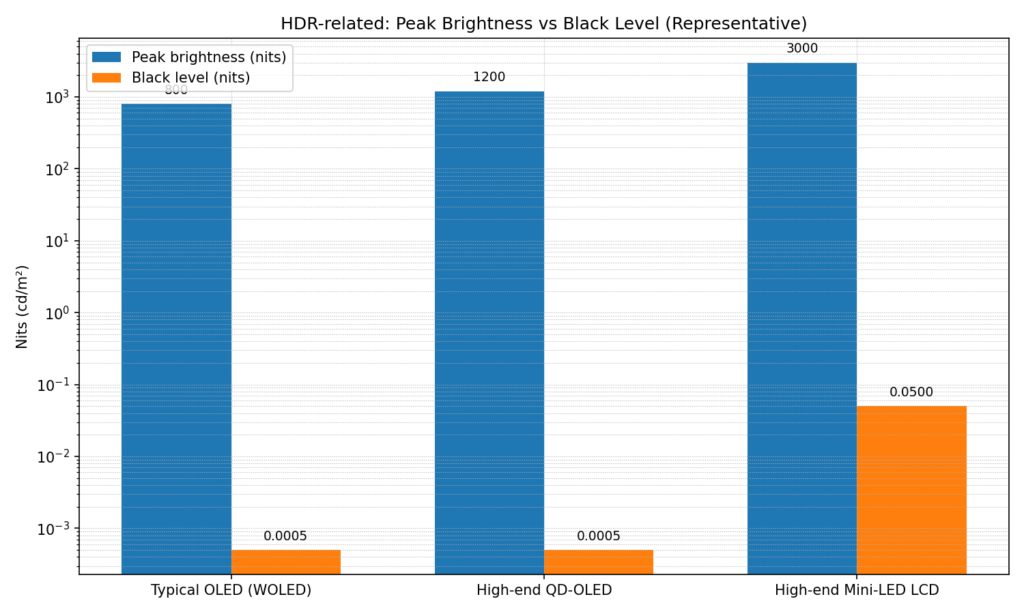
Quick visual: representative numbers
If you’re unsure what resolution or brightness level your current screen supports, I built a free tool on whatismyscreenresolution that shows your display resolution and device details instantly. It’s a useful starting point before comparing HDR or OLED capabilities.
HDR vs OLED vs QLED — How They Actually Compare
QLED is often mentioned alongside HDR and OLED, which adds another layer of confusion. QLED is not a competing version of OLED, and it is not a content format like HDR. QLED is a type of LED LCD display that uses a quantum dot layer to improve brightness and color.
HDR describes how video content is mastered and encoded. OLED and QLED describe how displays physically produce light. OLED uses self-emissive pixels that can turn completely off, creating perfect blacks. QLED uses an LED backlight, often with Mini-LED and local dimming, to achieve very high brightness.
In practice, HDR content behaves differently on each display type. OLED excels at contrast and black levels, making HDR movies look cinematic in dark rooms. QLED displays often achieve higher sustained brightness, which can make HDR highlights stand out more in bright environments. Neither technology is universally better — they optimize different strengths.
| Feature | HDR | OLED | QLED |
| Category | Content standard | Display technology | Display technology |
| Controls brightness/color | Yes | No | No |
| Self-emissive pixels | No | Yes | No |
| Peak brightness | Defined by content | Moderate to high | Very high |
| Black levels | Display-dependent | Perfect blacks | Depends on local dimming |
| Best environment | Any (content) | Dark to dim rooms | Bright rooms |
HDR vs OLED Use Cases
Movies and Television
When people search for HDR vs OLED for home cinema, this is usually the scenario they have in mind. If your idea of a perfect evening is dim lights and a great movie, OLED paired with HDR content is usually the most satisfying combo in the HDR vs OLED debate. Because each pixel can turn completely off, OLED delivers true blacks.
That means letterbox bars disappear into the frame, shadow detail looks natural, and contrast feels cinematic. HDR movies are mastered with bright highlights and deep shadows, and OLED reproduces that contrast beautifully. You get glowing highlights without losing detail in dark scenes. For films and TV dramas, OLED displays tend to deliver the most cinematic results when paired with HDR content.
Bright Room Viewing
In the HDR vs OLED discussion, bright-room performance is where the balance can shift. If your room gets a lot of sunlight or strong indoor lighting, raw brightness matters more than perfect blacks. In these conditions, high-end LED/LCD displays with Mini-LED or full-array local dimming usually outperform OLED for HDR.
They can sustain higher brightness across large areas of the screen, which keeps HDR highlights vivid even in bright environments. OLEDs have improved a lot in brightness, but LED/LCD still tends to win in the HDR vs OLED comparison for daytime sports, news, or casual viewing in sunlit rooms.
For Gamers
Gamers often research HDR vs OLED before buying a new TV or monitor, and for good reason. OLED offers near-instant pixel response, which means smooth motion and crisp fast-moving action. That is great for competitive games. HDR gaming also benefits from OLED’s contrast, making dark areas and bright effects stand out clearly.
On the other hand, bright LED/LCD HDR screens can make explosions, sunlight, and specular highlights look more intense, especially in bright rooms. If you play long sessions with static HUD elements, LED/LCD can also reduce worry about burn-in. In the HDR vs OLED choice for gaming, both can be excellent; it simply depends on your play style and room lighting.
Budget-Conscious Buyers
For many shoppers comparing HDR vs OLED, price plays a big role. OLED TVs and monitors have become more affordable, but they are still usually priced above standard LED/LCD models at the same size. If you want strong HDR performance on a tighter budget, a good full-array or Mini-LED LCD often gives more brightness per dollar.
OLED is worth the premium if deep blacks and contrast are your top priority. In the HDR vs OLED value comparison, if you mainly watch TV in a bright room and want solid HDR without spending extra, a quality LED/LCD model can be the smarter choice.
Technical Trade-offs Explained in Plain Language
Peak brightness sounds like the most important number in HDR, and it is important, but it’s not everything. Imagine two displays showing the same HDR movie. One can light up a tiny specular highlight to 1,000 nits but can’t hold that brightness across a large portion of the screen. The other can push many areas to 1,200 nits for longer. That sustained luminance across much of the screen often looks brighter to your eyes than a tiny highlight hitting 5,000 nits.
OLEDs have tiny pixels that can hit very bright levels in small areas, which makes fire, sparks, or shiny reflections look punchy. But for giant bright scenes like a sunlit sky filling most of the screen, OLEDs historically couldn’t reach the same sustained brightness as the best LED/LCD panels. That is changing: manufacturers have developed tandem OLED stacks and QD-OLED tech that are pushing sustained brightness higher while keeping the perfect blacks.
Also Read: HD vs FHD
Contrast is frequently more important than absolute brightness for perceived picture quality. A display that can show true black right next to a bright highlight can make images pop. OLED wins there because black is actually zero light in many parts of the scene.
Buying Advice — What to Pick and When
If you want a short checklist: pick OLED if you want the deepest blacks, excellent contrast, great viewing angles, and cinematic picture for movies in darker rooms. Pick a bright LED/LCD (especially Mini-LED or full-array local dimming) if you watch HDR in a bright room, need very high sustained highlights, or want potentially higher brightness for sports, HDR gaming, or rooms with lots of sunlight.
Also consider: budget, screen size, and brand reliability. OLEDs often cost more at larger sizes, though prices have been dropping. LCDs with Mini-LED backlights can cost a lot too, but they often outperform older edge-lit LCDs for HDR.
Think about longevity. Modern OLEDs are far more reliable than early generations, but for some heavy static use-cases (like digital signage with the same logos), LCD might be safer. Recent reliability tests show OLEDs performing very well in lifespan and robustness.
Frequently Asked Questions
Conclusion
HDR and OLED are part of the same picture but play different roles. HDR is a set of rules for how content should be shown — a higher-capacity file format for brightness and color. OLED is a type of screen that often makes HDR content look amazing because of its deep blacks and contrast. But in bright rooms or for sustained bright displays, the brightest HDR-capable LCDs still have an edge.
After testing and comparing displays for years while running whatismyscreenresolution, my advice is simple: match the display to your environment. OLED shines in dark rooms and cinematic setups, while bright HDR LCDs win in sunlit spaces. Neither is ‘better’ in every case — the right choice depends on how you actually watch.
View Sources