When you’re shopping for a new TV, laptop, or even just watching a video on your phone, you’ve probably seen terms like HD and FHD thrown around. They sound technical, but they boil down to something really simple: how clear and detailed what you’re seeing on screen looks.
Think about sitting on your couch watching your favorite show. Ever noticed how sometimes the picture looks crisp and detailed, and other times it seems a bit soft or fuzzy? A big part of that difference comes down to screen resolution – specifically whether your device is displaying HD (High Definition) or FHD (Full High Definition).
In today’s world of binge-watching, gaming, and streaming, understanding HD vs FHD can help you choose the right device without confusion or buyer’s guilt.
Resolution affects everything you see, from sharpness of text to the depth of colors in a movie.
In this article, we’ll break down exactly what HD and Full HD are, how they differ, and how to choose the best screen for your needs – whether you’re a casual viewer or a content creator. I built whatismyscreenresolution after helping friends and family constantly ask why their screens looked blurry or why a ‘1080p video’ didn’t look sharp on their laptop. HD vs FHD is one of the most common points of confusion I see, so I wanted to break it down in plain language.
Also Read: HDR vs OLED — What’s the real difference?
HD vs FHD
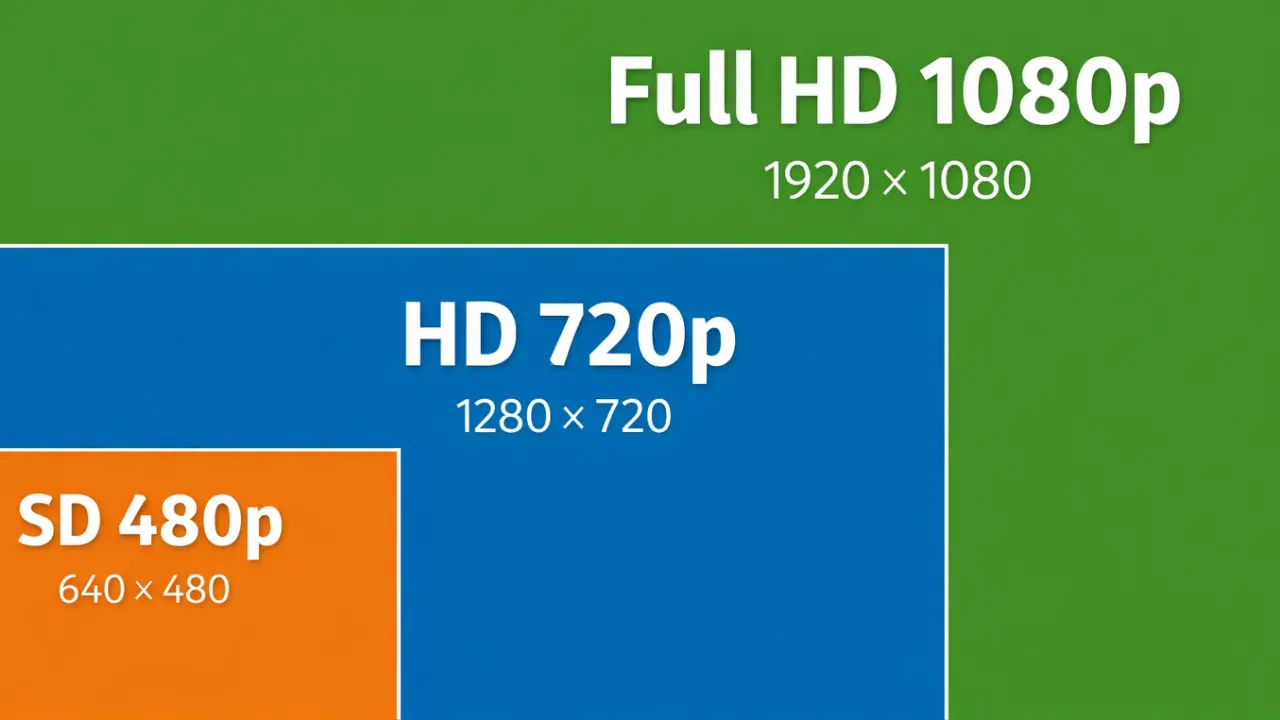
HD usually refers to a 1280×720 (720p) resolution, while Full HD (FHD) means 1920×1080 (1080p). FHD has more than twice the pixels of HD, resulting in sharper text, clearer images, and better viewing on larger screens like TVs, laptops, and monitors.
What is HD?
HD stands for High Definition. In simplest terms, it means the screen displays more detailed images than older standards like SD (Standard Definition). Most commonly when people say HD, they mean a display resolution of around 1280 pixels wide by 720 pixels tall. In shorthand, this is often called 720p.
At this resolution, the screen has roughly 0.9 megapixels. For many years, this was the gold standard for TVs and computer screens. Today, it still looks fine on small screens like tablets and phones, and it’s common in entry-level laptops and budget TVs. When I test HD screens on budget laptops or smaller tablets, the quality is fine up close. But once the screen size increases, especially above 14 inches, I can clearly see softer text edges and less detail compared to FHD.
In real-world terms, if you’re watching a video on an HD screen, you’ll see decent clarity and color. But compared to newer resolutions, the image has fewer pixels overall, meaning less detail especially in larger displays.
What is Full HD?
Full HD, also called FHD, is the next step up from HD. Full HD means the screen resolution is 1920 pixels wide by 1080 pixels tall. In shorthand, that’s 1080p.
This resolution gives you roughly 2.07 megapixels, more than double what a typical HD screen shows. That means more detail, sharper text, and clearer images. This standard became extremely popular because it hits a sweet spot: great image quality without the heavy processing or bandwidth that higher resolutions like 4K require.
When I check devices using our screen resolution tool, the vast majority of modern laptops and monitors still report 1920×1080. It’s the most common ‘sweet spot’ resolution I see people using every day.
HD vs Full HD: Comparison Table
Here’s a clear comparison to help you see the difference quickly:
| Feature | HD | Full HD (FHD) |
| Resolution (pixels) | ~1280×720 | 1920×1080 |
| Total Pixels | ~921,600 | ~2,073,600 |
| Image Detail | Good | Better |
| Typical Uses | Small screens, basic videos | TVs, monitors, laptops |
| Clarity | Standard quality | Sharper and more defined |
| Pixel Density | Lower | Higher |
| Everyday Experience | Fine for casual viewing | Better for movies, games, work |
If you’re unsure what resolution your current screen is using, I always recommend checking it directly instead of guessing. Many people think they’re watching FHD when their device is actually set to HD.
Why Choose Full HD?
Now that you know what each term means, you might wonder: why choose FHD over HD?
For many people, the answer is simple: clarity and visual detail. With FHD:
For example, on a 15-inch laptop display, Full HD text and icons will typically look crisper than on an HD screen. And on a 50-inch TV, FHD content looks noticeably sharper than HD when you’re sitting at a typical viewing distance.
Even though 4K is becoming more common, Full HD remains a great choice for most everyday users because it balances image quality, performance, and price.
How to Choose the Best Full HD Device for You
Picking the right device isn’t just about resolution, but resolution is a big part of it. Here’s how to think about choosing the best FHD device:
If you want, try this screen resolution calculator on our site to see how different resolutions compare in real size.
My Recommendation
If you’re choosing between HD and FHD today, I almost always recommend Full HD unless screen size is very small or budget is extremely tight. In my experience, the visual jump is immediately noticeable, and the price difference has become minimal.
Also Read: HD vs HDR: What’s Actually Different and Why It Matters
Conclusion
When it comes to everyday screens, HD vs FHD boils down to resolution and clarity. HD (around 720p) gives you standard clarity that’s fine for smaller screens and basic use. Full HD (1080p) gives you more than double the detail in the same space, making pictures sharper and text clearer. For most people, FHD is the better choice for TVs, laptops, and monitors because it fits most media, gaming, and work workflows right now.
Understanding HD vs FHD helps you shop smarter, enjoy better visuals, and pick a screen that matches your lifestyle.