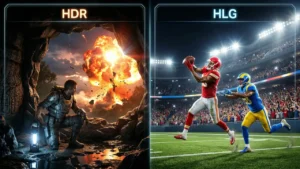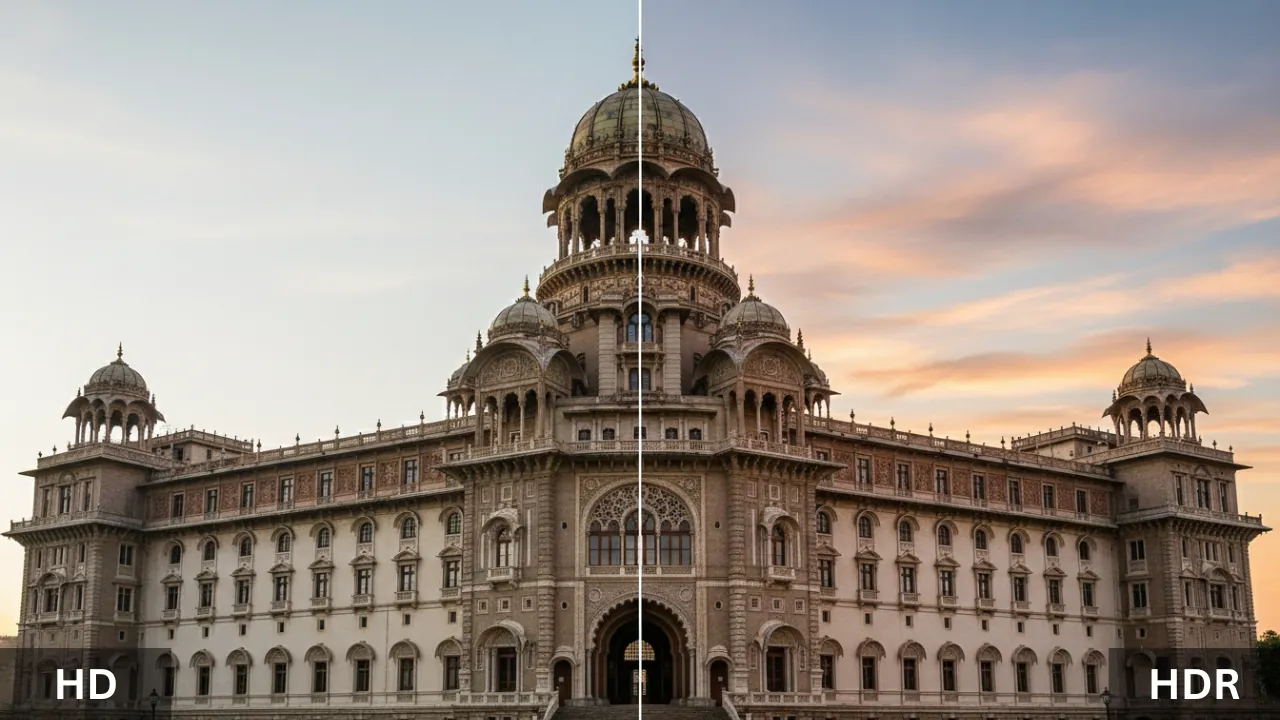
Picture this. You walk into Best Buy looking for a new TV. The salesperson starts rattling off specs faster than you can process them. HD this. HDR that. 4K here. They all kind of blur together after a while, right? The thing is, HD and HDR aren’t even remotely the same kind of improvement. One makes your picture sharper. The other makes it richer. They work on completely different parts of what your eyes actually see on screen. And if you’ve been lumping them together in your head this whole time, you’re not alone.
Most people do — and I used to see that confusion constantly after launching whatismyscreenresolution.site. When you spend your time testing displays, resolutions, and HDR support across browsers and devices, you quickly realize how often people are comparing the wrong features.
It helps you pick the right TV, the right monitor, the right streaming plan. Once you understand what each technology actually does under the hood, buying decisions get a whole lot easier. So let’s walk through it together — no jargon walls, no confusing spec sheets. Just a clear, honest look at what HD and HDR each bring to the table, and why one of them might matter a lot more to you than the other.
Also Read: HD vs FHD: What It Means and Why It Matters for Your Screen
HD vs HDR
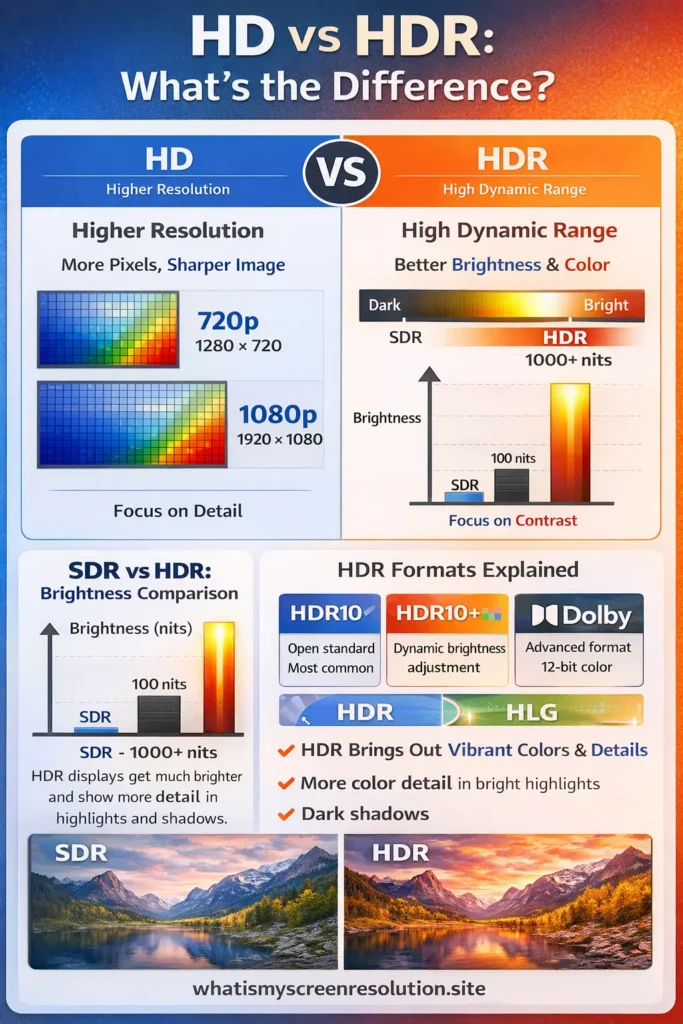
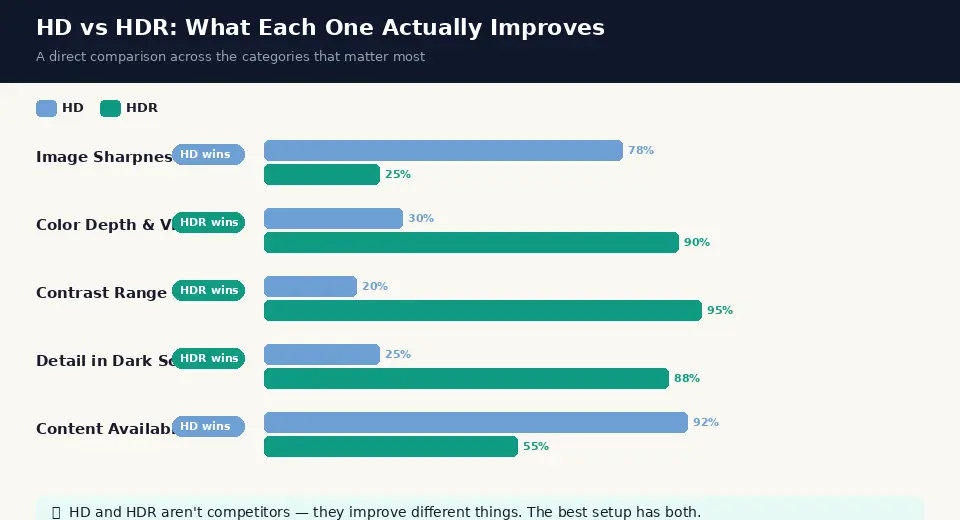
HD (High Definition) improves image sharpness by increasing resolution — more pixels on screen. HDR (High Dynamic Range) improves image quality by expanding brightness, contrast, and color range. HD makes images clearer; HDR makes them look more realistic. They affect different parts of picture quality.
What Is HD?
Historical Context and Development
HD didn’t appear out of nowhere overnight. The groundwork started way back in the late 1960s when Japan’s NHK Broadcasting Corporation began experimenting with higher-resolution television signals. They wanted images that looked closer to real life, and they poured years of research into making it happen. By the 1980s, NHK had something worth showing off, and that sparked a bit of an international race to nail down a standard everyone could agree on.
In the United States, the FCC started taking the idea seriously around the same time. After years of debate and competition between analog and digital approaches, the U.S. settled on a digital standard in 1996. The first public HD broadcast actually aired in October 1998, tied to astronaut John Glenn’s return to space aboard the Space Shuttle Discovery. That moment marked the real beginning of HD television in American homes.
720p TVs started showing up on store shelves around 1998, and by 2005, 1080p models began rolling out. Fast forward to today, and HD is practically the baseline. It’s everywhere. Your phone, your laptop, the TV in your living room — HD resolution is so common now that it barely feels like a feature anymore. It’s just expected.
Technical Specifications
At its core, HD is all about pixels — the tiny dots that make up everything you see on a screen. More pixels in a given space means a sharper, clearer image. Here’s a quick breakdown of the main HD formats:
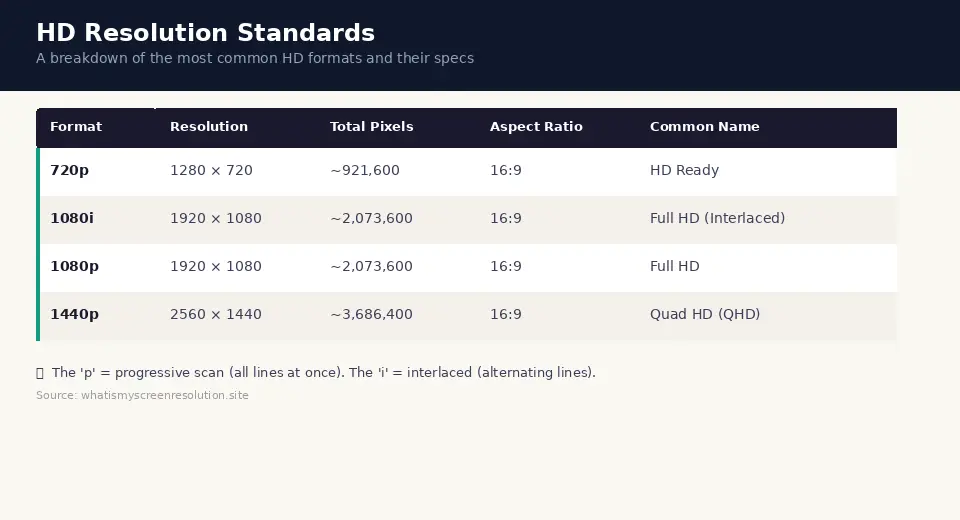
The “p” in 720p or 1080p stands for “progressive,” which means the screen draws all the lines of the image at once, top to bottom, in one smooth pass. The “i” in 1080i stands for “interlaced,” where the screen alternates between drawing odd and even lines. Progressive scanning looks noticeably smoother, which is why 1080p became the go-to standard over 1080i.
Common Uses and Applications
HD hit its stride because it showed up everywhere at once. Cable and satellite providers started broadcasting in HD around 2003. Blu-ray discs brought 1080p to home theaters. Gaming consoles like the Xbox 360 and PlayStation 3 pushed HD gaming into the mainstream. Streaming services built their entire libraries around HD quality. Today, 1080p is the floor for most video content. If something is below 1080p in 2026, it probably feels a little dated.
What Is HDR?
Historical Context and Development
Here’s the thing most people miss: HDR has nothing to do with resolution. Nothing at all. It stands for High Dynamic Range, and it’s about how bright, how dark, and how colorful your picture can get. The concept actually borrowed heavily from photography and cinema, where photographers and filmmakers had been chasing a wider range of light and shadow for decades before it made its way to your living room TV.
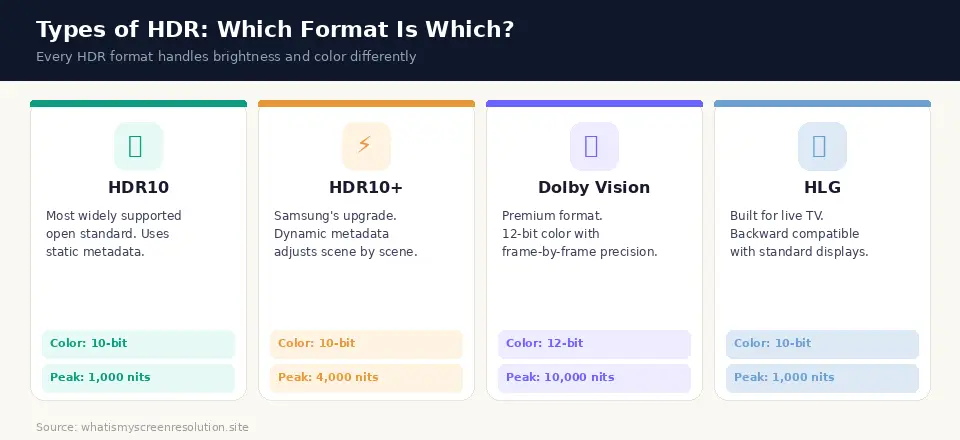
The first HDR standard for consumer displays, HDR10, was officially announced in August 2015 by the Consumer Technology Association. Samsung followed up with HDR10+ in April 2017. Around the same time, Dolby Labs was pushing its own format, Dolby Vision, which had been in development even earlier. The BBC in the UK and NHK in Japan jointly created HLG, a format built specifically for live television broadcasting. By 2017 and 2018, HDR content started showing up on streaming platforms like Netflix, Amazon Prime Video, and Disney+.
Technical Specifications
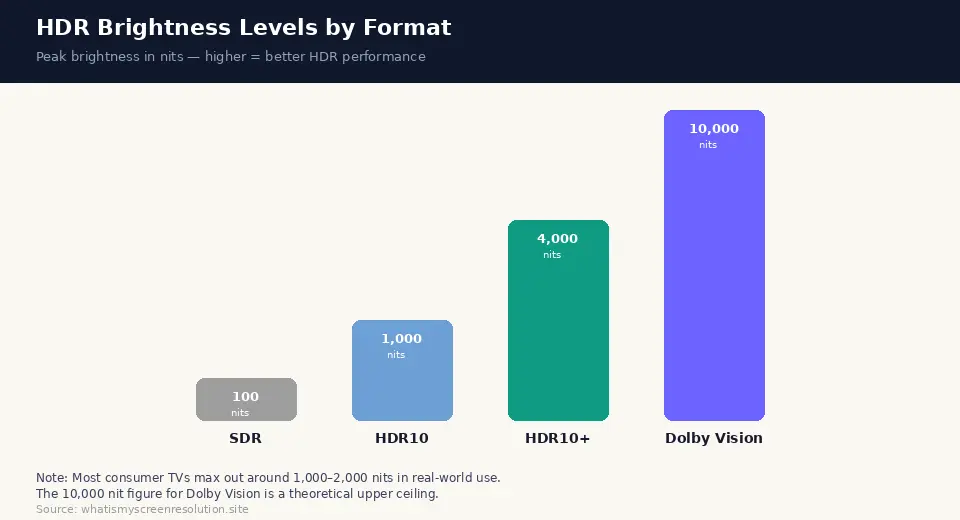
Standard dynamic range displays — the ones most people had before HDR — were technically still locked to brightness levels that cathode ray tubes could handle, even though CRT TVs disappeared years ago. That meant a maximum brightness of roughly 100 nits and a pretty narrow color range. HDR blows that ceiling wide open. It uses new transfer functions called PQ (Perceptual Quantizer) and HLG to encode way more brightness and color information into the signal. HDR content is typically mastered anywhere from 1,000 to 4,000 nits, with a theoretical upper limit of 10,000 nits.
Types of HDR
Not all HDR is created equal. There are several different formats out there, and they each handle things a little differently. Here’s a visual breakdown:
Display Standards: Brightness and Performance
When you’re shopping for an HDR TV, the number that matters most is peak brightness, measured in nits. A nit is simply one candela per square meter — basically a unit of how bright a spot on the screen can get. Here’s a visual comparison of what different HDR tiers actually deliver:
VESA, an industry standards body, also created tiers like HDR400, HDR600, and HDR1000 to help consumers understand what to expect from monitors and laptops. An HDR600 monitor, for example, needs to hit at least 600 nits of peak brightness to earn that label. These aren’t perfect, but they give you a rough idea of what you’re getting before you buy.
Key Differences Between HD and HDR
Resolution vs. Dynamic Range
This is the core of it. HD and HDR improve your picture in fundamentally different ways, and understanding this one distinction makes everything else click.
| HD — Adds More Pixels | HDR — Improves How Pixels Look |
| HD increases the number of pixels on screen. More pixels mean finer detail, sharper edges, and a clearer overall image. It’s about how much information is packed into each frame. | HDR doesn’t add pixels. It makes existing ones look better. Brighter highlights, deeper blacks, richer colors. It’s about how much life and realism each frame has. |
Analogy: Photography vs. Painting
Imagine you’re taking a photo of a mountain landscape. HD is like upgrading your camera lens. You get a sharper, more detailed image. You can see every rock, every tree branch, every tiny crack in the stone.
HDR is like upgrading the film itself. Suddenly your photo captures the golden glow of the sunset AND the deep shadows in the valley below — all in the same shot, without either part looking washed out or blown out. HD gives you the canvas with more detail. HDR paints a more vibrant, more realistic picture on that canvas. They’re solving different problems. And honestly, for most people watching movies or playing games in 2026, the HDR upgrade feels more dramatic than the jump from 720p to 1080p.
Benefits of HD
Don’t sleep on HD just because HDR exists. HD solved a real problem when it arrived, and it’s still the foundation everything else is built on. Going from standard definition (480p) to HD was a massive jump. Faces looked like actual faces instead of blurry blobs. Text on screen became readable. Sports suddenly showed you details you never noticed before — the stitches on a baseball, the expressions on players’ faces mid-play.
HD content is also incredibly accessible. Practically every streaming service offers HD as a baseline. It works on older devices without any compatibility issues. You don’t need a specific cable, a specific format label, or a specific TV model to enjoy it. It just works. For budget-conscious consumers, HD TVs and monitors are significantly cheaper than their HDR counterparts, and for a lot of everyday use — web browsing, video calls, casual streaming — HD is more than sufficient.
Quick Fact: A 1080p (Full HD) display has over 2 million pixels. That’s roughly six times more than a standard 480p TV. When HD first rolled out, that difference was immediately noticeable to anyone who’d been watching on an older set.
Benefits of HDR
Compatibility with Modern Content
Movies are where HDR really shines. When a filmmaker color-grades a movie in HDR, they’re making intentional decisions about how bright a sunset should look, how dark a cave should feel, how vivid the colors of an underwater scene should be. An HDR-capable display can actually honor those decisions. On a standard TV, that information gets flattened. Bright scenes get clipped. Dark scenes lose all their detail. HDR puts it back.
Gaming is another area where HDR makes a noticeable difference. Games like Forza Horizon, God of War, and many other modern titles have been specifically designed with HDR in mind. The explosions pop. The night skies actually look dark. The environments feel three-dimensional in a way that standard displays just can’t pull off. If you play games on a TV or monitor that supports HDR, turning it on is one of the easiest free upgrades you can make.
Future-Proofing with Emerging Technologies
HDR isn’t going anywhere. In fact, it’s only getting better. Dolby Vision IQ, for example, adjusts HDR settings based on the ambient light in your room. HDR10+ Adaptive does something similar. Micro LED and OLED display panels are getting brighter and more precise every year, which means HDR content is going to look even better as time goes on.
If you buy a TV or monitor with solid HDR support today, you’re investing in a technology that will remain relevant for years. The content libraries on Netflix, Disney+, Apple TV+, and Amazon Prime Video are all expanding their HDR catalogs. More games are shipping with HDR support out of the box. Buying an HDR display now means you’re ready for where things are heading, not playing catch-up later.
Worth Knowing: HDR and resolution are independent features. You can have a 1080p HDR TV, a 4K HDR TV, or even a 4K non-HDR TV. They’re separate upgrades that can be mixed and matched depending on what the manufacturer includes and what you’re willing to spend.
Practical Considerations
Device Compatibility
Before you get too excited about HDR, make sure your whole setup can handle it. HDR isn’t just about the TV or monitor. Your source device matters too. If you’re streaming from a smart TV app, it usually handles HDR automatically if your TV supports it. But if you’re using an external streaming device like a Roku, Apple TV, or Fire Stick, that device needs to support HDR as well.
Same goes for gaming — your console needs to support HDR output, and your HDMI cable needs to be fast enough to carry the signal. HDMI 2.0 can handle most HDR content at 4K 60fps. HDMI 2.1 is what you want if you’re playing at higher frame rates or higher resolutions.
For monitors, the story is a bit different. A lot of gaming monitors and professional displays now support HDR, but the quality varies a lot depending on the panel type and peak brightness. An IPS panel hitting 600 nits with HDR600 certification will give you a noticeably better HDR experience than a basic panel that technically “supports” HDR but can only hit 300 nits. Always check the actual brightness spec, not just the HDR label.
Content Availability
HD content is everywhere. You literally can’t avoid it. Almost every piece of video content produced in the last decade is available in at least 1080p. HDR content is growing fast but it’s not quite as universal yet. Netflix, Disney+, Apple TV+, Amazon Prime Video, and HBO Max all offer growing libraries of HDR titles. Ultra HD Blu-ray discs also carry HDR content. If you’re looking for HDR specifically, look for the HDR label on individual titles within these services. Not every movie or show on these platforms is available in HDR — it depends on what format the studio released it in.
Also Read: HD vs 2K vs 4K: A Friendly Guide to Screen Resolutions
Cost and Investment
Here’s the practical reality. HD displays are cheaper. Full stop. A solid 1080p monitor or TV is going to cost you less than a comparable HDR model. But the gap has been closing over the past couple of years. Mid-range 4K HDR TVs from brands like LG, Samsung, TCL, and Hisense have come down significantly in price.
If you’re buying a new TV for your living room in 2026, you’d actually be hard-pressed to find a decent-sized 4K TV without some level of HDR support. The real cost consideration is whether the HDR you’re getting is actually good. A cheap TV with a weak HDR implementation might not look much better than a standard TV watching the same content. Spending a bit more on a TV with strong HDR — 1,000 nits or higher peak brightness — makes the difference genuinely visible.
I’ve tested this myself across multiple TVs and monitors while checking resolution and HDR support for this site. On a 1,000-nit HDR TV, the difference is immediate. On a budget panel capped at 300 nits, HDR barely moves the needle. The label alone doesn’t tell the full story — the hardware does.
Conclusion
So, when it comes down to HD vs HDR, the answer isn’t which one is “better” — it’s what kind of improvement you actually care about.
HD improves clarity by increasing resolution. HDR improves realism by expanding brightness, contrast, and color. They’re not competing technologies; they solve different problems. From my own testing, HDR is usually the upgrade people notice immediately, especially for movies, TV shows, and modern games. Our eyes are more sensitive to contrast and lighting than to small jumps in resolution at normal viewing distances.
If you’re buying a new display in 2026, the sweet spot for most people is a 4K HDR TV or monitor with solid brightness performance. But if budget forces a choice, I’d personally prioritize good HDR implementation over raw resolution. A well-done 1080p HDR screen can look far more impressive than a higher-resolution panel with weak brightness and poor contrast.
The key is knowing what you’re buying. Once you understand the real difference between HD and HDR, the marketing noise fades away — and you can choose a display that actually looks better to you, not just better on a spec sheet.