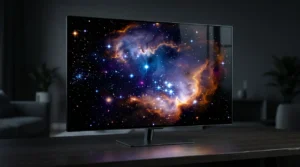
There is a reason a good 4K screen feels different the moment you turn it on. It is not just a bigger number on a product page. It is the way extra pixels make text look cleaner, edges look smoother, and movies or games feel less like you are staring at a panel and more like you are looking through one.
I built whatismyscreenresolution.site because I kept seeing people buy displays without really understanding what their current screen was already doing. After testing different monitors, laptops, TVs, and browser-based display tools, I noticed the same pattern again and again: many people could see that 4K looked better, but they could not always explain why. That is exactly where this topic gets interesting.
That is also why this guide pairs well with checking your current display first—once you know your existing resolution, it becomes much easier to understand whether 4K would actually improve your setup.
In real use, 4K is not only about giant TVs. I have seen the upgrade matter just as much on a desktop monitor where text sharpness and workspace are more noticeable than movie playback. On a TV, it is usually about immersion. On a monitor, it is often about clarity and comfort.
In this guide, I’ll keep it practical. I’ll explain what 4K resolution actually means, how it compares with Full HD and other common resolutions, when it is worth paying for, where 4K content is available today, and why HDR often makes a bigger visual difference than people expect.
Also Read: Hybrid Log–Gamma (HLG): The Bridge Between SDR and HDR
Quick Answer: What Is 4K Resolution?
4K resolution usually means 3840 × 2160 pixels on consumer TVs, monitors, and streaming devices. It delivers four times as many pixels as Full HD (1920 × 1080), which makes text look sharper, images more detailed, and large screens look cleaner—especially when paired with strong HDR, good brightness, and high-quality source content.
Bottom line: 4K matters most when your screen is large enough, your viewing distance is close enough, and your source quality is good enough to show the extra detail.
Understanding 4K Resolution
4K Resolution usually refers to a display or video format with around four thousand horizontal pixels. In consumer screens, the most common 4K format is 3840 × 2160, also called 4K UHD or Ultra HD. In digital cinema, 4096 × 2160 is also used, which is the more cinema-focused 4K format.
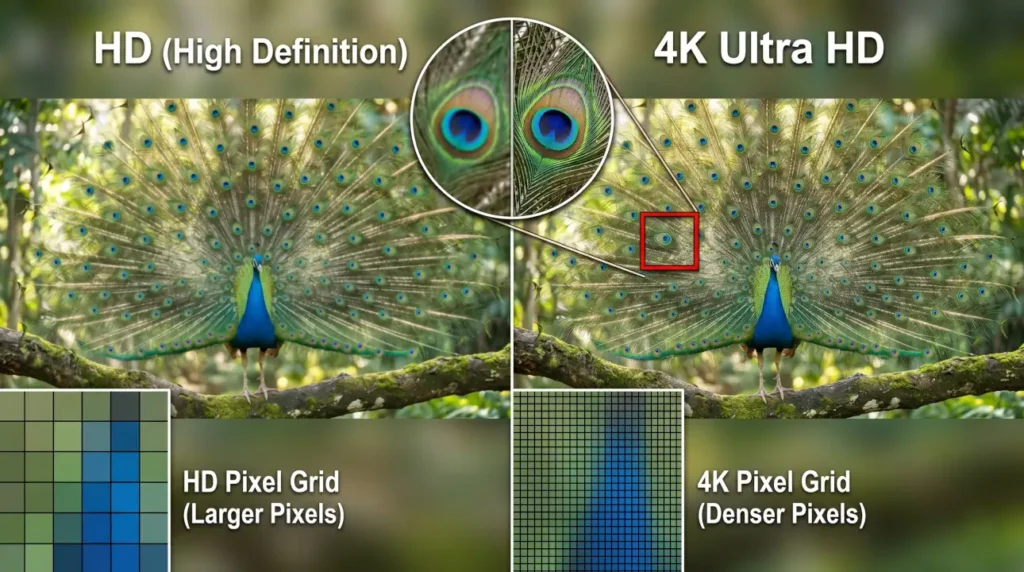
That difference matters because people often use the word “4K” as if it always means one exact number, but it does not. In everyday use, most TVs, monitors, streaming services, and game consoles mean 3840 × 2160 when they say 4K. The main idea is the same though. You are getting a much denser pixel grid than Full HD, which is why the picture looks more refined and detailed.
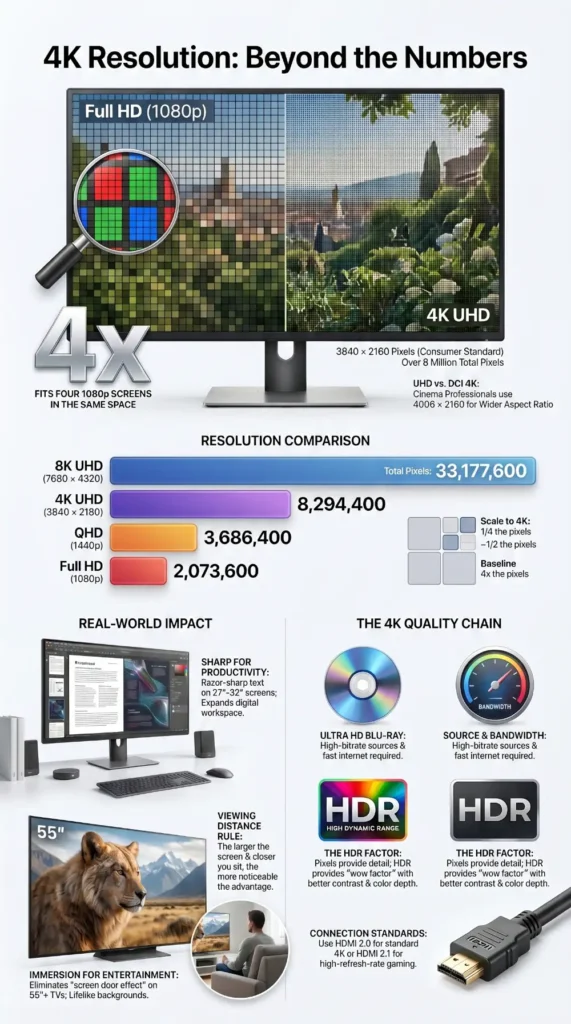
To see the jump more clearly, compare it with Full HD. Full HD is 1920 × 1080. 4K UHD has four times as many pixels as Full HD. That is not just a small improvement. It is a huge increase in detail. More pixels mean cleaner lines, smoother curves, less visible pixel structure, and a better chance of keeping the image sharp on larger screens.
A lot of the magic comes down to pixel density. On a small screen, high resolution can make text look extremely crisp. On a large screen, the extra pixels help the image hold together when you sit close. That is why 4K is popular in home theaters, gaming setups, and professional workstations.
4K Content and Devices Available Today
4K is no longer a niche format. It is mainstream now, but the experience still depends on both the content and the hardware.
Streaming platforms offer a lot of 4K content today. Netflix’s own help documentation explains that 4K Ultra HD availability depends on the right plan, supported hardware, and enough sustained bandwidth, which is why two people can pay for 4K but still get very different results if their setup is not ready. YouTube’s official resolution guidance also confirms that creators can upload and viewers can watch content at 4K, which is one reason so many modern tech videos, tutorials, and cinematic clips are published at 3840 × 2160.
If you want the cleanest home-theater quality, Ultra HD Blu-ray is still one of the best ways to watch 4K because it usually offers higher bitrate video than streaming.
Gaming has pushed 4K even further. The PlayStation 5, Xbox consoles, modern GPUs, and newer TVs have made 4K output much more normal than it was a few years ago. In practice, I would say gaming is one of the biggest reasons 4K stopped feeling like a luxury spec and started feeling like a standard feature.
Devices are just as important as the content itself. You can find 4K on smart TVs, computer monitors, streaming boxes, consoles, laptops, tablets, and phones. Even on smaller screens, 4K can still help with sharper text, cleaner scaling, and better editing flexibility. The main thing to remember is that 4K only really shines when the whole chain is ready for it: display, source content, cable or connection, playback device, and internet bandwidth all matter.
The Evolution of 4K Resolution
4K did not become popular overnight. It grew out of the broader shift from standard definition to high definition, and then from HD to ultra high definition.
For years, 1080p was the gold standard for home viewing. It looked sharp on many TVs, and it was much easier to deliver than larger formats. But as screens got bigger and people started sitting closer to them, the limits of 1080p became easier to notice. That is where 4K stepped in. It solved a practical problem: how do you keep a bigger screen looking clean and detailed?
Cinema helped shape the idea too. Digital cinema standards used a wider 4096 × 2160 format, which is one reason 4K has a strong association with professional film production. At the same time, consumer electronics makers pushed 3840 × 2160 as the practical home version. That made 4K easier to stream, broadcast, and display on consumer devices.
Over time, compression got better, internet speeds improved, GPU and console power increased, and display prices came down. Those changes mattered just as much as the resolution itself. A screen format only becomes mainstream when people can actually use it without jumping through hoops. 4K reached that point because the whole ecosystem matured around it.
Today, 4K is a baseline expectation in many product categories. TVs advertise it by default. Monitors use it for content creation and office work. Game consoles market it heavily. And streaming services often treat it as a premium quality tier.
4K Standards
Here is a simple breakdown of the most common 4K-related standards and formats. If the labels feel confusing, focus on one simple rule: for most readers, “4K” means 3840 × 2160 unless the article is specifically talking about cinema production.
| Standard / Format | Typical Resolution | Common Use | Notes |
| 4K UHD / Ultra HD | 3840 × 2160 | TVs, monitors, streaming, gaming | This is the most common consumer 4K format |
| DCI 4K | 4096 × 2160 | Digital cinema, film production | Wider cinema-focused format |
| UHDTV 4K | 3840 × 2160 | Broadcast and consumer video | Often used interchangeably with 4K UHD |
| 4K video | 3840 × 2160 | Online video and content delivery | Common naming on platforms and cameras |
| 4K cinema | 4096 × 2160 | Theater and post-production workflows | The “true” cinema 4K dimension |
The most important point here is not to get lost in labels. For most people, 4K means 3840 × 2160. For cinema professionals, 4096 × 2160 is the version they care about more. Both sit in the same family, but they are not identical.
If you dig deeper into technical documentation, you may also come across names like SMPTE UHDTV1 or CEA Ultra HD, but for most buyers, they still point back to the same consumer 4K baseline of 3840 × 2160. In other words, if you are shopping for a TV or monitor, the label that matters most is still whether it is 3840 × 2160 and whether the rest of the panel quality is actually good.
4K vs Other Resolutions
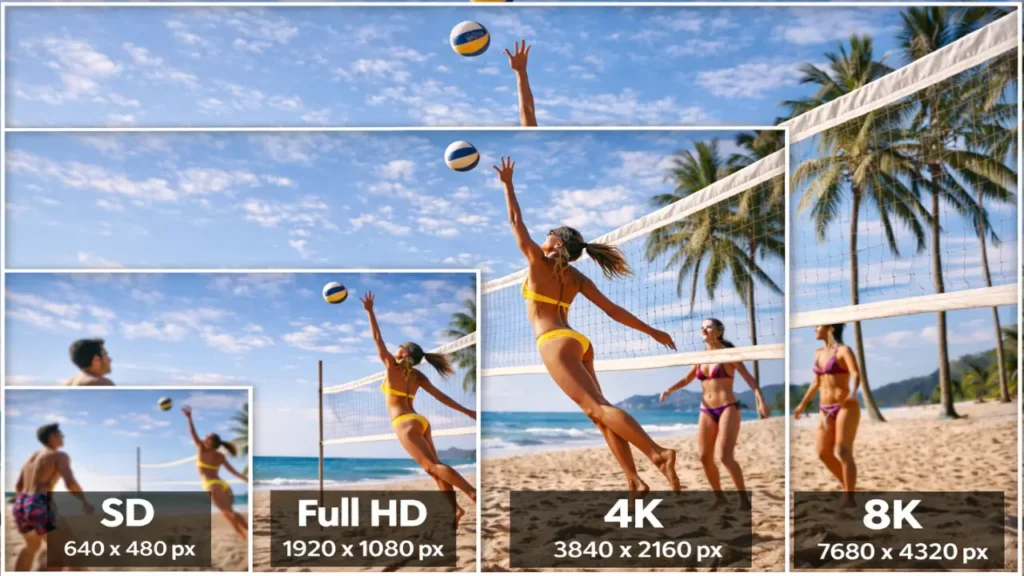
This is where the difference becomes easy to understand. The jump from one resolution to the next is not only about sharpness. It also affects how much information the screen can show at once.
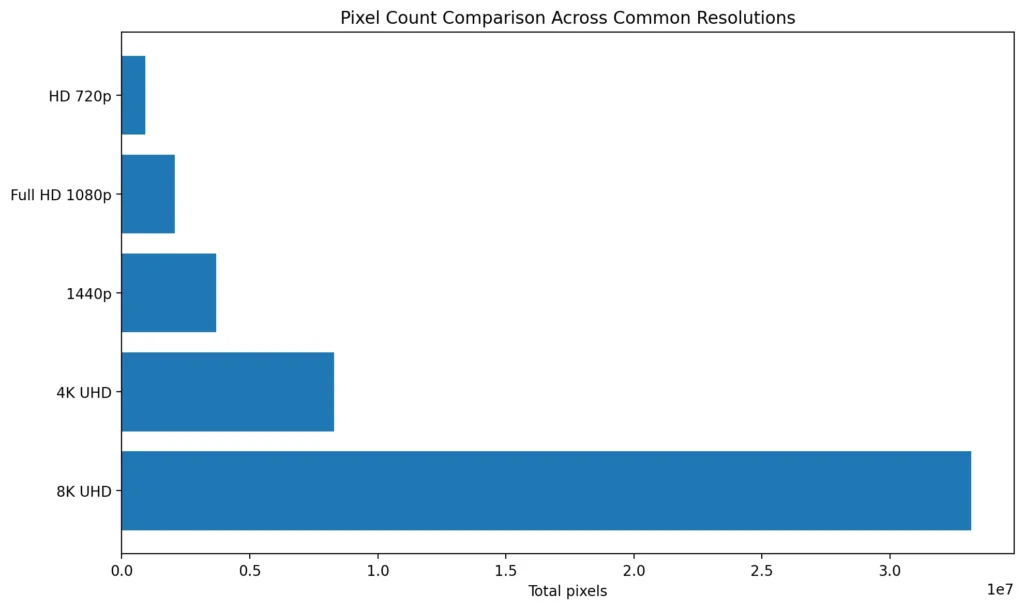
If you only remember one comparison from this guide, remember this: 4K UHD has four times the pixel count of Full HD, which is why the jump often looks bigger than people expect.
| Resolution | Pixel Dimensions | Total Pixels | Common Name | Relative to 4K UHD |
| 720p | 1280 × 720 | 921,600 | HD | Much lower |
| 1080p | 1920 × 1080 | 2,073,600 | Full HD | 4K has 4x the pixels |
| 1440p | 2560 × 1440 | 3,686,400 | QHD / 2K in some markets | 4K has noticeably more detail |
| 4K UHD | 3840 × 2160 | 8,294,400 | Ultra HD | Baseline 4K |
| 8K UHD | 7680 × 4320 | 33,177,600 | 8K | 4K has 1/4 the pixels of 8K |
When people ask whether 4K is worth it, the honest answer is that it depends on the screen size, viewing distance, and what they use the screen for. On a small phone screen, the difference may be harder to notice in everyday use. On a large TV or a 27-inch or 32-inch monitor, the improvement is much easier to see. On a close-up desktop setup, 4K can make text and interface elements feel far cleaner.
When 4K Is Easiest to Notice
| Screen Type | 1080p vs 4K Difference |
| 24-inch monitor | Noticeable mainly for text and close-up work |
| 27-inch monitor | Usually clearly noticeable for productivity and sharpness |
| 32-inch monitor | Very noticeable, especially for desktop use |
| 55-inch TV | Noticeable with good 4K content and normal seating distance |
| 65-inch+ TV | Usually much easier to appreciate |
Real-World Example: How I Usually Explain 4K To Visitors on My Site
One of the easiest ways I explain 4K is by starting with what people already have. When someone checks their display on whatismyscreenresolution.site and sees they are on 1920 × 1080, I tell them to compare that with 3840 × 2160 in plain numbers first. Full HD gives them just over 2 million pixels. 4K gives them more than 8 million. That simple comparison usually makes the jump click immediately.
In practice, the difference people notice first depends on the device. On a TV, they usually notice sharper backgrounds, cleaner textures, and a more “window-like” image. On a monitor, they usually notice text clarity and usable workspace before they notice movie detail. That is why I almost never describe 4K as just a TV upgrade anymore. For a lot of users, it is really a clarity and comfort upgrade.
Why 4K Looks So Good
The hidden reason your screen looks stunning is not just resolution. It is resolution plus how your eyes experience the image.
When pixel density goes up, individual pixels become harder to see. That makes diagonal lines, curves, text, and fine textures look smoother. It also reduces the “screen door” effect that many people notice on lower-resolution displays. On top of that, 4K can preserve more detail in high-quality source material, so the image feels closer to what the creator intended.
4K also helps with scaling. Modern operating systems can render interfaces more cleanly on high-density screens. That means fonts often look smoother and graphics feel more polished. For photos and video, 4K gives editing software more room to work with. You can crop, zoom, and stabilize footage while still keeping a high-quality final result.
There is also a very practical reason people call 4K “more lifelike.” When the screen is good enough, you stop noticing pixel edges and start noticing the content. That is especially true on larger TVs and close-up monitors. In my own testing, that is usually the moment people stop talking about resolution numbers and just say, “This one looks better.”
HDR and 4K Resolution
4K and HDR are often mentioned together, but they are not the same thing.
4K is about resolution, which means how many pixels the display has. HDR is about dynamic range, which means how bright the bright parts can get, how deep the dark parts can look, and how much detail is preserved in between. When both work together, the result can look much more dramatic and natural. If you want a simple real-world example, Dolby’s explanation of Dolby Vision is useful because it shows why two 4K TVs can look very different even when both have the same pixel count.
That is also where a wider color gamut matters. A wider color gamut allows the screen to show more shades and more accurate color transitions. Add an HDR format on top of that, and the image can look far richer than standard dynamic range video.
In real product listings, you may also see formats like HDR10, HDR10+, and HLG alongside Dolby Vision. They all sit under the HDR umbrella, but support varies depending on the content source and the display.
This is why a good 4K HDR TV often looks better than a plain 4K TV playing the same movie. The resolution gives you more detail. The HDR and wider color gamut give you better light, shadow, and color quality. Together, they create the wow factor people usually notice first.
Challenges and Opportunities of 4K
4K has plenty of strengths, but it is not perfect. There are still some real-world tradeoffs.
One challenge is bandwidth. Streaming 4K needs more data than HD. Netflix recommends higher-tier plans and better internet speeds for 4K UHD playback, and YouTube also recommends stronger sustained bandwidth for 4K formats. That means a slow connection can ruin the experience even if your screen is excellent.
Another challenge is storage and processing. A 4K video file is larger than the same video in HD. Editing 4K footage also takes more from your computer, phone, or camera workflow. That is why creators often need better GPUs, more storage, and stronger export settings.
Display quality is another issue. Not all 4K screens are equally good. Two TVs can both say “4K” on the box, but one may have better brightness, better contrast, better color, and better motion handling. Resolution alone does not guarantee a great picture.
The opportunity side is even bigger. 4K gives content creators more flexibility. It gives gamers sharper visuals and better detail. It gives home users a more immersive viewing experience. It gives professionals more screen space and more precise visuals. And because 4K has become common, prices are more accessible than they used to be.
In simple terms, 4K is now mature enough to be useful, but still exciting enough to matter.
When 4K Is Worth It, And When It Is Not
4K is a great upgrade for a lot of people, but I would not call it the right answer for every setup. The value depends on screen size, viewing distance, content quality, and budget.
If you sit close to a monitor, read or work with text for hours, edit photos or video, or want a cleaner desktop setup, I usually recommend 4K very confidently. It gives you more workspace, sharper fonts, and a more refined overall interface. For TVs, the value becomes much easier to justify once you get into larger screen sizes, especially if you already stream high-bitrate content or play on modern consoles.
If you mostly watch low-quality video, use a small screen from a far distance, or have a slow internet connection, the benefit may be less dramatic. In those cases, a good 1080p screen with strong brightness and color can still feel excellent. So the real question is not “Is 4K always best?” but “Does 4K fit my screen size, distance, and budget?”
A simple rule helps. The bigger the screen and the closer you sit, the more likely you are to notice the difference. That is why 4K is so popular on 27-inch and larger monitors, 55-inch and larger TVs, and premium streaming devices.
How To Read A 4K Label Without Getting Confused
Shopping for displays can be messy because brands do not always explain things clearly. A product may say 4K, UHD, Ultra HD, or even 2160p. In many cases, they all point to the same consumer resolution of 3840 × 2160.
That said, the label alone does not tell you everything. A true buying decision should also look at panel quality, brightness, contrast, refresh rate, HDR support, color accuracy, and input options. A cheap 4K screen can still look flat if the other parts of the display are weak.
This is also why two 4K screens can feel very different. One may be great for movies, while another is better for office work or gaming. Resolution is only one piece of the puzzle.
4K Myths People Still Believe
One common myth is that 4K only matters on giant TVs. That is not true. Even on smaller displays, 4K can improve text clarity and make fine details look smoother, especially when the screen is used up close.
Another myth is that 4K automatically looks amazing. Also not true. Bad compression, weak color, poor brightness, or a low-quality source can make a 4K video look only slightly better than HD.
A third myth is that you need 4K for every type of content. In reality, the best resolution depends on the job. If you are watching an old video, reading emails, or using a tablet on the go, 4K may not change your life. But for movies, games, and content creation, it can be a major upgrade.
4K On Tvs, Monitors, Laptops, And Phones
The way 4K feels changes a lot depending on the device.
On a TV, 4K is usually about immersion. The screen is larger, so the extra pixels help the picture stay crisp from the couch. This is where people notice sharper textures, cleaner motion in well-made content, and more detail in landscapes, sports, and movies.
On a monitor, 4K often becomes a productivity upgrade. You can fit more on the screen, keep text looking razor sharp, and work with more precision in design or editing tools. Many people who switch from 1080p to 4K on a desktop say the biggest change is not just video quality. It is how comfortable the whole interface feels.
On a laptop, 4K is a mixed bag. It can look fantastic, especially for creative work, but battery life, scaling, and price matter a lot. A 4K laptop makes sense if you care about display quality or use the machine for visual tasks. If your work is mostly basic browsing and documents, a very good high-quality lower-resolution screen can sometimes be the smarter choice.
On a phone, 4K is less about dramatic everyday impact and more about future-ready detail, camera work, and premium display design. A phone screen is small, so the difference is not always easy to notice at a glance. Still, 4K capture can matter a lot for creators who edit video on mobile or want more flexibility later in the workflow.
How Creators Use 4K
For creators, 4K is more than a display spec. It is a workflow advantage.
Video editors use 4K footage because it gives them extra room to crop and stabilize without falling apart. Photographers and designers like 4K monitors because fine detail becomes easier to inspect. Streamers and YouTubers use 4K to make their content feel more premium and to help their videos stand out on modern screens.
That does not mean every creator must work in 4K all the time. But it explains why 4K has become such a common part of professional tools. It gives you more room to make mistakes, refine the image, and deliver a cleaner final result.
How To Choose a Good 4K Screen
If you are shopping for a 4K display, the resolution number should be your starting point, not your final decision. I would rank the buying factors in this order for most people: screen size first, panel quality second, brightness/HDR third, refresh rate fourth, and ports or compatibility last. A weak 4K panel can still look underwhelming, while a well-tuned 4K display can look excellent even before you touch advanced settings.
Look at screen size first. A 4K resolution is easier to appreciate on larger displays or when you sit closer to the screen. Then look at panel type, because OLED, IPS, and VA all behave differently. After that, check brightness and HDR support. A bright, well-tuned display can look much better than a dim one, even if both are technically 4K.
Refresh rate also matters. A 4K screen with a higher refresh rate can feel smoother in gaming and general use, but it usually costs more and needs stronger hardware. If you want the display for movies and work, a standard refresh rate may be fine. If you want gaming, motion handling becomes much more important.
Color accuracy is another big deal. This is where wider color gamut, good calibration, and proper HDR support can make a visible difference. A display that handles color well can make the same 4K image feel richer and more accurate.
The final step is checking your hardware. A 4K display is only as good as the device feeding it. A weak cable, an underpowered graphics setup, or poor streaming quality can all hold the image back.
If you are buying for gaming or high-refresh playback, it is also worth checking the port version—HDMI 2.0 is enough for many 4K setups, while HDMI 2.1 is more relevant for higher refresh rates and newer consoles.
Also Read: Blue PHOLED Is Set to Transform TVs, Phones, and Wearables
Common Questions People Ask Before Buying 4K
Many people wonder whether 4K is overkill. In some setups, it absolutely can be—but in many everyday cases, it has become the most balanced mix of clarity, price, and future-proofing.
People also ask whether they can tell the difference without sitting very close. That depends on the screen size and their eyesight, but on larger displays the difference is easy to notice. The bigger the display, the more useful the extra pixel density becomes.
Another common question is whether 4K is only for premium buyers. That used to be true. It is much less true now. The market has changed, and 4K is far more accessible than it used to be.
Conclusion
4K Resolution is not just about packing more pixels into a screen. In real use, it changes how a display feels. Text looks cleaner, edges look smoother, large screens hold detail better, and good source material has more room to shine. That is the real reason a 4K display often looks “stunning” compared with older or lower-resolution panels.
After testing display tools and watching how people compare their current screens on whatismyscreenresolution.site, I’d describe 4K as one of the most practical display upgrades available today — but only when the rest of the setup is good enough to support it. Resolution matters, but so do HDR, brightness, compression quality, panel type, and viewing distance.
If you understand those pieces, 4K stops feeling like marketing language and starts feeling like a useful buying decision. That is the goal: not just to know the number, but to know when it will actually improve what you see.