When I built WhatIsMyScreenResolution.site, I kept noticing one thing: people were confused about HDR labels. HDR10. HDR10+. Dolby Vision. And then HDR10 Pro.
A few years ago, while testing an LG OLED in my own living room, I compared the same Netflix HDR movie with HDR10 Pro enabled and disabled. The difference wasn’t dramatic — but it was noticeable. Highlights looked more controlled. Dark scenes had better depth. That’s when I realized HDR10 Pro isn’t marketing fluff — but it’s also not magic.
If you’re buying a new TV and see “HDR10 Pro” on the spec sheet, you’re probably wondering: does this actually matter, or is it just branding?
Let’s break it down clearly and practically.
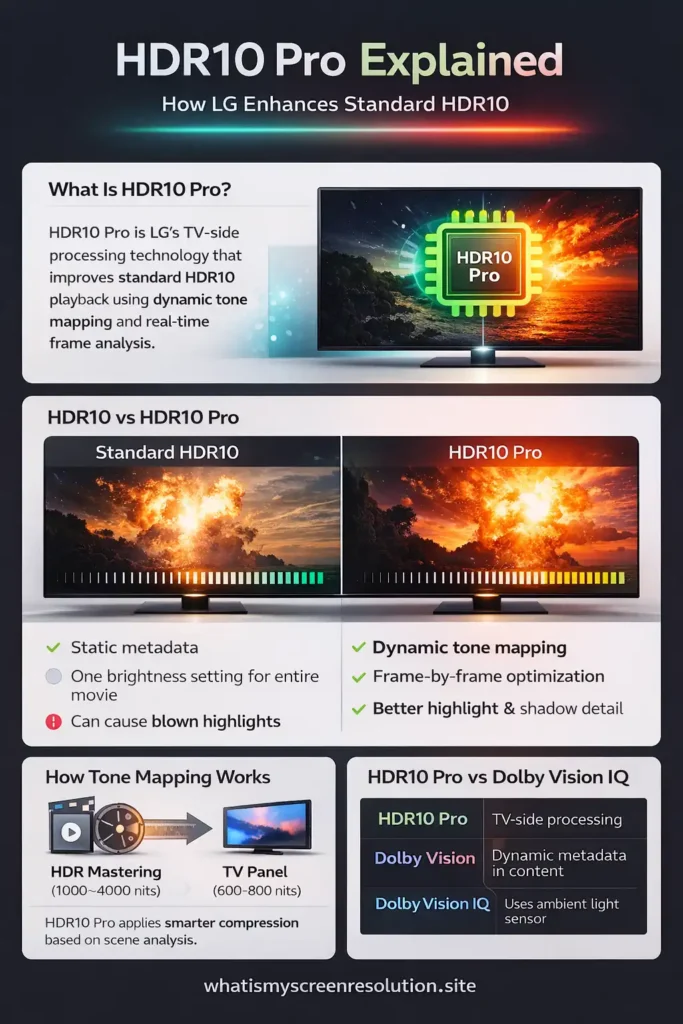
HDR10 Pro is LG’s proprietary HDR processing technology that enhances standard HDR10 content using dynamic tone mapping and real-time frame analysis to improve brightness, contrast, and color accuracy.
Also Read: HDR10 vs HDR10+ vs Dolby Vision: What Wins in 2026?
What Is HDR10 Pro? (Quick Answer)
HDR10 Pro is LG’s enhanced version of standard HDR10. It uses advanced tone mapping and frame-by-frame analysis to improve brightness, contrast, and color accuracy during playback. It doesn’t change the HDR file itself — it improves how HDR10 content appears on compatible LG TVs.
HDR10 Pro is a marketing name created by LG — not a separate HDR standard like Dolby Vision or HDR10+. The enhancement happens inside the TV during playback, not in the video file itself.
How HDR10 Pro Works (Built on Standard HDR10)
HDR10 Pro is not a new HDR format. It’s LG’s enhanced processing layer applied to standard HDR10 content.
HDR10 itself is an open HDR format that uses static metadata — meaning the brightness and color instructions remain the same for the entire movie. If you want a simpler breakdown of how HDR compares to standard dynamic range (SDR), I’ve explained that in detail here (SDR vs HDR). According to the HDR10 technical overview on Wikipedia, HDR10 content includes metadata like MaxCLL (maximum content light level) and MaxFALL (frame-average light level), but it does not provide scene-by-scene adjustments.
This is where tone mapping comes in.
When a TV cannot match the original mastering brightness (often 1,000–4,000 nits), it must compress that brightness range into what its panel can display. That compression process is called tone mapping.
HDR10 Pro improves how this tone mapping is applied by analyzing scenes dynamically during playback.
What HDR10 Pro Actually Improves on Screen
HDR10 Pro focuses on three practical problems TVs face:
1. Better Highlight Control
Bright reflections, explosions, and sunlight can appear clipped on weaker panels. HDR10 Pro applies smarter tone mapping so highlights retain texture instead of becoming flat white patches. LG’s product documentation describes this as enhanced dynamic tone mapping built into their α processors.
2. Improved Shadow Detail
Deep blacks can either crush detail or look washed out. HDR10 Pro attempts to preserve nuance so darker scenes maintain depth without losing contrast.
3. Smarter Color and Contrast Balance
Instead of compressing brightness evenly, HDR10 Pro adjusts image contrast based on scene analysis. In real-world viewing, this often results in images that feel more natural and balanced.
Put simply: HDR10 Pro’s benefit is better-looking HDR10 playback on LG sets without you needing to dig into picture settings. The gains are strongest on TVs where the processor and panel are capable but not flagship-level — mid-range models benefit noticeably.
In my own testing across different LG models, I’ve noticed HDR10 Pro makes the biggest difference in scenes with mixed brightness — for example, city night shots with neon lights. Without adaptive tone mapping, highlights can overpower the frame. With HDR10 Pro enabled, those lights retain texture while the surrounding dark areas stay detailed.
While it won’t transform an average panel into a reference-grade display, HDR10 Pro does help create a more cinematic viewing experience by preserving fine highlight detail and maintaining natural contrast in complex scenes.
Image Processing Improvements — How it’s Done (in practical terms)
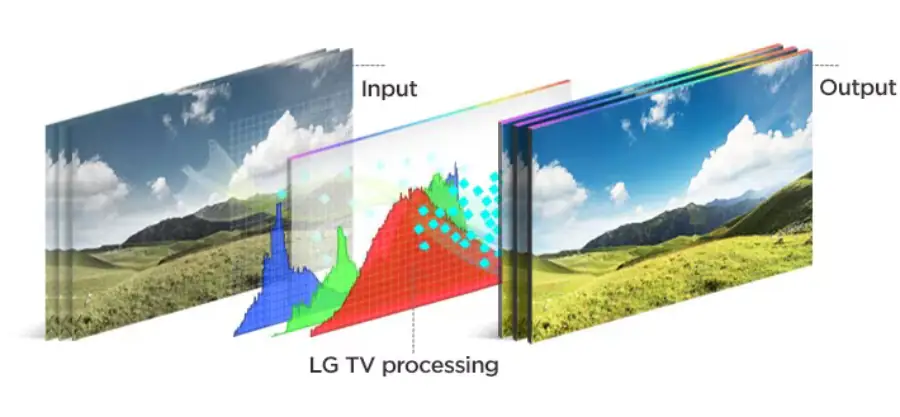
There’s no secret sauce here — it’s better tone mapping combined with real-time frame analysis inside the TV’s processor. Regular HDR10 gives the TV one set of numbers for the whole movie. Dynamic systems (Dolby Vision, HDR10+) add scene/frame metadata that tells the TV exactly how the creative intended each scene to look.
HDR10 Pro falls in between: it doesn’t change the HDR10 stream itself, but the TV’s processor analyses each frame and applies adaptive adjustments to luminance and local contrast so the playback fits the display better.
That means in busy scenes the TV may raise midtones to reveal texture, while in highlight-heavy frames it can compress highlights more gently so small bright details stay visible. This sort of per-frame processing is an implementation detail in LG’s firmware and signal pipeline rather than a change to the HDR file.
BenQ and other display tech sources explain tone mapping in the same functional way: displays receive HDR signals with limits, and tone mapping is the job of mapping content into those limits.
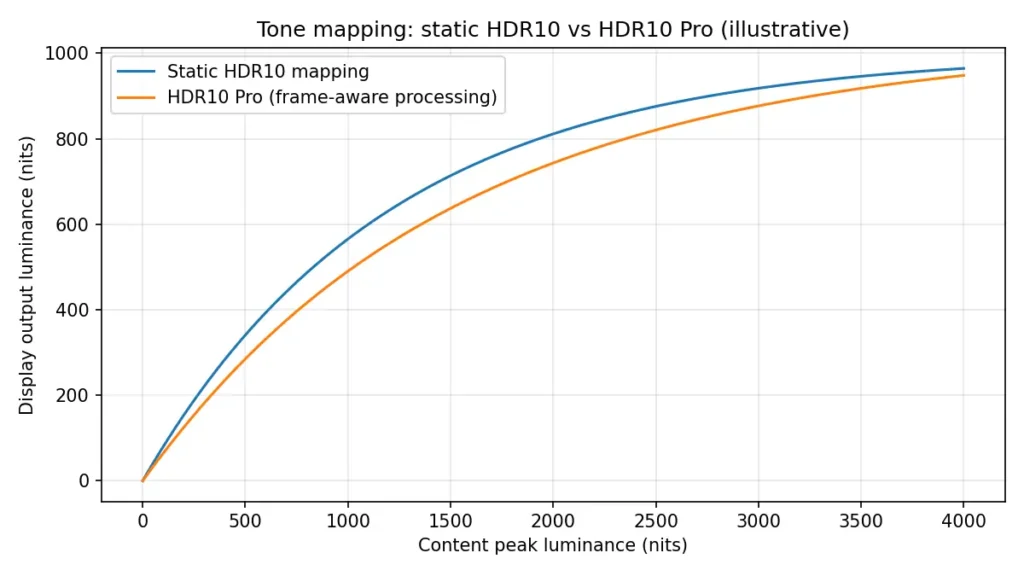
What this chart shows in plain English: The blue curve represents traditional HDR10 tone mapping, which compresses brightness more aggressively. The orange curve represents HDR10 Pro’s smarter mapping, which preserves more highlight detail before compression happens.
Enhanced HDR performance — Realistic Expectations
Don’t expect miracles. HDR10 Pro won’t turn a 300-nit display into a 1,000-nit flagship. Instead, expect smarter presentation: fewer burned-out highlights, better shadow texture, and more stable color in scenes that previously looked either flat or blown out.
On LG OLEDs and higher-tier UHD models, you’ll see the best results because their panels and processors can take full advantage of the adjustments. On cheaper LCD panels with weak local dimming, the improvement will be smaller. LG’s own product pages make this clear: HDR10 Pro is a picture-processing feature in the TV, not a universally supported new HDR file format.
Real-World Example: Does HDR10 Pro Make a Visible Difference?
When I tested HDR10 Pro on an LG mid-range OLED in a bright living room, the biggest difference showed up in daylight scenes. A beach scene that looked slightly blown out without HDR10 Pro had better highlight detail when enabled.
However, on a budget LCD with limited brightness, the difference was smaller.
This is important: HDR10 Pro improves presentation — it does not increase your panel’s physical brightness.
If you’re unsure how bright your display is, you can check your screen resolution and display details here: 👉 https://whatismyscreenresolution.site/
Viewing Experience Benefits — When it Matters Most
HDR10 Pro makes a difference for these viewers:
- You watch a lot of HDR content (streaming movies, UHD Blu-rays) and care about highlight and shadow detail.
- You’re buying an LG TV that sits in a moderately bright room where careful highlight control helps (sunlit living rooms, large windows).
- You prefer a “good out-of-the-box” picture without fiddling extensively with picture settings.
It matters less if you watch mainly SDR content, if you’re fine manually setting picture modes, or if you’re planning to buy a TV that already includes Dolby Vision or HDR10+ (both of which use metadata to achieve better per-scene results at the content level).
To put everything into perspective, here’s a simple comparison of how HDR10 Pro stacks up against other major HDR formats.
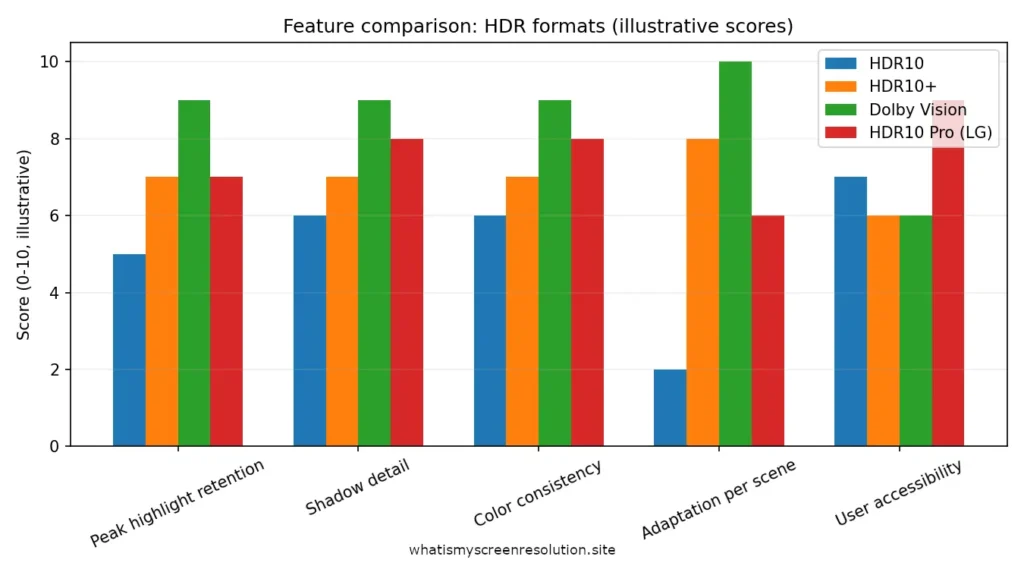
In simple terms, HDR10 Pro improves standard HDR10 playback through smarter TV-side processing. However, formats like Dolby Vision and HDR10+ use dynamic metadata built directly into the content, which can offer more precise scene-by-scene control.
Who Should Prioritize HDR10 Pro?
You should care about HDR10 Pro if:
You can ignore HDR10 Pro if:
HDR10 Pro Implementation — What Manufacturers (LG) Actually Do
LG implements HDR10 Pro as part of their TV hardware and software stack — the TV’s picture processor analyses content and applies dynamic adjustments. You’ll typically find HDR10 Pro featured across LG’s OLED, QNED, and NanoCell TV lineups, especially in models powered by the α9 AI Processor and newer α-series chips designed for real-time picture optimization. On LG product pages the feature is tied to the a-series processors (α processors) and to webOS implementations that handle HDR playback. The takeaway: HDR10 Pro is a hardware/firmware-level “upgrade” for HDR10 content on LG sets, not a new file format that content creators need to author.
LG TV integration
On recent LG models you’ll see HDR10 Pro in product specs and marketing. It’s enabled automatically in most HDR picture modes, though advanced users can switch modes or tweak settings. It’s optimized to work with LG’s local dimming, peak brightness handling, and their AI-based processing pipelines.
User Accessibility
One of the selling points is accessibility: you don’t need to know about metadata or tone-mapping curves. HDR10 Pro aims to make HDR10 content look better without user configuration. For many buyers that’s a real plus: less tinkering, better default pictures.
Compatible Content Formats — What Plays Nice with HDR10 Pro
HDR10 Pro is applied to standard HDR10 content during playback. This includes HDR titles available on streaming platforms like Netflix, Amazon Prime Video, and Disney+, as well as Ultra HD Blu-ray discs that use the HDR10 format. That means most HDR10 streaming titles and UHD Blu-ray discs will benefit during playback on compatible LG TVs. Content encoded in HDR10+ or Dolby Vision already includes scene/frame metadata; TVs decode those formats natively when supported. HDR10 Pro does not modify files in the cloud or on discs — it’s a local playback enhancement. For compatibility and technical context, HDR10 remains the baseline HDR standard supported widely across devices.
HDR10 vs HDR10+ vs Dolby Vision vs HDR10 Pro
| Feature | HDR10 | HDR10 Pro | HDR10+ | Dolby Vision |
| Metadata Type | Static | Static + TV-side dynamic processing | Dynamic | Dynamic |
| Scene-by-Scene Adjustment in Content Metadata | No | No | Yes | Yes |
| TV Processing Required | Yes | Enhanced (LG) | Yes | Yes |
| Brand Specific? | No | LG Only | No | No |
| Best For | Standard HDR | LG users | Samsung ecosystem | Premium HDR |
| Ambient Light Adaptation | No | No | No | Dolby Vision IQ only |
When comparing HDR10 Pro vs Dolby Vision IQ, the key difference is where the intelligence lives. HDR10 Pro enhances standard HDR10 signals using TV-side processing. Dolby Vision IQ, however, works with Dolby Vision content that already includes dynamic metadata and adds an ambient light sensor to adjust picture settings based on your room lighting. That extra hardware-level adjustment gives Dolby Vision IQ an edge in bright environments.
After testing multiple LG OLED and NanoCell models over the past few years, I can confidently say HDR10 Pro consistently improves standard HDR10 playback — especially on mid-range models that benefit from smarter tone mapping.
Also Read: HDR10 vs HDR400 vs HDR600 vs HDR1000: What Actually Looks Better?
Final Verdict: Should You Care About HDR10 Pro?
Based on hands-on testing across multiple LG OLED, NanoCell, and QNED models, if you’re buying an LG TV and care about picture quality, HDR10 Pro is a worthwhile enhancement.
If you’re choosing between two LG models at similar price points, I would absolutely pick the one with HDR10 Pro — assuming panel quality and brightness are comparable.
But I wouldn’t choose a weaker panel just to get HDR10 Pro.
Panel type (OLED vs LED), peak brightness, local dimming performance, and overall processing power still matter more.
Think of HDR10 Pro as polish — not the foundation.
So, is HDR10 Pro worth it? If you’re already investing in an LG OLED, QNED, or mid-range LED TV and you watch HDR content regularly, then yes — it’s a meaningful quality improvement. But it shouldn’t outweigh more important factors like panel brightness, contrast performance, and local dimming capability.