I built whatismyscreenresolution.site to help people understand why two screens with similar specs can look completely different in real life, and HDR tone mapping is one of the clearest examples. I’ve seen two 4K TVs side by side where one looked punchy and detailed while the other made the same HDR scene look flat or oddly dim.
Most of the time, the hidden difference is not the resolution at all — it’s how the TV handles tone mapping. This is the part of HDR that squeezes very bright content into the brightness your panel can actually produce. If the TV does it well, HDR looks rich and balanced. If it does it badly, highlights can clip, shadows can get muddy, and the whole image can feel off.
HDR also works hand in hand with a Wide Color Gamut display, because brightness alone is not enough if the TV cannot show richer colors properly. That is why tone mapping, color gamut, and panel quality all matter together when you are judging HDR on a real TV.
Also Read: Direct Lit vs Edge Lit vs Full Array: Which TV Backlight Is Actually Better?
Quick Answer: HDR Tone Mapping
HDR tone mapping on a TV is the process of compressing very bright HDR content so it fits within the brightness limits of your screen while preserving as much highlight and shadow detail as possible. Good tone mapping makes HDR look balanced and realistic; poor tone mapping can make it look flat, clipped, or too dark.
What Is Tone Mapping on a TV?
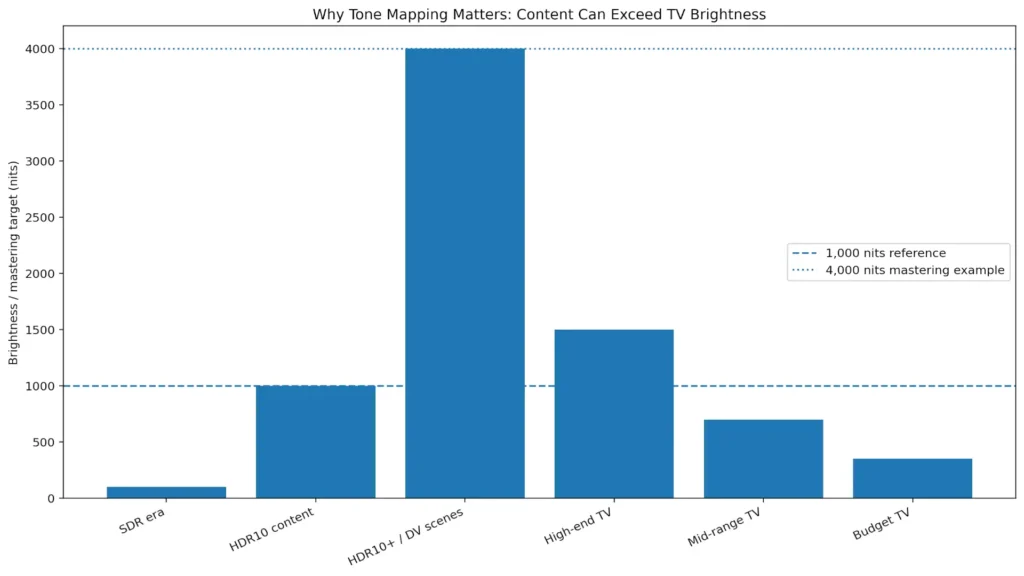
Tone mapping is the process a TV uses to convert HDR brightness levels into a range the panel can actually display. Many HDR movies and games are mastered far brighter than the peak brightness of most consumer TVs, so the display has to compress that range while trying to preserve highlight detail, shadow detail, and color realism.
One of the simplest ways to understand this is with peak brightness. A lot of HDR movies and shows are mastered at 1,000 nits or even 4,000 nits, but many consumer TVs cannot sustain that level of brightness across real scenes. That is exactly why tone mapping exists: the TV has to compress those brighter highlights into a range the panel can actually show without blowing out detail.
In practical terms, tone mapping is what stops bright clouds from turning into a white blob and dark scenes from collapsing into a muddy mess. The better the tone mapping, the closer the final image stays to what the creator intended.
This is also why HDR is not just “brighter SDR.” HDR changes how the TV handles highlight detail, shadow detail, and color volume at the same time. That extra headroom only helps if the display maps it properly. When tone mapping is weak, even a nice HDR title can look less impressive than SDR. When it is good, HDR usually looks more lifelike immediately.
Static Tone Mapping
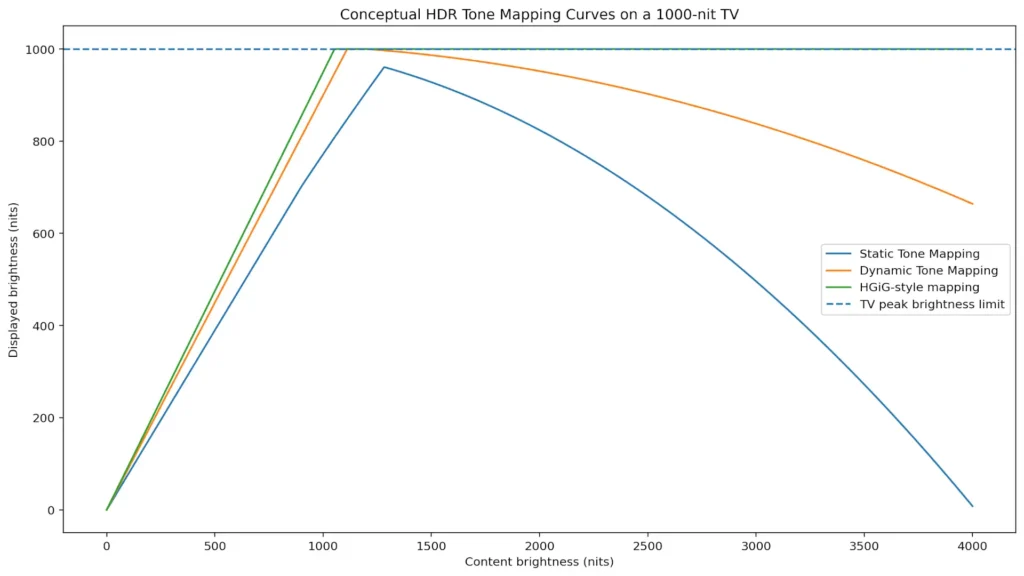
Static tone mapping uses one fixed set of instructions for the whole program. That means the TV looks at the metadata for the title, builds one overall mapping curve, and applies it across the entire movie or show. HDR10 is the best-known example of this style because it relies on static metadata rather than scene-by-scene adjustments. The upside is consistency and simplicity. The downside is that one curve has to cover every scene, even when the content changes from a dark room to a bright outdoor shot.
In HDR, that “instruction set” usually comes from metadata, which is the information attached to the video about things like peak brightness and average scene brightness. With HDR10, that metadata is static, so the TV gets one overall set of brightness instructions for the entire title rather than scene-by-scene guidance.
That is why static tone mapping can sometimes feel a little blunt. A scene mastered for very high peaks may force the TV to protect highlights by compressing them, which can reduce sparkle. At the same time, a darker scene in the same movie may not get as much nuance as it could if the display could adapt on the fly. This does not mean static tone mapping is bad. It just means it is a simpler approach with less flexibility. For many TVs, especially mid-range models, a good static curve still looks perfectly fine most of the time.
In simple terms, static tone mapping is the baseline approach. It is stable and predictable, but it cannot adapt when one movie jumps between very dark and very bright scenes. On a decent TV, that can still look quite good in normal viewing. On a weaker panel, it can be the difference between HDR looking acceptable and HDR looking a little underwhelming.
Dynamic Tone Mapping
Dynamic tone mapping adjusts the HDR mapping scene by scene, and in some systems even frame by frame. That extra flexibility is the big difference. HDR10+ is built around dynamic metadata, and the HDR10+ Technologies documentation describes it as a way to optimize brightness scene by scene or frame by frame. Dolby Vision also uses dynamic metadata and tone mapping to help preserve creative intent across displays with different brightness limits.
In simple terms, dynamic tone mapping gives the TV more information, so it can react more intelligently to each part of the content. That is why it often looks more impressive right away. Highlights usually hold up better, and shadow detail can feel cleaner in scenes that would otherwise be crushed or flattened. On a bright TV, it can make HDR pop in a way that is easy to notice.
The trade-off is that the picture can move a little farther from a strict reference image, depending on how aggressive the TV’s processing is. Some viewers prefer that because it looks more vivid. Others prefer a more restrained presentation. Both reactions are normal.
If you want the format side explained in more detail, this is where it helps to compare HDR10, HDR10+, and Dolby Vision, because the format often determines whether dynamic metadata is available in the first place. For movies and streaming, dynamic tone mapping is usually the more exciting option. For gaming, the answer can be different, because many players prefer to reduce extra TV processing and use HGiG Mode instead.
Static vs Dynamic Tone Mapping
| Tone Mapping Type | How It Works | Best For | Main Advantage | Main Trade-Off |
| Static Tone Mapping (HDR10) | Uses one brightness curve for the entire title | Basic HDR playback, many mid-range TVs | Predictable and simple | Less adaptive in mixed scenes |
| Dynamic Tone Mapping (HDR10+, Dolby Vision, TV processing) | Adjusts scene by scene or frame by frame | Movies, streaming, visually punchy HDR | Better highlight and shadow control | Can look less reference-accurate |
How to Choose the Best Tone Mapping Options for Your HDR TV
The best tone mapping option depends on what you watch and how you use the TV. If you mostly watch movies and streaming shows, dynamic tone mapping often gives the most immediately pleasing result, especially on TVs with good peak brightness and decent local dimming. Dolby Vision and HDR10+ titles tend to benefit the most when both the content and the TV support dynamic metadata.
If you mostly game on a console, the best starting point is usually to reduce extra TV processing and use a more calibration-friendly option such as HGiG Mode, especially if the game or console has its own HDR setup screen. That usually gives you a more predictable result than letting the TV aggressively remap the image on top of the console’s calibration.
If your TV is entry-level or not very bright, dynamic tone mapping can sometimes rescue HDR that would otherwise feel dull. That is not magic, though. A dim panel cannot become a bright one just because the setting changed. It can only make better use of the brightness it already has.
If you care most about accuracy, choose the mode that gets closest to the creator’s intent. If you care most about a vivid living-room picture, dynamic tone mapping may be more satisfying. There is no universal winner — only the best match for your room, your TV, and your viewing habits.
If you want the short version from the settings menu, it is this: static tone mapping is stable and predictable, dynamic tone mapping is more adaptive and dramatic, and gaming often benefits from a more restrained, calibration-friendly approach.
Best HDR Tone Mapping Setting by Use Case
- Movies / Streaming: Dynamic Tone Mapping usually looks more vivid and forgiving
- Accuracy-first movie viewing: Use the most restrained HDR picture mode available
- PS5 / Xbox Gaming: Start with HGiG Mode or the most calibration-friendly game HDR option
- Entry-level or dim TV: Dynamic Tone Mapping may help weak HDR look less flat
- Bright living room: Dynamic Tone Mapping often looks better than a conservative mode
How Tone Mapping Fits with Resolution and Color
Resolution and tone mapping are not the same thing, and that is exactly why two 4K TVs can look so different. A 4K TV can still look underwhelming if it has weak HDR handling, while a lower-resolution screen can look surprisingly good if its contrast and HDR processing are strong. Resolution gives the image its pixel count. Tone mapping decides how those pixels render brightness, highlight detail, and shadow detail.
This is also where Wide Color Gamut (WCG) matters. HDR is not only about brightness. It also depends on how many colors the TV can actually show and how well it can hold those colors at higher brightness levels. A TV with decent tone mapping but weak color coverage can still make HDR look flat, even if the spec sheet sounds impressive.
This is also why HDR discussions often mention color spaces like DCI-P3 and Rec.2020. Even if a TV accepts an HDR signal, it still needs enough real color coverage and brightness to make that wider HDR image look convincing instead of flat.
Older SDR content typically targets Rec.709, while HDR discussions more often reference wider color spaces like DCI-P3 and Rec.2020, which is why HDR-capable TVs need both brightness and real color coverage to look convincing.
Also Read: Full Array LED vs Mini-LED: Which TV Backlight Is Better?
Real-World Example: Why Two 4K TVs Can Show the Same HDR Movie Differently
I’ve seen this happen with mid-range TVs more than once: the same Dolby Vision or HDR10 movie looks bright and detailed on one set, but on another TV the highlights look blown out or the whole scene feels strangely dim. On paper, both TVs may be 4K and both may claim HDR support, but one panel has better peak brightness, better local dimming, and better tone mapping behavior.
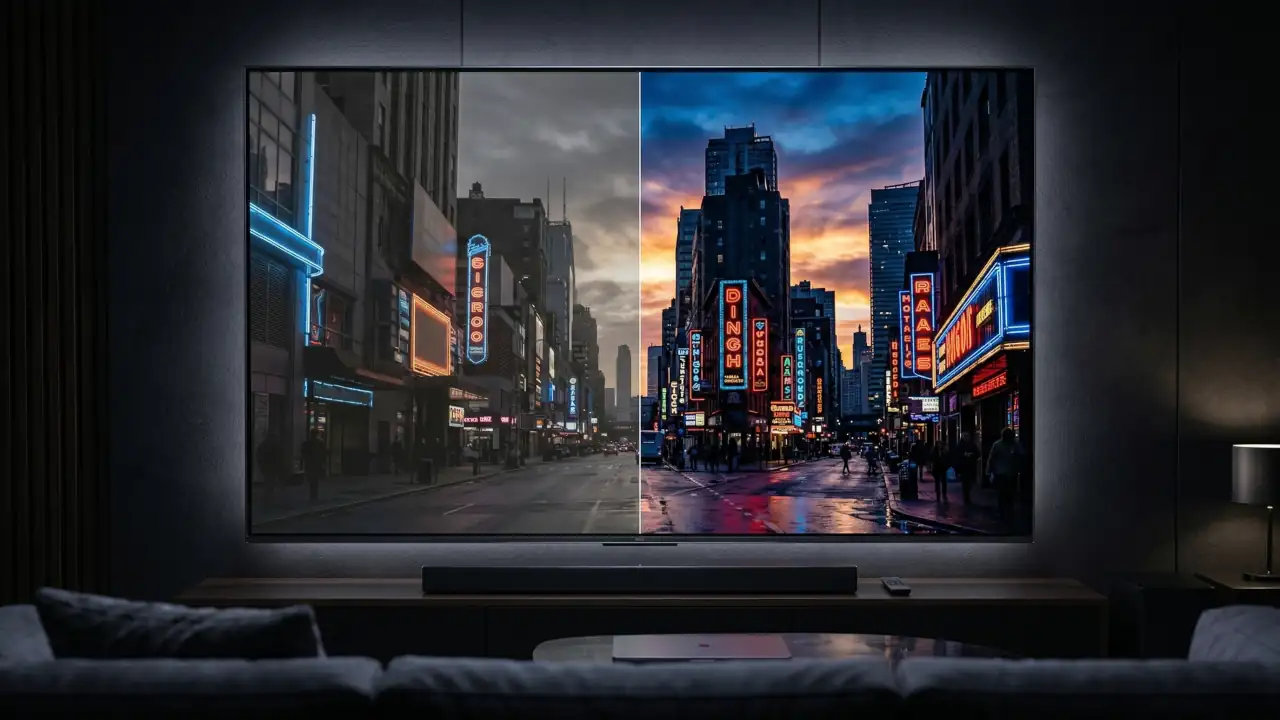
A good test scene is a dark room with a bright window or a night skyline with neon signs. On the better TV, you still see detail in the bright areas and the shadows do not collapse. On the weaker TV, the window can turn into a white patch or the darker parts of the image lose texture. That is the kind of difference readers usually notice immediately, even if they do not know the term “tone mapping” yet.
Conclusion
HDR tone mapping is the part of HDR that quietly does most of the heavy lifting. It decides how the TV handles brightness that is too high for the panel, and that directly shapes whether the image looks rich, clipped, punchy, or just plain off.
Static tone mapping uses one fixed curve for the whole title, which works well enough in many cases. Dynamic tone mapping adds more intelligence by adapting scene by scene or frame by frame, which is why HDR10+ and Dolby Vision often look more refined on capable TVs.
If I had to give most readers one simple recommendation, it would be this: use dynamic tone mapping for movies and streaming if you want HDR to look richer and more dramatic. If you game on a PS5 or Xbox, start with a more calibration-friendly setting such as HGiG Mode and then adjust from there.
And if the TV is weak, remember this: no setting can fully fix limited brightness, weak local dimming, or poor panel performance. Tone mapping can help a lot, but the display still has to do the real work.