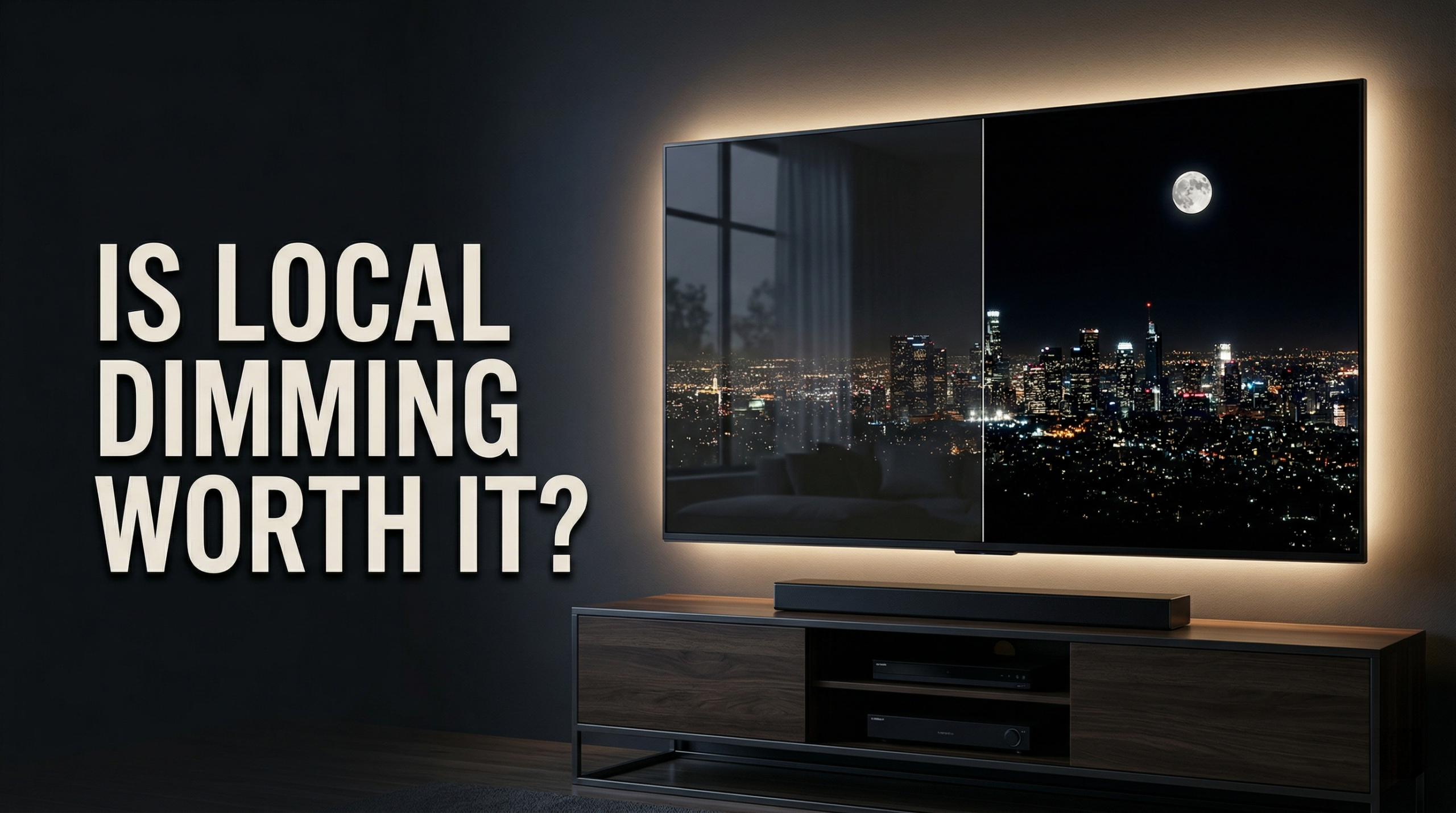
If you have ever looked at a TV spec sheet and wondered why one model costs more just because it says “local dimming,” you are not alone. I see this a lot when I’m comparing TVs and display features for whatismyscreenresolution.site. On paper, it sounds like a small upgrade. In real-world viewing, though, it can be one of the biggest reasons two TVs with the same resolution look completely different in dark movie scenes, HDR content, or games.
I originally built whatismyscreenresolution.site because too many display specs are explained in ways that confuse regular buyers instead of helping them. Local dimming is a perfect example. Brands love putting it on spec sheets, but the label alone does not tell you whether the picture will actually look better.
A good local dimming system can make an LCD TV feel far more premium, with deeper blacks and stronger contrast. A weak one can still leave you with blooming, grayish blacks, or uneven brightness. So the real question is not just “does the TV have local dimming?” It is “what kind of local dimming does it use, and is that upgrade actually worth paying for?” In my experience, this is one of the easiest TV features to overpay for if you only read the spec sheet and never check how the TV actually handles dark scenes.
Also Read: Full Array LED vs Mini-LED: Which TV Backlight Is Better?
Is Local Dimming Worth Paying Extra? (Quick Answer)
Local dimming is usually worth paying extra for if you watch movies, HDR content, or play games in a dim room. It helps LCD TVs produce deeper blacks, better contrast, and stronger highlights. Full-array local dimming and Mini-LED are usually worth it; basic edge-lit local dimming is often much less impressive.
What Is Local Dimming?
Local dimming is a backlight control method used mainly in LCD TVs and some monitors. Since LCD panels do not create their own light, they rely on a backlight behind the screen. Local dimming lets the TV lower brightness in darker parts of the image while keeping bright areas brighter, which improves contrast and makes dark scenes look more convincing.
You will see local dimming discussed most often in TVs, but it also matters on higher-end monitors, especially HDR gaming monitors and professional displays where contrast is part of the selling point.
This matters because one of LCD’s biggest weaknesses is that some light leaks through even when the screen is supposed to look black. Local dimming reduces light where it is not needed, which helps shadows look darker without dulling highlights.
A simple way to picture it: imagine turning off the lights in one corner of a room while leaving the rest on. That is essentially what local dimming does with different parts of the screen.
Types of Local Dimming
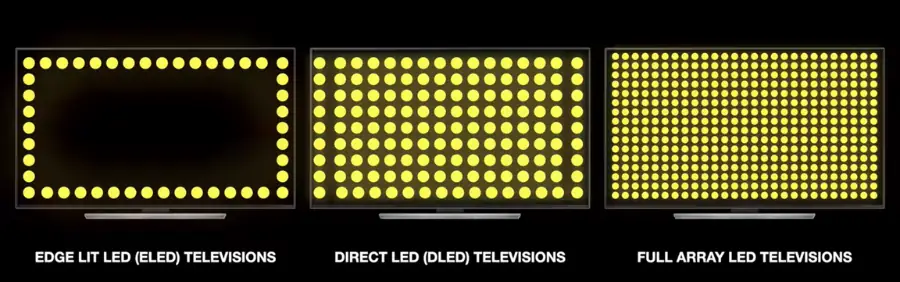
Not all local dimming systems are equal. The three main LCD approaches are edge-lit, full-array, and Mini-LED. The result depends on the backlight layout, how many dimming zones the TV has, and how well the processing controls those zones.
Edge-Lit Local Dimming
Edge-lit TVs place their LEDs along the edges of the panel instead of directly behind the whole screen. That helps make TVs thinner and cheaper, which is why this design still shows up in more affordable models.
Pros: The main advantage is price and slim design. Edge-lit TVs can still look fine for casual viewing, especially in a bright room where black-level flaws are less obvious.
Cons: Precision is the problem. Because the light comes from the sides, edge-lit local dimming has fewer and less exact zones to work with. That can cause weaker blacks, more blooming, and visible bands or uneven brightness. In real use, this is the version of local dimming I trust the least because the improvement can be small while the side effects are easier to notice.
Full-Array Local Dimming (FALD)
Full-array local dimming places LEDs across the entire back of the panel instead of only along the edges. That gives the TV much better control over different parts of the picture, which is why it usually looks noticeably better than edge-lit designs in dark scenes and HDR. Sony’s own BRAVIA Mini-LED and backlight overview also shows this shift toward more precise backlight control in better LCD TVs.
Pros: FALD usually delivers a noticeable jump in picture quality. You get deeper blacks, stronger contrast, and better HDR impact because the TV can brighten highlights without washing out the darker parts of the image. That makes it a very solid middle ground for buyers who want real improvements without going all the way to the most expensive Mini-LED sets. If I’m helping someone pick a TV without jumping all the way to OLED pricing, this is usually the point where I start saying, “Yes, now the upgrade is actually visible.”
If you care about HDR, this is where FALD starts to make a real difference. HDR content is designed to show a wider range between dark shadows and bright highlights, and LCD panels need backlight control to do that well. That is why local dimming matters so much for HDR viewing.
Cons: FALD is not perfect. Blooming can still show up around subtitles, stars, or bright logos on black backgrounds. I notice it fastest with white subtitles on dark movie scenes or loading screens with bright logos. If one dimming zone contains both something bright and something dark, the TV has to compromise, which can lift black levels or trim highlight detail. It is much better than edge-lit, but it still is not pixel-level control.
Mini-LED Local Dimming
Mini-LED is an advanced form of LCD backlighting that uses much smaller LEDs and usually gives the TV far more dimming zones to work with. In practice, that usually means better precision, stronger HDR highlights, less obvious blooming, and better black levels than a regular LED TV.
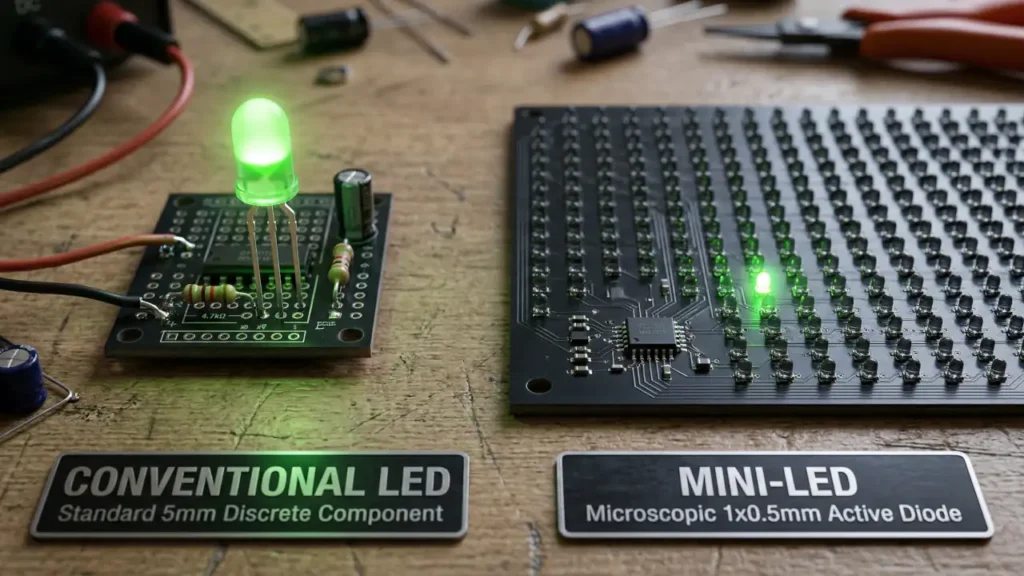
Pros: The biggest win is precision. More, smaller zones usually mean less blooming, better black levels, and stronger HDR impact. Mini-LED TVs can also get very bright, which helps in daylight viewing and HDR scenes that need real punch. Better Mini-LED sets usually look much cleaner in difficult scenes, especially with bright highlights or small bright objects against dark backgrounds.
Mini-LED is also where many buyers start asking the bigger question: should they stick with premium LCD, or just jump to OLED?
Cons: Mini-LED is still not the same as per-pixel control. In tough scenes, you may still see haloing around subtitles or small bright objects on a dark background. It also costs more than regular LED TVs, and results still vary by model depending on zone count and processing.
Before we get into zone counts and the detailed comparison table, here’s a quick visual guide that shows how Edge-Lit, FALD, and Mini-LED differ in contrast, blooming, price, and real-world value.
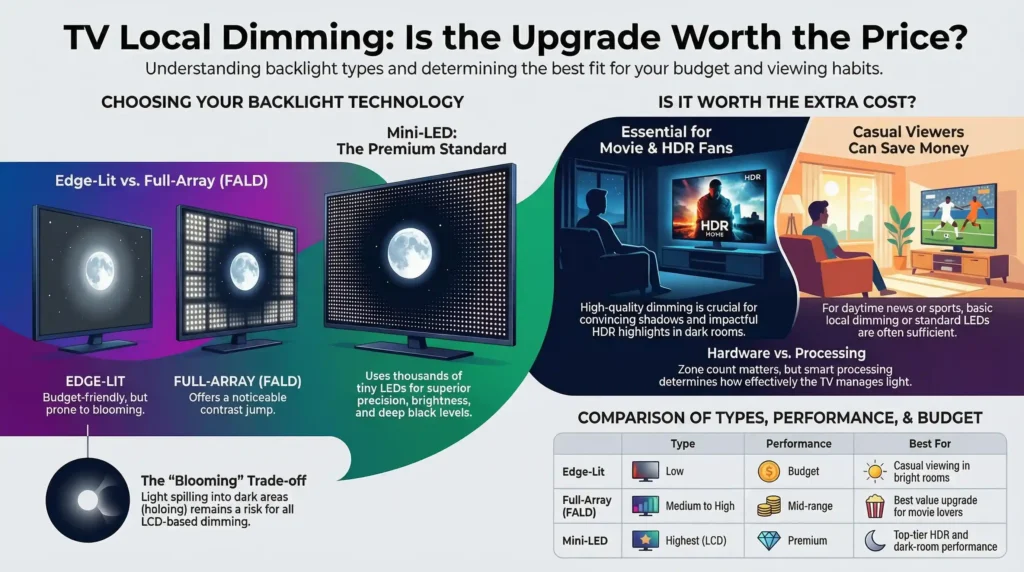
As you can see, the basic pattern is simple: better backlight control usually means better contrast and less blooming, but the TV’s processing still matters just as much as the raw hardware.
How Many Local Dimming Zones Is Good?
There is no perfect zone count that guarantees a great TV, because the processing matters just as much as the hardware. But as a rough rule, more zones usually means better control.
Edge-lit TVs often have very limited zone control. Full-array models can range from dozens to hundreds of zones, and better Mini-LED TVs can push much higher. That is why a basic edge-lit set might only show a modest contrast improvement, while a stronger Mini-LED model can look dramatically cleaner in dark scenes with bright highlights or subtitles.
I would never judge a TV by zone count alone, but if two models are similarly priced, the one with better local dimming control usually has the advantage in dark scenes and HDR.
Comparison Table
Not all local dimming labels mean the same thing in real life. The type of backlight, how precise the dimming is, and how well the TV controls blooming matter more than the marketing term alone.
| Type | Picture | Blooming | Best For | Downside | Budget |
| Edge-Lit | Fair blacks, modest HDR | High | Bright rooms, casual viewing | Weakest control, more blooming | Budget |
| FALD | Very good blacks, strong HDR | Medium | Best-value upgrade for movies and HDR | Can still bloom in dark scenes | Mid-range |
| Mini-LED | Best LCD blacks, strongest HDR | Lower | Premium LCD performance | Costs more, still not OLED-level | Premium |
If you want the short version, edge-lit is the budget option, FALD is usually the best value, and Mini-LED is the premium LCD choice. If I were choosing between two similarly priced TVs, I would almost always take a good FALD model over a weaker edge-lit one, even if both advertise local dimming.
Benefits of Local Dimming
The biggest reason people pay extra for local dimming is simple: the image looks better.
Better Contrast
This is the biggest upgrade. Local dimming lets the TV make dark parts darker while keeping bright parts bright, which gives the image more depth and makes scenes feel less flat.
Better Black Levels
Without local dimming, LCD blacks often look grayish, especially in a dark room. By reducing light behind darker parts of the screen, local dimming helps shadows look more believable and keeps dark scenes from turning into a washed-out haze.
Better HDR Performance
Local dimming also matters a lot for HDR. HDR is supposed to show bright highlights and deep shadows at the same time, and LCD TVs need backlight control to get closer to that effect. A good local dimming system helps highlights pop without destroying shadow detail.
Downsides of Local Dimming
Local dimming is useful, but it is not perfect.
Blooming (Halo Effect)
The most common complaint is blooming, sometimes called the halo effect. This happens when light from a bright area spills into nearby dark areas, creating a glow around subtitles, menus, stars, or other small bright objects. In my experience, blooming is easiest to spot in a dark room with white subtitles on a black background.
Dimming Zone Limitations
A dimming zone is bigger than a pixel. If one zone contains both a bright object and a dark background, the TV has to choose a middle ground. That can reduce highlight precision or slightly raise black levels in that area.
Quality Varies a Lot by TV
Two TVs can both advertise “local dimming” and still look completely different in real use. Zone count matters, but so do processing speed, backlight control, and how aggressively the TV balances bright highlights against black levels. That is why I always treat “local dimming” as a starting point, not proof that the TV will automatically look great.
Local Dimming vs. Other Contrast Enhancement Technologies
Local Dimming vs. Direct-Lit Without Dimming
A direct-lit TV without local dimming can still place LEDs behind the screen, but it lights the backlight more uniformly instead of controlling separate zones. That can be better than some cheap edge-lit TVs for basic brightness, but it still cannot match the contrast and black-level improvement of a true local dimming system.
Local Dimming vs. Dynamic Contrast
Local dimming is not the same thing as dynamic contrast. Dynamic contrast usually changes the brightness of the whole image or backlight based on scene content. It can make a dark scene look deeper at first glance, but it does not control different parts of the screen separately.
That is why dynamic contrast can feel like a shortcut. It may make a TV seem punchier in a demo, but it often comes with trade-offs like crushed shadow detail or blown highlights. Local dimming is more useful because it works spatially, not globally.
Local Dimming vs. Self-Emissive Pixels
Local dimming is an LCD workaround. Self-emissive displays like OLED and Micro-LED create their own light at the pixel level, so they do not rely on a shared backlight.
That is why OLED and Micro-LED still have the edge in pure black performance. There is no backlight zone to spill light into neighboring dark areas, so blooming is far less of an issue. The trade-off is that LCDs with local dimming can still win on brightness and sometimes price.
If you want a more visual breakdown, this chart shows how dynamic contrast, Edge-Lit local dimming, FALD, Mini-LED, and self-emissive displays compare in dark-scene performance, black levels, HDR impact, and blooming control.
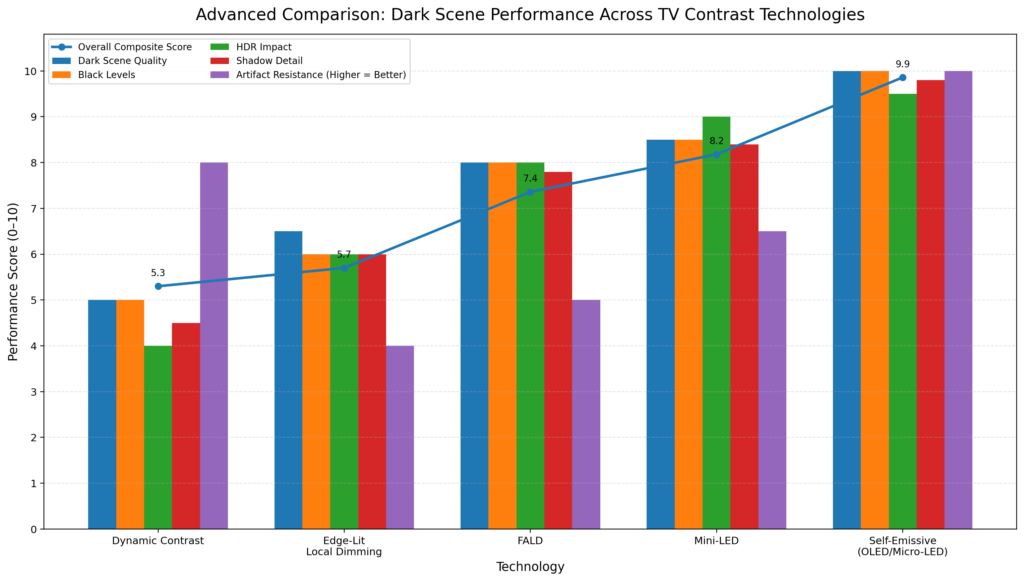
The takeaway is simple: local dimming improves LCD picture quality in a very real way, but better hardware and better processing make a huge difference, and self-emissive displays still lead in pure black-level performance.
Future of Local Dimming Technology
The future of local dimming is mostly about finer control. Mini-LED is already pushing LCDs closer to OLED-like contrast, and manufacturers keep improving zone counts, backlight precision, and processing speed. The overall trend is simple: better control over small bright objects in dark scenes, with fewer visible artifacts.
Micro-LED is the more radical future. Unlike LCD backlighting, it is self-emissive, so it goes beyond local dimming altogether. That gives it the kind of pixel-level light control LCD TVs can only imitate, but it is still expensive and difficult to manufacture at scale.
Smarter processing is the other big trend. The goal is not just adding more LEDs, but making the TV react more intelligently so bright objects stay bright without turning nearby dark areas gray.
Also Read: HDR Gaming: Why It Makes Every Game Look More Realistic
Should You Pay Extra for Local Dimming?
For most people, yes — but only if the upgrade is meaningful.
If you watch a lot of movies in a dim room, care about HDR, or notice grayish blacks on cheaper TVs, local dimming is one of the few features that can make an LCD TV feel genuinely more premium. This is especially true once you move into decent full-array local dimming or Mini-LED.
If you mostly watch news, sports, daytime TV, or casual streaming in a bright room, the difference can be much smaller. In those cases, I would not automatically pay a big premium just because the spec sheet says “local dimming.” Basic edge-lit local dimming often sounds better in marketing than it looks in real life.
My simple rule is this: if the TV is your main movie or HDR screen, buy the best local dimming you can reasonably afford. If it is mostly for everyday viewing and budget matters more than black-level performance, a decent standard LED TV may be enough. If I were buying today, I would gladly pay extra for solid FALD or Mini-LED, but I would be cautious about paying much more just for edge-lit local dimming.
Conclusion
Local dimming is one of those features that sounds small on paper but can completely change how an LCD TV looks in real life. It helps produce deeper blacks, better contrast, and stronger HDR, especially in dark rooms where picture flaws are easier to notice.
Still, it is not a feature I recommend buying blindly. “Local dimming” on a spec sheet does not automatically mean the TV will look great. Edge-lit local dimming can be limited, FALD can still bloom, and Mini-LED quality still varies by model. That is why I always look at the type of backlight first, then think about the room, the content, and whether the price jump is large enough that OLED starts making more sense.