If you have been comparing monitor specs and getting stuck between UWQHD and 4K, you are definitely not the only one. I see this confusion a lot on whatismyscreenresolution.site, especially from readers who assume the monitor with more pixels is automatically the better buy. In real use, that is not always true. I have tested enough screen setups, scaling combinations, and monitor layouts to know that UWQHD and 4K can feel completely different on a desk, even though both sound like premium upgrades on paper.
The real choice is not just about resolution. It is about how you actually use your monitor every day. A gamer, a video editor, a spreadsheet-heavy office user, and someone who mainly watches movies can all end up making different choices for good reasons. Personally, I like ultrawide monitors for multitasking and timeline-heavy work, but I still prefer 4K when I want the cleanest text and the sharpest image. So instead of comparing specs in a vacuum, let’s break down what each one actually feels like in real life and which option makes more sense for your desk, your GPU, and your budget.
Also Read: HDR10 vs HLG: Why One HDR Format May Look Better Than You Expect
Quick Answer: UWQHD vs 4K
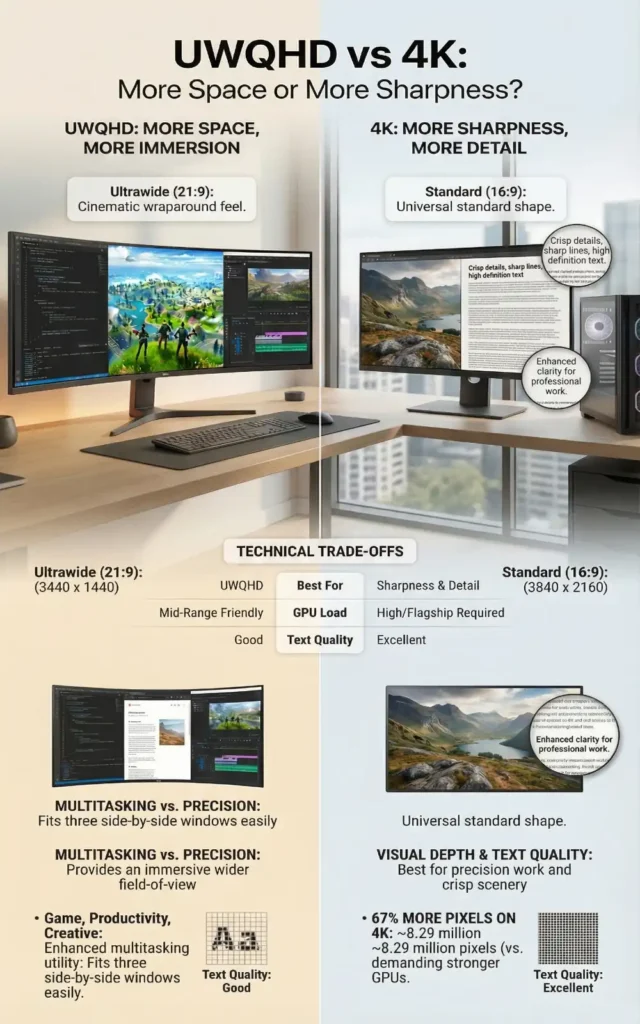
UWQHD (3440 × 1440) is usually better if you want a wider workspace, smoother gaming, and easier GPU demands. 4K (3840 × 2160) is better if you want sharper text, finer detail, and broader compatibility. In simple terms: UWQHD gives you more space, while 4K gives you more sharpness.
UWQHD vs 4K at a Glance
If you want the short version before we break everything down, this quick comparison makes the trade-off easier to see:
| Feature | UWQHD | 4K |
| Typical Resolution | 3440 × 1440 | 3840 × 2160 |
| Total Pixels | ~4.95 million | ~8.29 million |
| Aspect Ratio | 21:9 | 16:9 |
| Best For | Multitasking, immersive gaming, wider workspace | Sharper text, fine detail, universal compatibility |
| Best Screen Feel | Wider and more spacious | Sharper and more refined |
| GPU Demand | High, but easier than 4K | Higher and more demanding |
| Typical High Refresh Availability | Easier to find at 144Hz–165Hz | Available, but usually more expensive |
| Text Clarity | Good | Excellent |
| Gaming Experience | More immersive, easier to drive at high refresh rates | Sharper visuals, but heavier GPU load |
| Media Compatibility | Great for cinematic content, sometimes mixed support | Best all-around compatibility |
| Best Fit for Mid-Range PCs | Usually the better value | Better if sharpness matters more |
Resolution & Aspect Ratio Basics
Before comparing them properly, it helps to understand what the numbers actually mean.
UWQHD usually refers to 3440 × 1440. The important part is not just the resolution itself, but the screen shape. UWQHD uses a 21:9 ultrawide aspect ratio, so it stretches wider than a standard 16:9 monitor. That extra width is what gives ultrawide displays their signature feel. If you want to see a real-world example of the format most people mean when they say UWQHD, this UltraWide 3440 × 1440 monitor listing shows the exact kind of 21:9 layout commonly used in this category.
4K on consumer monitors usually means 3840 × 2160 in a standard 16:9 format. Compared with UWQHD, it packs in significantly more pixels, which is why text, photos, and fine interface details usually look cleaner and more detailed. If you want the official standards-based definition behind the common consumer format, the 4K UHDTV reference from the ITU confirms the 3840 × 2160 UHD reference used for modern displays.
In raw pixel terms, the difference is bigger than many people expect. UWQHD (3440 × 1440) has about 4.95 million pixels, while 4K (3840 × 2160) has about 8.29 million. That means 4K pushes roughly 67% more pixels than UWQHD, which helps explain why it looks sharper but also demands much more from your GPU.
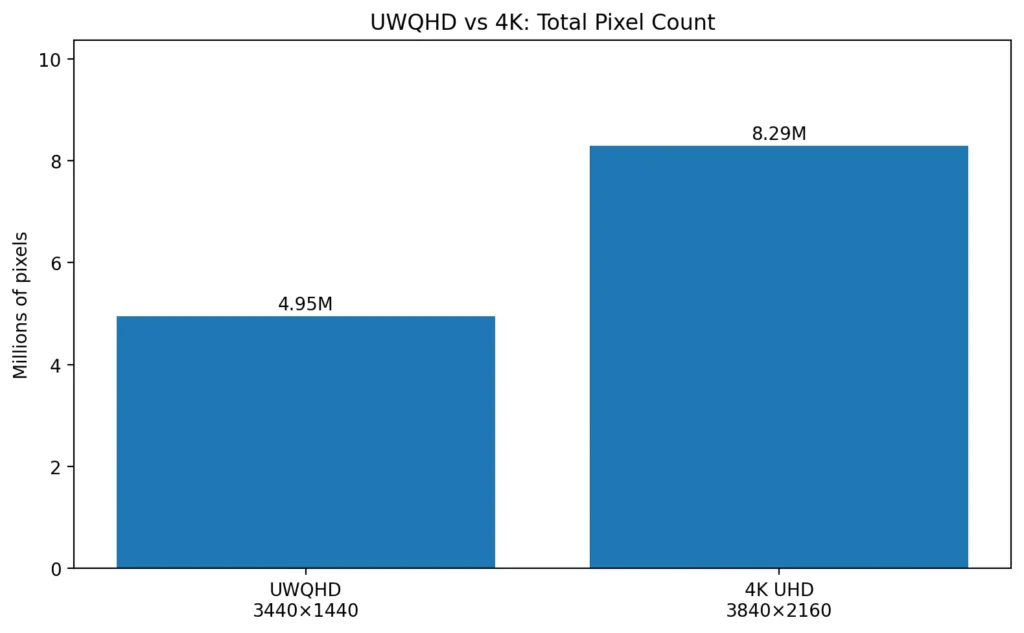
On the same screen size, that also means 4K usually has higher pixel density than UWQHD, which is one reason text and fine image details often look noticeably sharper.
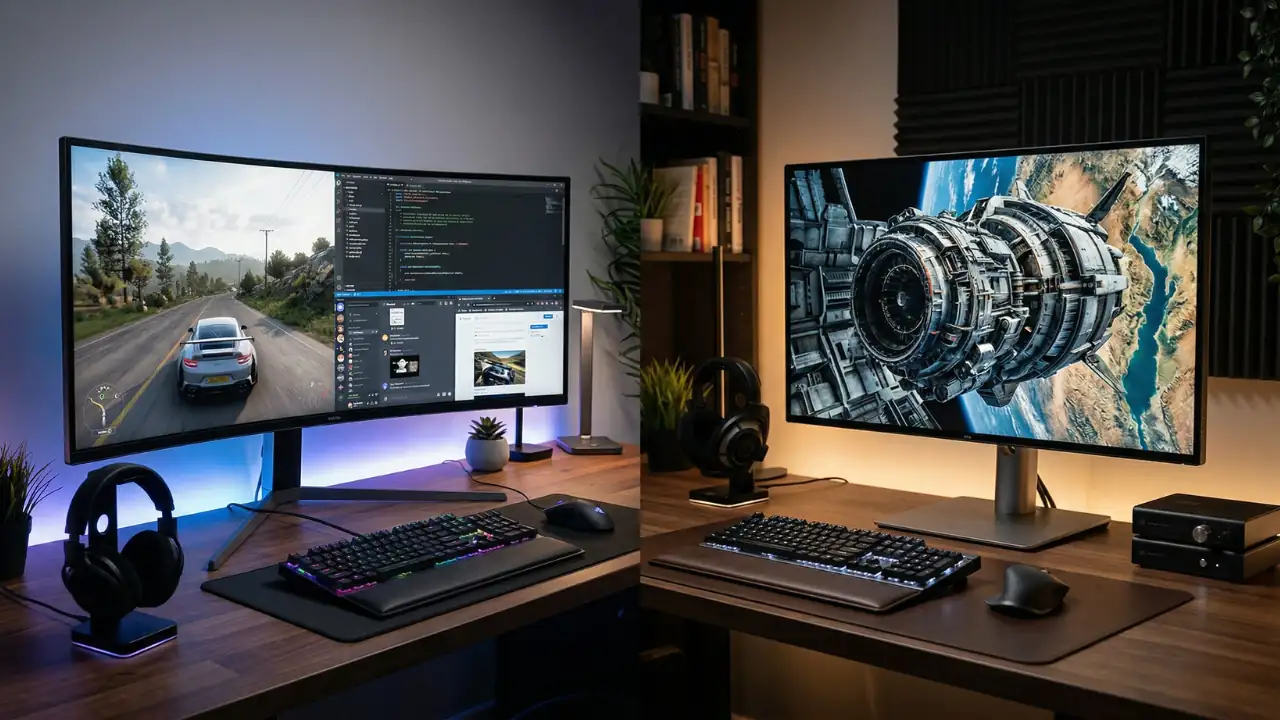
Once I switch between the two on a real desk setup, the difference becomes obvious fast. UWQHD feels like getting more room side to side, which is great for multitasking and immersion. 4K feels more refined, with tighter detail and cleaner sharpness. Neither one is a gimmick. They are simply built for different priorities, and that changes how they feel for work, gaming, and media.
If you want a simple rule: choose UWQHD for more usable screen space, and choose 4K for the cleanest image quality.
Productivity & Multitasking
For productivity, UWQHD is usually the more obvious win if you like to keep several things open at once. The wide shape makes it easier to place two or three windows side by side without everything feeling cramped. That is why so many people who work in spreadsheets, dashboards, stock charts, timelines, code editors, or browser-heavy workflows end up liking UWQHD. It feels less like one screen and more like a wide canvas.
On my own desk, this is where ultrawide usually feels the most useful. A 3440 × 1440 display makes it easy to keep a browser, a document, and a notes window open without constantly resizing everything. If your day involves spreadsheets, research tabs, dashboards, or editing timelines, that extra horizontal room can feel more valuable than simply having more pixels.
That extra horizontal room can save time in very practical ways. You can keep email, a document, and a reference page visible at the same time, stretch a video timeline wider, or view more spreadsheet columns without constantly rearranging windows. In real use, a single ultrawide often feels like a cleaner alternative to a dual-monitor setup.
4K takes a different approach to productivity. Instead of giving you more width, it gives you much tighter detail. Text can look very clean, especially on 27-inch and 32-inch monitors, and that makes long reading, design work, and editing easier on the eyes.
For people who spend a lot of time zooming in on images, working on layouts, or checking tiny details, 4K can feel more polished and precise. That is also why 4K tends to appeal more to people doing photo retouching, detailed design work, or CAD-style precision tasks where fine visual detail matters more than horizontal workspace.
So the real question is not “Which one is better for work?” It is “Do you need more room, or do you need more sharpness?” If you live in multiple windows all day, UWQHD often feels more useful. If your work depends on crisp visuals and detail, 4K usually has the edge.
Gaming Experience
Gaming is where the UWQHD vs 4K decision gets more personal. UWQHD has a strong advantage in immersion because the wider field of view fills more of your peripheral vision. Racing games, flight sims, strategy games, open-world adventures, first-person shooters, and many RPGs can feel especially good on ultrawide screens. The image wraps around your view in a way that feels more cinematic and less boxy.
There is also a performance angle here. On a real desk, the difference is easy to notice: UWQHD usually feels more dramatic the moment you launch a racing game or open-world title, while 4K tends to impress more when you stop and look at texture detail, distant scenery, and small UI elements.
UWQHD pushes fewer pixels than 4K, so it is usually easier to run at high frame rates. That matters a lot if you care about smooth gameplay, especially above 100 Hz. A mid-range GPU can often handle UWQHD more comfortably than 4K, which means you may get better responsiveness without spending as much on graphics hardware.
4K gaming looks fantastic when your system can handle it. The image is sharper, distant objects stay clearer, and textures stand out more. On a large screen, or when you sit close, the difference can be very obvious. If you play slower single-player games and care more about image quality than raw frame rate, 4K can feel amazing.
The catch is that 4K is demanding. You are pushing a lot more pixels, and that means your GPU has to work much harder. If you want high refresh rates at 4K, you usually need a stronger graphics card and a bigger budget. That is why I usually see UWQHD as the sweet spot for most PC gamers. It feels noticeably more immersive than standard 1440p, but it is still much easier to run well than 4K if you care about higher frame rates and smoother gameplay.
Compatibility is another thing to keep in mind. UWQHD support has improved a lot, but some older games and some console content still prefer 16:9. That can lead to black bars on the sides or limited ultrawide support. 4K, because it stays within the standard 16:9 shape, is more universal.
Media & Entertainment
For movies and streaming, the answer depends on what you watch most. UWQHD can feel great for cinematic content because many films are made in wider aspect ratios that sit closer to ultrawide displays than to standard monitors. When the source content matches the screen shape, you get a more theater-like feel with less wasted space.
4K is the safer all-around choice for media. Standard 16:9 content is simply more likely to fit naturally on a 4K display, with fewer chances of side bars, letterboxing, or awkward stretching. Major streaming platforms, YouTube, Blu-ray, and a lot of modern TV content are built around 16:9, so 4K usually fits more naturally. You get the benefit of a sharper image without worrying much about aspect ratio mismatches. If you watch a mix of TV shows, sports, YouTube, and movies, 4K tends to be the easier fit.
The important difference here is that 4K improves detail, while UWQHD improves the sense of width. So when a movie fills the screen nicely on ultrawide, it can feel more immersive. But when you want universal compatibility and sharper overall picture quality, 4K usually wins.
One thing that often gets overlooked in this comparison is that screen size changes how both resolutions feel in real use.
UWQHD vs 4K by Monitor Size
Screen size changes how these resolutions feel more than many people expect.
- 34-inch ultrawide (3440 × 1440): This is the classic UWQHD experience. It feels wide, immersive, and very practical for multitasking.
- 27-inch 4K: Great if you want very sharp text and dense detail, but scaling matters more here.
- 32-inch 4K: Often the sweet spot for 4K productivity and media because the sharpness is obvious without feeling quite as cramped.
- If you mainly want workspace: UWQHD usually feels more useful.
- If you mainly want image precision: 4K usually feels more impressive.
Hardware & Performance Requirements
This part matters more than most people expect. Resolution is not just a visual choice — it changes how demanding the whole setup becomes. When I compare these on real desktops, the hardware difference often matters more than the panel spec itself. A 4K monitor may look like the premium option, but if your GPU struggles, the upgrade can feel worse in daily use than a well-matched UWQHD setup.
GPU Demands
4K is harder to drive than UWQHD because it contains more pixels. That means your graphics card has to render more information every frame. For everyday desktop use that may not matter much, but for gaming it matters a lot. If you want high settings and smooth frame rates, 4K quickly pushes you toward stronger GPUs.
UWQHD is still demanding compared with 1080p or regular 1440p, but it is lighter than 4K. That makes it a more realistic match for people who want strong visuals without jumping straight into flagship-level hardware.
Refresh Rates and Responsiveness
High refresh rates often matter as much as resolution. A 144 Hz or 165 Hz ultrawide can feel extremely smooth for desktop work and gaming. UWQHD monitors are commonly available in high-refresh variants at prices that are not completely wild.
4K monitors used to be mostly about 60 Hz, but the market has improved. Still, high-refresh 4K panels usually cost more and need a stronger GPU to benefit fully. If you play competitive games, a fast UWQHD panel often feels like the easier, more balanced purchase.
Cost
Cost is where the comparison becomes very practical. UWQHD monitors are often cheaper than high-end 4K monitors, especially once you include the graphics hardware needed to run them well. A 4K monitor may look affordable at first, but the total system cost can rise fast if you need a better GPU too.
That is why many buyers choose UWQHD as a value-focused upgrade. You get a premium-looking screen shape, good multitasking space, and solid gaming performance without going all the way into the most expensive hardware bracket.
In general, good UWQHD monitors are often easier to find in the more affordable mid-range bracket, while high-quality 4K monitors — especially high-refresh ones — tend to move into a more expensive tier faster.
That is why, for most people building a balanced setup, I usually see UWQHD as the easier upgrade to justify on both monitor price and total system cost.
Pros & Cons Summary
If you prefer to think in terms of trade-offs, here is the quick pros-and-cons version:
| Option | Good Points | Weak Points |
| UWQHD | Wide workspace, immersive, easier to drive | Less sharp than 4K, some game support issues |
| 4K | Very sharp, great detail, universal format | Higher GPU load, often more expensive |
| UWQHD for gaming | Smooth, wide FOV, strong immersion | Not every title supports 21:9 |
| 4K for work | Crisp text, great detail, clean look | Can feel cramped without scaling |
Real-World Example: What I’d Choose on a Mid-Range Setup
If I were helping someone choose between these two on a typical mid-range PC, I would usually look at the whole setup first instead of just the monitor spec. For example, with a system in the RTX 4060 or RTX 4070 class, UWQHD often feels like the more balanced upgrade. You get the wider field of view in games, more room for multitasking, and a much easier time maintaining strong frame rates without turning settings down too aggressively.
On the other hand, if the main goal is photo editing, video previewing, design work, or long hours of reading text-heavy content, 4K on a 27-inch or 32-inch monitor often feels better immediately. The sharper text and finer detail are easier to appreciate in daily work, especially once display scaling is set properly.
That is why I usually simplify it like this: if your system is mid-range and you want a monitor that feels great for both work and gaming, UWQHD is often the safer value. If image precision matters more than raw performance, 4K is usually the better long-term choice.
Which One Should You Choose?
Choose UWQHD if you spend a lot of time multitasking, editing timelines, trading, coding, or gaming in genres that benefit from a wider view. It is the better pick when you want a screen that feels spacious and immersive without demanding top-tier hardware all the time.
Choose 4K if your priorities are sharpness, text clarity, fine image detail, and broader compatibility across games and media. It is the better all-rounder for media, content creation, and detailed visual work, especially if your GPU is strong enough to support it comfortably.
A simple way I explain it is this: UWQHD is about space, while 4K is about sharpness. If you want a monitor that feels wider, more flexible, and easier to live with on a mid-range system, UWQHD is usually the smarter buy. If your priority is crisp text, fine detail, and the cleanest possible image, 4K is the better upgrade.
Also Read: PHOLED vs OLED: Which Display Technology Is Actually Better?
Quick Buying Recommendation
If you just want the fastest recommendation, here is the simple version:
- Choose UWQHD if you want better multitasking, more immersive PC gaming, and a display that is easier to run on a mid-range system.
- Choose 4K if you care more about sharp text, fine detail, universal compatibility, and a cleaner image for creative or detail-heavy work.
- Choose UWQHD first if you are upgrading from 1080p or 1440p and want the best balance of value, immersion, and performance.
- Choose 4K first if image sharpness matters more to you than extra horizontal space.
Conclusion
When it comes to UWQHD vs 4K, there is no universal winner — it depends on what you want your monitor to do best.
If you want a display that feels wider, more immersive, and more practical for multitasking or smoother gaming on reasonable hardware, UWQHD is usually the smarter buy. It gives you that “more room to work” feeling immediately, and for many people, that is more useful day to day than chasing maximum pixel density.
If your priority is sharpness, text clarity, image detail, and broader compatibility, 4K is the better long-term choice. It is especially appealing for content creation, detailed visual work, and anyone who values a cleaner, more refined image above all else.
If I were recommending one to the average reader with a mid-range setup, I would lean toward UWQHD first. But if you already know that sharpness matters more to you than extra width, 4K is absolutely worth it.
Frequently Asked Questions
If you still are not sure which one fits your setup, these quick answers should help clear up the most common last-minute questions.