HDR Gaming is one of those features that feels confusing on paper but obvious once you see it working properly. I’ve tested HDR on entry-level gaming monitors, brighter HDR TVs, and a few displays that technically supported HDR but barely improved the picture. When it is done right, the difference is easy to notice. Dark corners stop looking muddy, bright skies keep their detail, and lighting effects like neon signs, fire, reflections, and sunlight feel much closer to real life.
For gamers, realism is not just about sharper textures or higher resolution. I’ve seen plenty of 4K games still look flat on weak panels because brightness, contrast, and color range were the real bottlenecks. HDR changes that. It gives the display more room between the darkest and brightest parts of the image, so games look less compressed and more natural. A torch in a cave can actually glow without washing out the walls around it. A sunset can stay warm without turning the whole scene orange.
I built whatismyscreenresolution.site because too many people troubleshoot display problems without checking the basics first. HDR is a perfect example of that. A lot of gamers turn it on, hate how it looks, and assume HDR is overrated, when the real issue is often a weak panel, bad calibration, or the wrong output settings. That’s why I prefer explaining HDR in practical terms instead of just repeating spec sheets.
Also Read: Local Dimming: Is This TV Feature Worth Paying Extra For?
Quick answer: HDR vs SDR in Gaming
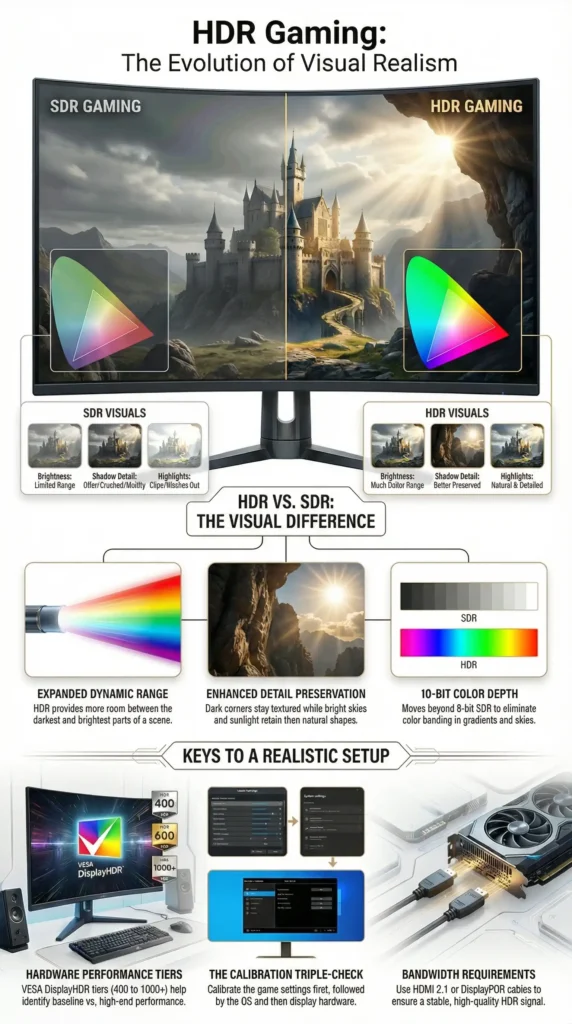
HDR gaming makes games look more realistic by increasing brightness range, preserving more shadow detail, and showing richer color than SDR. When HDR is implemented well, highlights look more natural, dark scenes keep more detail, and lighting effects like sunlight, fire, and neon feel closer to how real light behaves.
What is HDR Gaming?
HDR stands for High Dynamic Range. In gaming, it means the game is rendered and displayed with a bigger range of brightness levels and richer color detail than standard output. On capable hardware, that usually also means moving beyond the more limited 8-bit look of SDR into 10-bit HDR output, which helps gradients and bright color transitions look smoother instead of banded.
A simple way to think about it is that HDR gives the image more room between the darkest and brightest parts of the scene. Instead of squeezing everything into a narrow brightness window, HDR lets highlights shine and shadows keep their shape.
That is the big difference from SDR, which stands for Standard Dynamic Range. SDR still works fine for many games, but it has a smaller brightness range and a more limited color volume. HDR, when done well, can make the scene feel more natural because bright things can look bright without ruining everything else on screen. Microsoft’s official HDR settings guidance for Windows also explains that HDR can deliver a brighter, more vibrant, and more detailed image than SDR when the display and signal path support it properly.
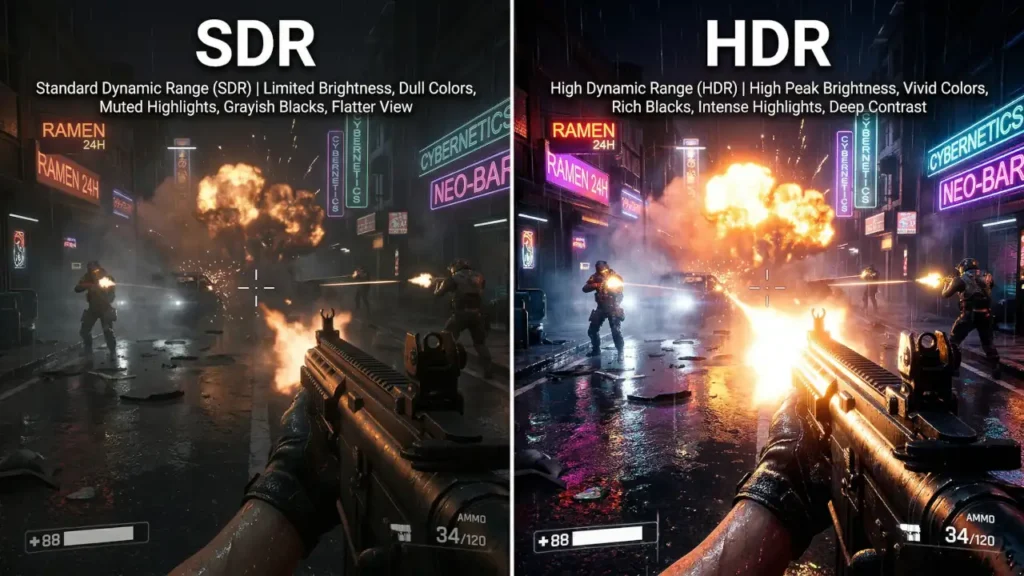
In practical terms, HDR gaming is not just “brighter gaming.” It is better-balanced lighting. In the HDR setups I’ve tested, the biggest difference is not raw brightness by itself. It’s that bright effects can pop without crushing shadow detail or flattening the rest of the scene. That is why a good HDR game feels more lifelike instead of just more colorful.
HDR vs SDR in Gaming at a Glance
If you are comparing HDR vs SDR gaming directly, the biggest differences usually show up in highlight detail, shadow depth, and how natural lighting effects look on a capable display.
| Feature | SDR Gaming | HDR Gaming |
| Brightness range | More limited | Much wider |
| Shadow detail | Can get crushed in dark scenes | Better preserved when implemented well |
| Highlight detail | Bright areas can clip easily | Sunlight, fire, and reflections look more natural |
| Color depth and richness | More limited overall | Richer, smoother color transitions |
| Overall realism | Can still look good | Usually more lifelike on a capable display |
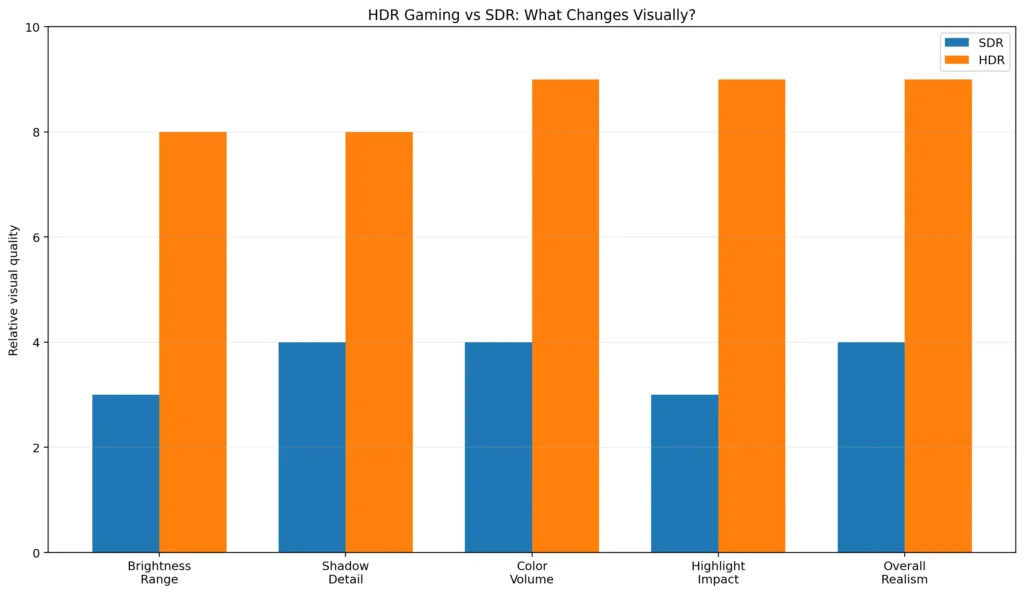
Benefits of HDR for Gamers
The first benefit most people notice is contrast. HDR makes bright areas pop while preserving the shape of darker areas. In a horror game, for example, you can still see into a dim hallway without losing the eerie mood. In a fantasy game, spell effects can glow hard without turning the whole scene into a blur of light.
Another big win is color richness. HDR usually works best alongside wider color gamuts, which means the display can show a bigger range of colors more accurately. That is a huge deal in games with lush forests, neon cityscapes, sunsets, deep oceans, or detailed character lighting. The result is not just “more saturated.” It is more believable. A red cape, a blue sky, and golden fire can all coexist without stepping on each other. That is also why HDR tends to look best on displays that combine decent brightness with wider color support instead of simply accepting an HDR signal.
HDR also improves the way you perceive depth. When highlights and shadows both have room to exist, the image stops looking like a flat postcard. It starts feeling layered. That matters in games because your brain reads depth from light and contrast all the time. A polished helmet, a wet road, or distant city lights can all feel more “there.”
A less obvious benefit is that HDR can make visual effects feel cleaner. Bloom, fire, reflections, muzzle flashes, magic spells, and sunlight often look better because the display can handle bright effects more naturally instead of turning them into a messy glow.
Real-World Example: What I Notice First When HDR Is Working Properly
When I compare the same game in SDR and HDR on a decent display, the first thing I notice is usually lighting separation. In a racing game, reflections on wet roads look cleaner and less fake. In a dark action game, torchlight stands out more naturally without turning the whole room gray. In neon-heavy games, signs and bright effects look punchier without wiping out nearby detail.
That said, I’ve also tested “HDR-compatible” displays where the difference was tiny, and in some cases SDR actually looked better. That is why I always tell gamers not to judge HDR by the label alone. A weak panel can technically support HDR and still fail to deliver the realism people expect.
Hardware Requirements
HDR Gaming lives or dies by the display. You can have the best console or gaming PC in the world, but if the screen cannot get bright enough, cannot show enough color, or handles HDR poorly, the result may be disappointing. That is why display quality matters so much.
If you are shopping for an HDR gaming monitor, the VESA DisplayHDR 400, 600, and 1000 tiers are a useful reference point. Even the best HDR gaming monitor can look underwhelming if the monitor settings, Windows output, and in-game HDR calibration are not aligned. VESA introduced these levels as a way to define baseline, mid-range, and high-end HDR performance for PC displays. The higher the tier, the more demanding the requirements around brightness and overall display performance.
In practical terms, higher-end HDR displays usually offer more meaningful peak brightness measured in nits, which is one reason brighter panels tend to produce a more convincing HDR effect. VESA’s original specification established DisplayHDR 400 as baseline, 600 as mid-range, and 1000 as high-end.
That does not mean DisplayHDR 400 is useless. It can still show HDR content, but in my experience it is the point where HDR starts, not where it becomes truly impressive. If you want HDR that feels dramatic in games, brightness, contrast, and local dimming matter a lot more than the marketing label alone. VESA’s DisplayHDR standard is still a useful baseline because it helps separate basic HDR support from more serious HDR-capable displays.
For TV gaming, the same rule applies: you want a panel that handles HDR well, not one that merely accepts an HDR signal. A lot of TVs advertise HDR support, but the real difference comes from panel quality, brightness, and how well the TV handles tone mapping once the console sends the signal.
The other hardware piece that people forget is the cable. A weak or outdated cable can cause bandwidth limits, handshake problems, or unstable HDR output. For modern gaming, especially at higher resolutions and refresh rates, a proper HDMI 2.0 or HDMI 2.1 connection, or a suitable DisplayPort setup on PC, matters a lot. If the display and cable cannot carry the signal cleanly, HDR will feel like a headache instead of an upgrade.
Software and Game Support
HDR only shines when the game actually supports it well. This is where implementation makes a massive difference. A game with careful HDR grading can look incredible. Another game might technically support HDR but still look too dark, too washed out, or oddly clipped in highlights.
That is also why some gamers describe weak HDR implementations as “fake HDR,” especially when the image feels more like a stretched SDR signal than a properly graded HDR presentation.
A good place to start is the world of AAA games, because big-budget titles are often the first to get polished HDR pipelines. But size alone does not guarantee quality. Some smaller games look excellent in HDR too. The real question is whether the developers designed the tone mapping, brightness range, and color values with HDR in mind instead of treating it as a checkbox.
Game engines matter here as well. Modern engines already support HDR workflows, but the quality still depends on how the studio uses them. The tools are there. What really matters is whether the developer tuned tone mapping, brightness, and highlight handling with HDR in mind. That includes popular engines like Unreal Engine and Unity, but engine support alone does not guarantee a great HDR result.
That includes popular engines like Unreal Engine and Unity, but the real difference still comes from how well the studio tunes HDR for the final game.
Examples of games with strong HDR often include large cinematic action titles, racing games, and open-world games that use lighting to build atmosphere. Titles such as Cyberpunk 2077, Forza Horizon-style racers, and many modern PlayStation exclusives are commonly praised by players when their HDR settings are tuned correctly.
The important thing to understand is that HDR does not behave exactly the same in every title. One game may use a higher paper white setting. Another may keep the image darker for atmosphere. A third may push highlights aggressively for spectacle.
Games Where HDR Usually Stands Out the Most
In my experience, HDR is easiest to notice in games that rely heavily on lighting and atmosphere. A few examples that gamers often praise for strong HDR presentation include:
- Cyberpunk 2077
- Forza Horizon series
- Horizon Forbidden West
- Ratchet & Clank: Rift Apart
- Gears 5
- Microsoft Flight Simulator
- Ori and the Will of the Wisps
- Red Dead Redemption 2
- Elden Ring
These are not the only good examples, but they are the kind of games where HDR tends to be obvious even to people who normally do not pay attention to display settings.
That is why HDR implementation differs across titles. Some games use simpler static tone mapping, while others handle highlights and brightness more intelligently scene by scene. Dolby’s own Dolby Vision gaming documentation explains why HDR10 and Dolby Vision can behave differently on supported hardware, especially because Dolby Vision can use dynamic metadata instead of the static approach used by standard HDR10.
Setting Up HDR for Gaming
The setup process is not complicated, but it does reward patience. Good HDR gaming settings usually come down to three things: correct system output, proper in-game calibration, and a display mode that is not fighting the HDR signal. On Windows, you turn on HDR in Display settings and then fine-tune it using the built-in HDR controls and calibration tools.
If you are on PC, I strongly recommend spending a few minutes here because poor Windows HDR setup is one of the biggest reasons people think HDR looks bad when the real problem is just bad calibration.
On Xbox, the built-in HDR calibration flow is worth using because console HDR only looks right when the display matches what the console expects. If bright details clip or dark areas disappear, calibration is usually the first thing I fix.
On PS5, the built-in HDR adjustment is also worth doing manually, even if the TV and console seem to auto-detect everything correctly. In practice, a few minutes of manual tuning usually gives a better result than trusting the default settings.
The easiest way to think about calibration is this: use the game’s own HDR calibration menu first, then use the operating system or console calibration tools, and then check your display settings. That order usually gives the most stable result. In-game calibration matters because some games expose paper white, peak brightness, and black level controls. OS calibration matters because the system can shape HDR and SDR content differently. Display settings matter because picture mode, local dimming, brightness, and contrast can all change the final image.
A lot of people rush this step and then blame HDR itself. That is usually unfair. A properly calibrated setup can look amazing, while a badly set one can look muddy or blown out. HDR is picky, but it rewards care.
One thing I’ve learned from testing displays is that “bad HDR” is often not actually HDR’s fault. It is usually a mix of weak panel performance, the wrong picture mode, bad Windows SDR balance, or a cable and port combination that is limiting the signal. If HDR looks washed out or oddly dark, I always check the basics before blaming the game.
Common Setup Pitfalls and How to Avoid Them
One of the most common mistakes is using the wrong cable or port. If your monitor supports HDR at high refresh rates but your cable does not have enough bandwidth, you may get a fallback mode, unstable signal, or strange color output. The fix is simple in principle: use the cable type and port speed your device actually needs, not the one you hoped was enough.
Another common problem is a display setting mismatch. Sometimes HDR is on in Windows, but the monitor is still in a picture mode that fights it. Or the console is outputting HDR, but the TV is stuck in a mode that crushes blacks or over-brightens everything. This happens because the display and the source device both need to agree on the signal. If either side is using the wrong mode, HDR can look worse than SDR very quickly.
Poor calibration is another big one. If peak brightness is set too low, highlights look dull. If it is set too high, bright areas clip and lose detail. If black levels are off, shadow detail disappears. That is why calibration tools matter so much—they are practical fixes, not just nice extras.
Windows SDR content brightness is also a frequent complaint. When HDR is enabled system-wide, SDR windows, menus, and desktop elements can appear too dim or too bright if the slider is not set right. That is why adjusting SDR brightness balance on Windows can make a huge difference when HDR is enabled system-wide.
Conflicting software can also cause trouble. Third-party display utilities, GPU color filters, monitor software, and special “enhancement” apps may interfere with the clean HDR signal path. The safest approach is to keep the chain simple while testing. Turn off extra processing, verify the game works correctly, and then add only the tools you truly need.
HDR Formats Explained
HDR is not one single thing. It is a family of formats and approaches.
The most common one in gaming is HDR10. HDR10 is the baseline HDR format used across a huge amount of content and hardware. It is widely supported and is usually the format you will see on PCs, consoles, TVs, and streaming devices. In simple terms, HDR10 uses a more fixed approach to brightness and tone mapping compared with newer dynamic HDR formats.
Another format worth knowing is HLG, which stands for Hybrid Log-Gamma. You will run into it less often in gaming than HDR10, but it still matters as part of the wider HDR ecosystem, especially in broadcast and mixed-content discussions.
HDR10+ is another dynamic HDR format worth knowing about, but in gaming it is still much less common than standard HDR10 and Dolby Vision.
Then there is Dolby Vision, which can use dynamic metadata on supported content and hardware. That makes it a different animal from plain HDR10, especially on setups where the display and game are both tuned well enough to take advantage of it.
The format matters, but real-world implementation still matters more. A badly tuned HDR10 game can look worse than a beautifully tuned SDR game. A well-tuned HDR10 game can look fantastic. The format is only the starting point.
Challenges and Limitations
HDR Gaming is not perfect, and pretending otherwise would be silly. One challenge is inconsistency. A game may support HDR, but the implementation can still be overly dark, too bright, or not balanced for all displays. That is why people sometimes say HDR looks amazing in one game and merely fine in another.
Another limitation is display quality. A low-end HDR screen can accept HDR input without truly delivering strong HDR performance. In that case, the image may not look dramatically better than SDR. This is one reason HDR labels can be misleading in practice. Two displays can both say “HDR,” yet deliver completely different results once you actually game on them.
There is also the issue of mixed content. A game might have excellent HDR visuals, but the user interface, menus, or in-game overlays may still feel awkward if the system scaling is not right. Modern operating systems try to reduce that problem, but it can still show up on some setups.
Finally, HDR can be more sensitive to room lighting than many people expect. In a bright room, the effect may feel muted. In a dark room, the contrast can feel much stronger. That means the same display can seem incredible at night and just okay during the day. It is not a flaw exactly. It is just how our eyes and displays interact.
My Honest Recommendation: When HDR Is Worth Using
If you have a genuinely capable HDR display, I would leave HDR on for most modern single-player games, racing games, and visually rich open-world titles. That is where the extra contrast and lighting detail are easiest to appreciate.
If you are using a budget “HDR-compatible” monitor, I would compare HDR and SDR side by side before deciding. I’ve tested enough weaker HDR displays to know that some of them look better in SDR, especially if brightness and local dimming are limited.
Also Read: HDR10 vs HLG: Why One HDR Format May Look Better Than You Expect
The Future of HDR Gaming
HDR Gaming is still improving, and the next few years should make it easier to enjoy. One big reason is better panel technology. OLED and similar emissive displays are especially exciting because they can produce deeper blacks and more precise contrast than many older screen types. In my experience, this is exactly why good OLEDs tend to make HDR look more dramatic than many basic LCD gaming monitors.
That matters because one of HDR’s biggest strengths is contrast. A screen that can go truly dark while also producing bright highlights has a real advantage for games with moody lighting, neon effects, or cinematic visuals. It is easy to see why OLEDs are often mentioned in the same breath as premium HDR gaming. For a deeper look at the panel side of things, see our guide on OLEDs.
Software support is also getting better. Game engines continue to improve their HDR pipelines, console calibration is more polished, and operating systems now expose better tools for calibration and control. As more developers learn how to grade for HDR correctly, the average quality should rise. That is the real future here. Not just more displays that support HDR, but more games that use it thoughtfully.
Conclusion
HDR Gaming makes games look more realistic because it lets the image behave more like real light. Bright effects can shine without blowing out nearby detail, dark scenes can keep more texture, and colors can look richer without turning unnatural. When the display, the cable, the game, and the calibration all line up, the result feels less flat and more believable.
After testing enough monitors and TVs, I’d say HDR is no longer just a nice extra for gaming. On the right display, it is one of the most noticeable visual upgrades you can make. That said, weak “HDR” screens can still disappoint, which is why I always recommend judging HDR by real panel performance and proper setup, not just the label on the box.