If you have ever looked at two screens and wondered why one feels richer, deeper, and more lifelike even when both claim HDR, this is where things start to make sense. HDR True Black 400, 500, 600 is not just a fancy label. It is a VESA certification that tells you how well an emissive display, usually OLED, can handle bright highlights, dark shadows, and the tiny details in between. That matters a lot for movies, games, and even everyday laptop use, because a good HDR screen can change the whole feel of the image.
I started paying much closer attention to HDR certifications after testing OLED laptops for whatismyscreenresolution.site. On paper, many of them looked similar. In actual use, though, some screens clearly handled dark scenes, reflections, and HDR highlights better than others. That is usually where DisplayHDR True Black ratings begin to matter in a very noticeable way.
Also Read: Blue PHOLED Is Set to Transform TVs, Phones, and Wearables
Quick Answer: DisplayHDR True Black 400, 500, 600
DisplayHDR True Black 400, 500, and 600 are VESA HDR certifications designed for OLED and other emissive displays. The main difference between HDR True Black 400 vs 500 vs 600 is peak brightness. All three maintain extremely deep black levels, while higher tiers deliver brighter HDR highlights, stronger contrast perception, and a more vivid viewing experience.
Understanding The Difference Between Displayhdr and Displayhdr True Black
The easiest way to think about it is this: DisplayHDR is VESA’s HDR standard for LCD-type displays, while DisplayHDR True Black is the version built for emissive displays such as OLED and future microLED panels. According to the official VESA DisplayHDR specification, both standards are designed to give buyers a clearer baseline for real HDR performance instead of relying entirely on marketing labels. The True Black line exists because self-emissive screens can turn pixels fully off, which is why they can produce much deeper blacks than most LCDs. All tiers also require HDR10 support.
A lot of people also compare these OLED-focused certifications with standard LCD HDR tiers like DisplayHDR 400, 600, and 1000, even though the underlying panel behavior is very different. Most True Black-certified screens today use OLED technology because OLED panels can control light at the individual pixel level. On the content side, formats like HDR10+, Dolby Vision, and HLG influence how HDR movies and streaming content are mastered and displayed. Broadcast HDR standards such as Hybrid log–gamma also fit into this ecosystem, although they work differently from display certification systems. Those are different from display certifications, but people mix them up all the time.
Why HDR True Black Feels Different in Real Life
The big reason is contrast. VESA’s True Black standard is built for displays that can go extremely dark at the pixel level, so blacks look more like true black and less like a dark gray glow. VESA also says True Black delivers much deeper black levels and improved rise time compared with its LCD-oriented HDR tiers. That combination is a big part of why OLED HDR often looks more dramatic in a dark room, even when brightness numbers are not wildly different on paper.
That does not mean brightness does not matter. It does. But in real viewing, contrast is often what makes the image feel “different,” not just “brighter.” A screen with better black control can make stars, shadows, night scenes, and dark game menus look cleaner and more defined.
In HDR games especially, True Black panels tend to make bright effects like explosions, neon lighting, and reflections stand out more naturally against darker environments without the gray glow that weaker HDR screens sometimes produce. That deeper contrast is usually the first thing people notice when moving from standard HDR displays to a strong OLED panel.

DisplayHDR True Black 400
DisplayHDR True Black 400 is the entry point in the True Black family. According to VESA, it requires a peak luminance level of 400 cd/m², a black level of 0.0005 cd/m², and 95% DCI-P3 coverage. In simple terms, that means it can get bright enough for punchy HDR highlights while still keeping the black floor extremely low.
This is also where the difference from SDR becomes obvious. Compared with SDR, which uses a much narrower brightness and contrast range, HDR gives the display far more room for shadow detail, highlight depth, and overall image realism. On a True Black 400 panel, that usually means better shadow separation, more convincing depth, and a picture that feels less flat than SDR.
Color matters too, especially because a wide color gamut allows HDR displays to reproduce richer and more saturated colors without looking unnatural. VESA’s True Black spec calls for at least 95% DCI-P3 coverage, so the screen is not only darker where it should be, but also more capable of showing rich, saturated color without looking washed out.
In practice, True Black 400 is already good enough for most people who want a serious upgrade from basic HDR or SDR. It is a strong fit for laptops, creative work, streaming, and gaming if you care more about contrast and black level than raw brightness.
DisplayHDR True Black 500
True Black 500 raises the peak brightness requirement to 500 cd/m² while keeping the same extremely low black level. That sounds like a modest jump, but in use it can make HDR highlights look noticeably more alive. VESA’s own wording around the newer tier makes clear that the move from 500 to 600 is another step in the same direction, not a change in philosophy.
The real point of True Black 500 is balance. It gives you more brightness headroom than 400, but keeps the blacks, color, and emissive-display behavior that make OLED-style HDR so convincing. That is why it often feels like the “sweet spot” for premium laptops and portable creator machines. VESA also notes that many laptop families have been certified at the 400 and 500 level, which shows how common this tier has become.
If you have ever used a screen that looked beautiful indoors but a little too dim for sunny rooms, this is the tier where that concern starts to ease a bit. True Black 500 still is not about brute-force brightness like some LCD HDR monitors. It is about preserving OLED black depth while giving the image more punch.
DisplayHDR True Black 600
DisplayHDR True Black 600 pushes the peak brightness requirement to 600 cd/m², again while keeping the same 0.0005 cd/m² black level. VESA introduced this tier specifically to target higher luminance HDR on OLED and other emissive displays, and it described the 600 level as 20 percent brighter than True Black 500.
This is also where OLED’s pixel-level light control starts becoming much more obvious in real use. OLED Association documentation notes that emissive OLED displays excel at controlling brightness at the individual pixel level, which is a major reason HDR scenes can appear more cinematic on True Black-certified panels compared with conventional LCD backlights.
That extra brightness is what makes this tier feel more premium. It gives HDR content more visible sparkle in highlights, better visibility in brighter environments, and a little more room for scenes that need strong contrast without sacrificing the black floor. In VESA’s framing, it is still the same deep-black OLED experience, just with more light output on top.
This is the tier that usually makes people say, “Okay, this actually looks different.” That is especially true if the display is paired with good HDR content and a room lighting setup that does not wash the image out. VESA also says True Black tiers are designed for the visually strong, home-theater-style experience that OLED and similar emissive displays can deliver.
True Black 400 vs 500 vs 600: Comparison
| Feature | True Black 400 | True Black 500 | True Black 600 |
| Peak brightness requirement | 400 cd/m² | 500 cd/m² | 600 cd/m² |
| Black level | 0.0005 cd/m² | 0.0005 cd/m² | 0.0005 cd/m² |
| Color gamut | 95% DCI-P3 | 95% DCI-P3 | 95% DCI-P3 |
| Best at | Great HDR entry point | Better brightness balance | Brightest True Black option |
| Typical feel | Deep blacks, strong contrast | More pop, still very clean blacks | Strongest punch and highlight impact |
| Best use case | Laptops, gaming, streaming | Premium laptops, mixed use | High-end OLED laptops and creator devices |
| Typical Environment | Indoor / darker rooms | Mixed lighting | Bright rooms and HDR-heavy use |
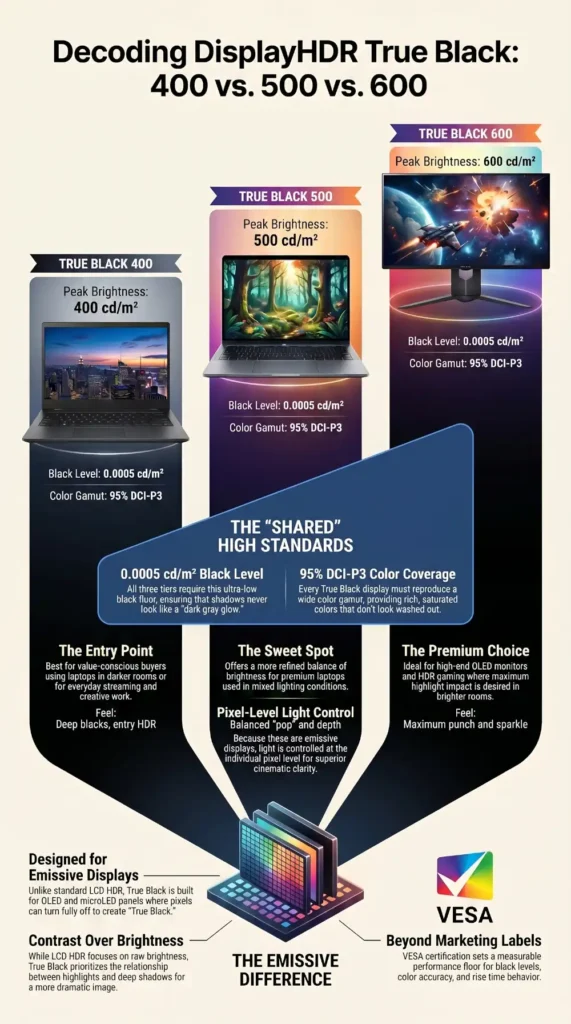
The differences between True Black 400, 500, and 600 become much easier to understand when you compare the brightness tiers and shared OLED characteristics side by side.
Brightness Differences
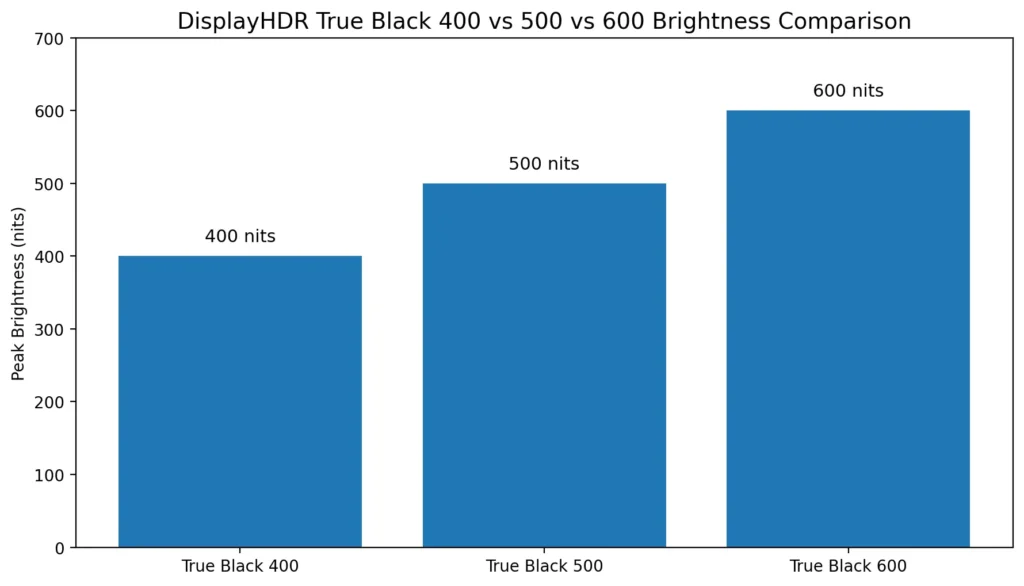
The biggest difference between True Black 400, 500, and 600 is peak brightness. Black levels remain identical across all three tiers, but each step upward increases HDR highlight intensity and improves visibility in brighter environments.
The brightness increase between True Black 400, 500, and 600 looks straightforward on paper, but seeing the peak luminance side by side makes the progression much easier to visualize.
Black Level Performance
All three True Black tiers maintain the same extremely low 0.0005 cd/m² black level requirement. That means upgrading from 400 to 600 does not improve black depth itself. Instead, the higher tiers preserve the same OLED-style blacks while increasing overall brightness headroom.
VESA certification is not based only on peak brightness numbers. True Black displays are also tested for black-level performance, color accuracy, rise time behavior, and HDR consistency across different viewing conditions. That matters because two screens can advertise similar brightness specs while delivering very different real-world HDR quality.
Best Use Cases
True Black 400 is usually enough for most laptops, streaming, and everyday HDR use. True Black 500 tends to feel more balanced in mixed lighting conditions, while True Black 600 works especially well for premium OLED monitors, HDR gaming, and brighter viewing environments.
The simple takeaway is that black level stays the same across all three tiers, while peak brightness steps up from 400 to 500 to 600. So the upgrade is not about “better blacks” in the higher tiers. It is about keeping the same black depth while lifting the top end of the image. That is why each higher tier can make HDR look more vivid without losing the OLED-style look people love.
What The Numbers Actually Mean When You Sit Down and Watch
The brightness differences can look minor on a spec sheet, but they become easier to notice once you watch HDR content side by side. In real life, it is more about where the image feels comfortable and convincing. True Black 400 already gives you the deep-black advantage. True Black 500 adds more breathing room in brighter scenes. True Black 600 gives the strongest brightness headroom of the three while preserving the same black floor.
Room lighting also changes how dramatic these differences feel. In darker rooms, OLED black levels become much easier to appreciate, while brighter environments tend to make peak brightness more important than shadow detail alone.
That is why a lot depends on the panel and the content, not only the certification badge. A well-tuned True Black 400 screen can look better than a badly tuned higher-tier panel. Certification is useful because it sets a floor, but the rest of the display still matters. VESA’s program is meant to give buyers a meaningful baseline, not a perfect picture in every situation.
Where HDR Formats Fit into All This
This part confuses a lot of people, so let us make it simple. HDR True Black is a display certification. HDR10, HDR10+, Dolby Vision, and HLG are content formats or signal systems. They are related, but they are not the same thing. A screen can be certified for True Black and still support different HDR formats depending on the hardware and software around it.
That is why a user can buy a very good OLED laptop and still be confused when one streaming service looks better than another. The display tier tells you how the screen behaves. The HDR format tells you how the content is mastered and delivered. Both matter.
A Simple Way to Choose Between 400, 500, And 600
If you care most about value and strong HDR contrast, True Black 400 is already a very good place to land. If you want a more refined balance and a bit more brightness, True Black 500 is the safer middle. If you want the best brightness headroom within the True Black family, True Black 600 is the one that usually stands out most. VESA’s own tiering is basically saying the same thing, just in spec-sheet language.
For laptops, True Black 400 and 500 are usually the most common tiers because they balance brightness, battery efficiency, and OLED contrast well. Desktop OLED monitors and larger creator displays are more likely to push toward the True Black 600 range.
If you mostly watch movies, play HDR games, or work in darker rooms, even True Black 400 can already feel like a major jump from standard HDR laptop panels.
Also Read:
Personally, I think True Black 500 is where OLED HDR starts feeling comfortably premium for most people. True Black 400 already looks excellent in darker rooms, but the extra brightness headroom at 500 makes everyday use feel more balanced without jumping into very expensive hardware territory.
A good rule of thumb is this: the higher the tier, the more the screen can push bright highlights without giving up the deep-black behavior that makes OLED HDR special. Once you actually compare these panels side by side, that difference becomes surprisingly easy to notice.
Conclusion
HDR True Black 400, 500, 600 is worth understanding because it explains why some screens feel dramatically better even when the spec sheet looks familiar. The key idea is simple. All three tiers are built for emissive displays, all three keep blacks extremely low, and each step upward gives you more peak brightness. That means better HDR punch without losing the dark-level advantage that OLED and similar panels are known for.
So if you are comparing laptops, monitors, or compact OLED devices, do not treat HDR as one vague feature. Look at the True Black tier, check the panel type, and compare it with the kind of room and content you actually use. Once you start comparing HDR screens this way, the marketing terms become much easier to filter out.