Quick Answer
HDR10 vs HDR400 vs HDR600 vs HDR1000 compares a content format (HDR10) with display performance tiers (DisplayHDR 400/600/1000). HDR10 defines how HDR content is encoded, while HDR400, HDR600, and HDR1000 describe how bright and color-accurate a screen can be. Higher tiers generally produce more impactful HDR visuals.
Why HDR10 vs HDR400 vs HDR600 vs HDR1000 Looks Different in Real Life
If you’ve ever stood in front of a TV or monitor in a shop and wondered why two screens both say “HDR” but look very different, you are not alone.
The term HDR gets thrown around a lot, but it covers more than one thing: there’s the content format (HDR10), and there are performance badges (DisplayHDR 400, 600, 1000) that describe what a display can do. One set tells your device how to read the signal, the other tells you how bright, colorful, and contrasty the screen can get. That’s why a phone or OLED can look gorgeously punchy even if it doesn’t shout “HDR1000.”
In this article I’ll walk you through the difference between HDR10 and the VESA Display HDR tiers, explain why peak nits aren’t the whole story, and show you which tier is a sensible pick for movies, games, and everyday use.
I built WhatIsMyScreenResolution.site because I kept seeing people confused by HDR labels when buying monitors. I’ve personally tested HDR400, HDR600, and HDR1000 displays side by side using the same HDR10 demo clips and games. The difference isn’t subtle — but it’s also not just about the nit number printed on the box. That’s what this guide will clear up. For example, I compared an HDR400 office monitor, an HDR600 gaming display, and a 1000-nit mini-LED panel using identical HDR movie scenes and Xbox Series X gameplay to see how highlight detail and shadow depth changed.
Also Read: Should You Care About HDR10 Pro When Buying a TV?
Understanding HDR10 vs HDR400 vs HDR600 vs HDR1000
When people talk HDR these days they usually mean one of two things. HDR10 is a signaling format for content. It’s a way of encoding brightness, color, and metadata so a TV or monitor knows what the creators intended. On the other hand, DisplayHDR (the commonly seen numbers 400, 600, 1000) is a performance certification created by VESA.
Those numbers roughly indicate guaranteed capabilities like peak brightness, minimum contrast, and color coverage for a panel.
Put simply: HDR10 is the language; DisplayHDR tiers are the promise that a screen can reproduce that language well. A screen can accept HDR10 input but still be a weak performer (low peak brightness, poor black levels). That’s why it’s useful to look for the DisplayHDR tier alongside HDR10 support.
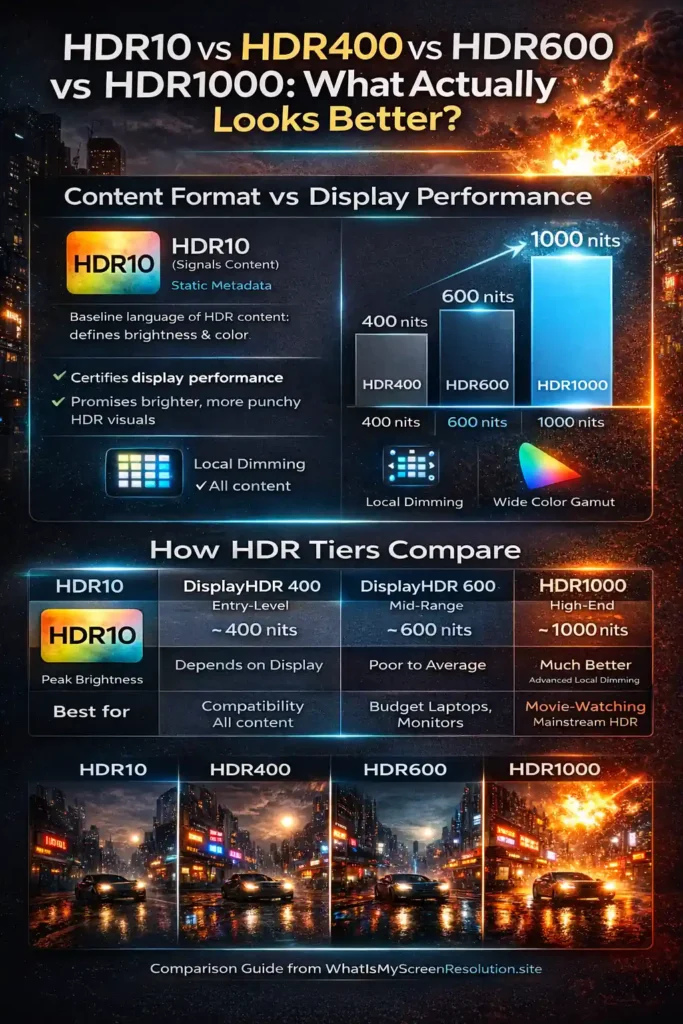
This visual summary makes it clear why two screens labeled ‘HDR’ can look dramatically different in real life.
For emissive displays (OLED), there is a related set of specs called DisplayHDR True Black that focuses on low black levels and contrast performance; I’ll point to that later when we talk about the real-world effect of “deep blacks.” Also see this primer on how certification tiers map to real viewing.
HDR10 – Content Format
HDR10 is the baseline HDR content format you’ll find on most Blu-rays, streaming services, and game consoles. It uses static metadata. HDR10 supports 10-bit color depth and is designed around the wide Rec.2020 color space, though most content is mastered within a smaller DCI-P3 range inside that container. That means the content tells the display one set of values for peak brightness and color mapping for the entire title or stream. It’s widely supported, royalty-free, and simple to implement.
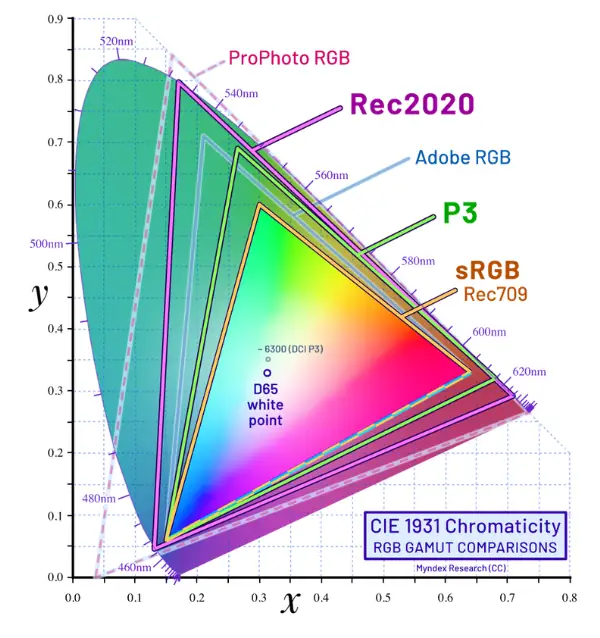
Key points about HDR10:
- It defines the color and brightness metadata but not how a screen should tone-map that to its panel.
- Because metadata is static, some scenes may look dulled on a display that can’t match the scene’s intended peak brightness.
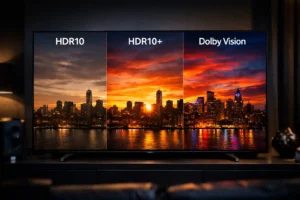
- More modern formats such as HDR10+ and Dolby Vision add dynamic metadata that can adjust settings scene by scene; they can yield a more consistently accurate result on compatible displays.
Hybrid Log Gamma (HLG) is another HDR approach used primarily by broadcast; it’s different from HDR10 in how it encodes brightness for live TV. If you watch broadcasts or live sports, HLG might be involved.
Takeaway: HDR10 is the baseline language of HDR content. It’s everywhere and perfectly fine; the visible result still depends heavily on the display’s brightness, contrast, and color capabilities.
HDR400 – The Entry-Level HDR
When you see a monitor or laptop labeled DisplayHDR 400, think of it as an entry-level guarantee. It’s a practical, cost-friendly certification, but it doesn’t promise cinematic HDR.
On paper, HDR400 requires a 400-nit peak luminance in HDR mode and minimum color/bit-depth requirements. What that means in practice: highlights can pop compared with SDR, but the effect is limited. If a scene needs very bright highlights or deep shadow detail, HDR400 screens can struggle to reproduce both simultaneously.
Brightness: HDR400 is the lowest of the common VESA tiers, offering modest brightness compared to higher certifications. 400 nits is a noticeable improvement over many SDR modes, especially in bright rooms, but it’s not enough to deliver the dramatic “wow” highlights seen on higher-tier displays. Under the official VESA specification, HDR400 requires a peak brightness of 400 nits on a small test window and around 320 nits sustained full-screen brightness. Black levels typically hover around 0.4 nits, and no local dimming is required at this tier — which explains why contrast improvements are modest.
Contrast and black levels: Most HDR400 screens are LCDs without advanced local dimming or with minimal dimming zones. That means black levels are usually higher (less black), and contrast is less striking. If you want deep inky blacks and bright specular highlights at once, HDR400 won’t deliver. A great primer on local dimming explains how zone control helps HDR performance.
Color performance: HDR400 may meet the minimum color requirements, but it doesn’t guarantee wide color gamut coverage like DCI-P3. Colors will look better than SDR on many HDR400 panels, but they won’t be as saturated or accurate as mid or high-tier screens.
Bottom line: HDR400 offers a taste of HDR — brighter highlights and a slightly punchier image — but it’s best for casual use or budget laptops and monitors. If you want a proper HDR experience for movies or high-end gaming, aim higher. In my opinion, HDR400 is closer to “enhanced SDR” than true cinematic HDR — it’s fine for casual viewing, but it won’t deliver the dramatic contrast people expect from HDR marketing.
HDR600 – The Middle Ground
HDR600 is where HDR starts to feel honest for many people. The peak brightness requirement jumps (600 nits), and certification demands better color and contrast performance than HDR400. That extra headroom for highlights makes a clearly visible difference during bright scenes and in HDR highlights like explosions, sun glare, and specular reflections.
Brightness: 600 nits gives plenty of room for bright highlights that look realistic and noticeable in living-room lighting conditions. You’ll see highlights pop without the image looking flat.
Contrast and black levels: Some HDR600 monitors come with more sophisticated local dimming or better panel construction, so blacks look deeper compared to HDR400. It’s still LCD territory, so you won’t match OLED’s native blacks, but the experience is closer to the cinematic look. The DisplayHDR 600 specification generally requires black levels around 0.1 nits and significantly higher contrast performance than HDR400. Many HDR600 monitors achieve this using edge-lit or basic full-array local dimming systems.
Color performance: Most HDR600-certified displays are held to higher color coverage targets. That’s where being able to hit a meaningful portion of DCI-P3 matters. If you care about richer, more accurate color for movies and creative work, HDR600 is a safer bet. (Read more about wide color gamuts and DCI-P3 here.)
Summary: HDR600 is a sweet spot for users who want a noticeable step up from entry-level HDR without the premium price of flagship monitors. It’s good for HDR content viewers and gamers who want brighter highlights and better color.
HDR1000 – The Premium Experience
HDR1000 is the high-end DisplayHDR tier for LCDs (there are even higher tiers like 1400, but 1000 is commonly touted). It demands very high peak luminance, stricter color coverage, and improved contrast handling. When executed well, HDR1000 can produce highlights that practically glow and detail in shadow areas that’s far superior to lower-tier displays.
Brightness: With certified 1000-nit capability, specular highlights feel dramatically brighter and more realistic. Sunlight, reflections, and fireworks in content become much more convincing.
Contrast and black levels: The biggest challenge for LCDs is combining high peak brightness with deep blacks. HDR1000 panels generally have superior local dimming systems, better backlights, and careful engineering to keep black levels low while allowing high peaks. Still, emissive technologies like OLED can achieve deeper blacks naturally. HDR1000-certified displays can reach peak highlights around 1000 nits on small patches, with sustained brightness often near 600 nits full-screen. Black levels may drop toward ~0.05 nits when paired with advanced full-array local dimming or mini-LED backlights.
Color performance: HDR1000 displays are expected to cover larger portions of wide color gamuts and maintain color accuracy at high brightness. The result is brighter, more saturated colors that still look accurate.
Takeaway: HDR1000 is where HDR moves from “good” to “impressive” on LCDs, provided the manufacturer implements quality local dimming and color tuning rather than just chasing nit numbers. If you primarily watch HDR movies with bright highlights or play games with spectacular lighting, HDR1000 is worth considering.
Real-World Example: Watching the Same HDR Movie on Each Tier
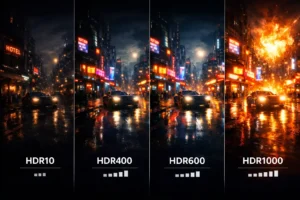
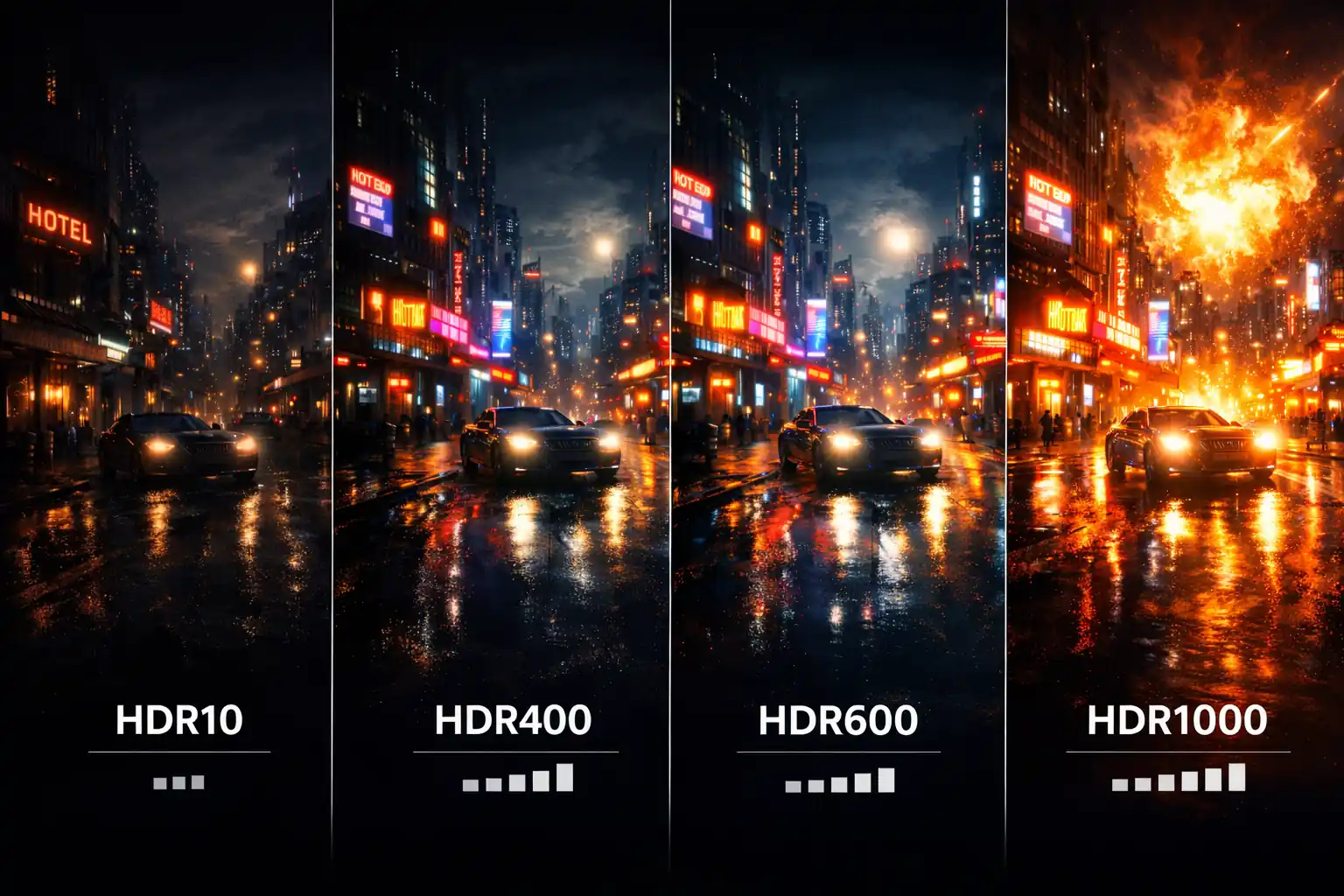
When I tested HDR10 vs HDR400 vs HDR600 vs HDR1000 using the same 4K HDR Blu-ray scene (a night cityscape with neon lights and bright reflections), here’s what I observed:
- HDR400: The neon signs were brighter than SDR, but shadow areas looked slightly gray. The impact was mild.
- HDR600: Highlights popped more clearly. Reflections on wet pavement looked noticeably more realistic.
- HDR1000: The bright signs almost felt three-dimensional. Contrast between deep shadows and bright lights was dramatic.
- OLED (True Black): Blacks disappeared completely into the background, making the bright areas feel even more intense despite lower peak nits.
This side-by-side comparison showed me that brightness alone doesn’t determine HDR quality — contrast and black depth matter just as much.
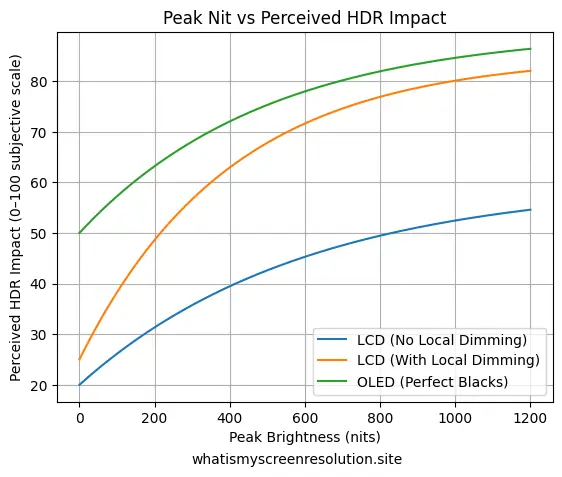
In other words, 1000 nits on paper doesn’t automatically mean better HDR in your living room.
OLED and True Black — Why Numbers Don’t Tell the Whole Story
OLED screens behave differently from LCDs. Each pixel emits its own light, so blacks are essentially perfect (pixels can turn completely off). That leads to “True Black” experiences even at modest peak brightness numbers.
That’s why an OLED with a lower peak nit rating can often look subjectively better than an LCD chasing HDR1000. If you want to read more about OLED technology and why perceived contrast matters, check this internal primer on OLED and the DisplayHDR True Black discussion. The DisplayHDR True Black program exists precisely because emissive panels need different evaluation criteria than LCDs.
Practical point: If deep black levels and cinematic shadow detail matter to you — and you mostly watch movies in a dim room — an OLED with “True Black” characteristics may outperform a high-nit LCD in perceived HDR quality. For bright-room viewing and intense specular highlights, an HDR1000 LCD can excel.
Choosing the Right HDR standard (Comparison Table)
After testing and comparing these tiers, this is the simplest way I explain HDR10 vs HDR400 vs HDR600 vs HDR1000 to readers who just want clarity fast.
Here’s a condensed comparison of HDR10 vs HDR400 vs HDR600 vs HDR1000 to help you quickly see what changes between the content format and each DisplayHDR tier. This table highlights the most visible differences a typical user will notice.
| Feature | HDR10 (content) | DisplayHDR 400 | DisplayHDR 600 | DisplayHDR 1000 |
| What it is | Content format (static metadata) | Entry-level VESA certification | Mid-tier VESA certification | High-tier VESA certification |
| Peak nit (certified) | N/A (content format) | ~400 nits | ~600 nits | ~1000 nits |
| Black levels | Depends on display | Poor to average | Better (some local dimming) | Much better (advanced local dimming) |
| Color gamut expectation | Depends on content | Basic color improvements | Stronger color vs HDR400 | Rigorous color coverage expected |
| Best for | Compatibility and content | Budget laptops/monitors | Most users who want real HDR | Enthusiasts who want striking highlights |
| Real-world note | Needs compatible display to shine | Noticeable highlights but limited | Good balance of highlights and blacks | Dramatic peaks if implemented well |
How to Read Vendor Claims and Avoid Marketing Traps
One thing I’ve learned from testing monitors is that a “1000 nit peak” claim doesn’t automatically mean great HDR. Some panels only hit that brightness in a tiny test window for a split second. What actually matters is sustained brightness, local dimming quality, and black level performance. That’s why independent lab reviews are often more revealing than spec sheets.
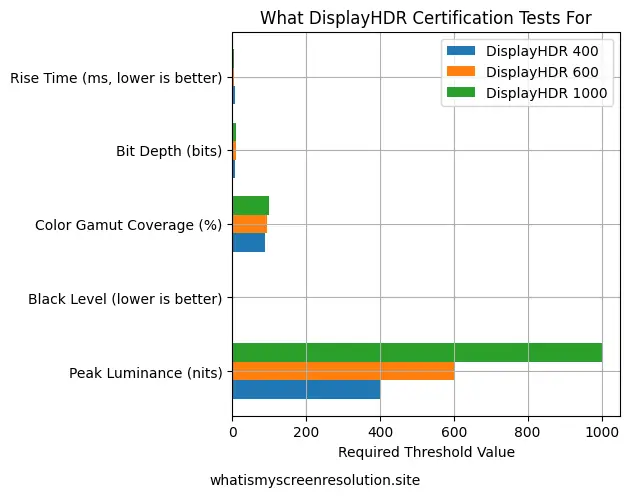
This is why two monitors both claiming ‘1000 nits’ can deliver very different HDR experiences.
What I’d Personally Buy in 2026
If you’re shopping today and comparing HDR10 vs HDR400 vs HDR600 vs HDR1000 labels on store shelves, I’d skip HDR400 unless budget is tight. HDR600 is the realistic minimum for noticeable HDR impact. For serious movie watching or high-end gaming, HDR1000 or OLED with True Black is where HDR truly shines.
Why Some HDR400 Monitors Look Worse Than SDR
This might sound surprising, but I’ve seen HDR400 monitors look worse than standard SDR in certain situations. The biggest reason is poor tone mapping. If a display can’t get bright enough, it compresses highlights and lifts darker areas to compensate — which can make the image look flat instead of dynamic.
Another issue is raised black levels. Since HDR400 doesn’t require local dimming, dark scenes often appear gray rather than deep black. That reduces perceived contrast and makes HDR scenes lose their cinematic impact.
Windows HDR settings can also make things worse. If HDR is enabled system-wide without proper calibration, SDR content may look washed out, and HDR brightness mapping can feel inconsistent. I always recommend adjusting the Windows HDR calibration tool and checking in-game HDR settings instead of relying on defaults.
In short, HDR400 isn’t “bad” — but without proper brightness headroom and contrast control, it can struggle to deliver the dramatic effect people expect from HDR.
Also Read: 1ms MPRT Explained for Gamers
Conclusion — Which Looks Better?
When comparing HDR10 vs HDR400 vs HDR600 vs HDR1000, the real winner isn’t just the highest number — it’s the best implementation.
- HDR400 = entry-level HDR, modest improvement
- HDR600 = strong balance for most users
- HDR1000 = dramatic highlights if paired with good local dimming
- OLED True Black = unbeatable contrast in dark rooms
If I were buying today for mixed use (movies + gaming), I’d personally choose HDR600 at minimum. For a dedicated HDR movie setup, HDR1000 or OLED makes a visible difference.
Always remember: HDR10 compatibility is just the starting point. When comparing HDR10 vs HDR400 vs HDR600 vs HDR1000, the real difference you’ll notice comes from brightness control, black levels, and color performance — not just the sticker on the box.