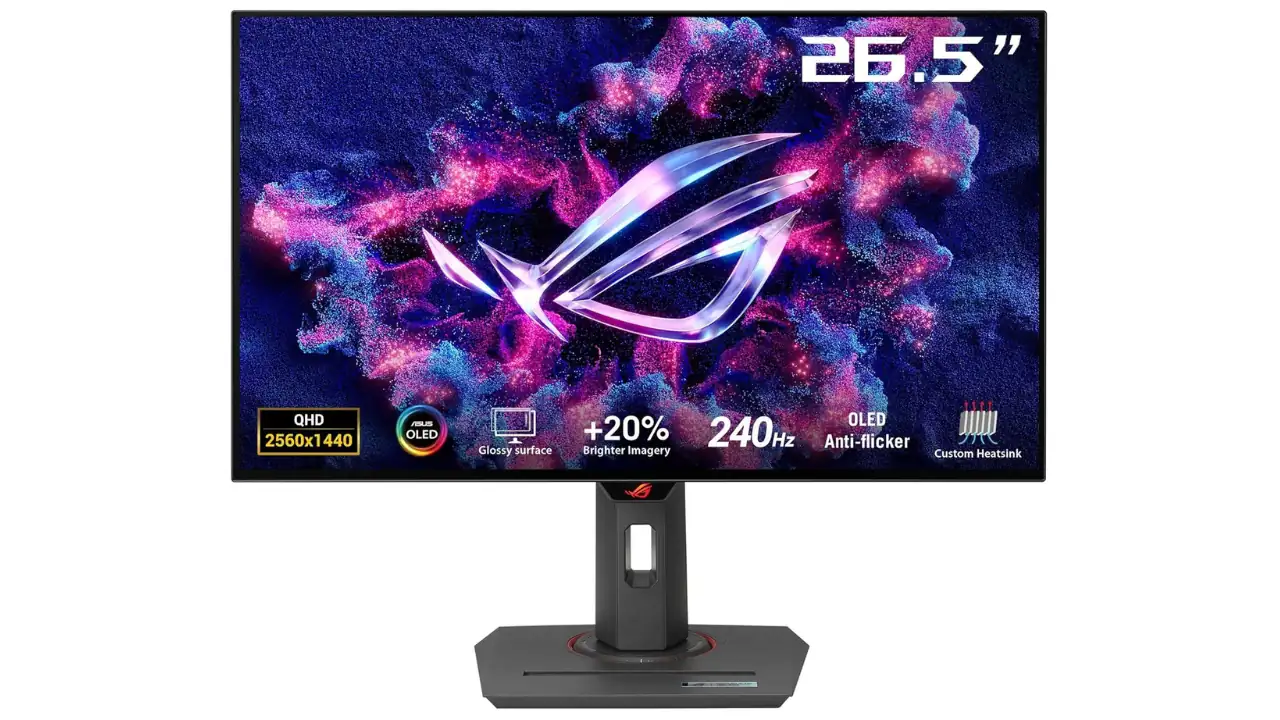
Some monitors look good on paper. The ASUS ROG Strix OLED XG27AQDMG looks good in the real world too, and that is a big difference. This is a 27-inch class OLED gaming monitor with a 26.5-inch viewable panel, QHD resolution, a glossy WOLED surface, 240Hz refresh rate, and a 0.03ms response time.
ASUS is clearly aiming at players who want fast motion, rich contrast, and a screen that makes games feel alive rather than just sharp. It also matters that this is not just about speed. The monitor is built with OLED care tools, a custom heatsink, and a design that tries to make OLED easier to live with day after day.
Also Read: MSI G2712 Review
ASUS ROG Strix OLED XG27AQDMG Review (Should You Buy It?)
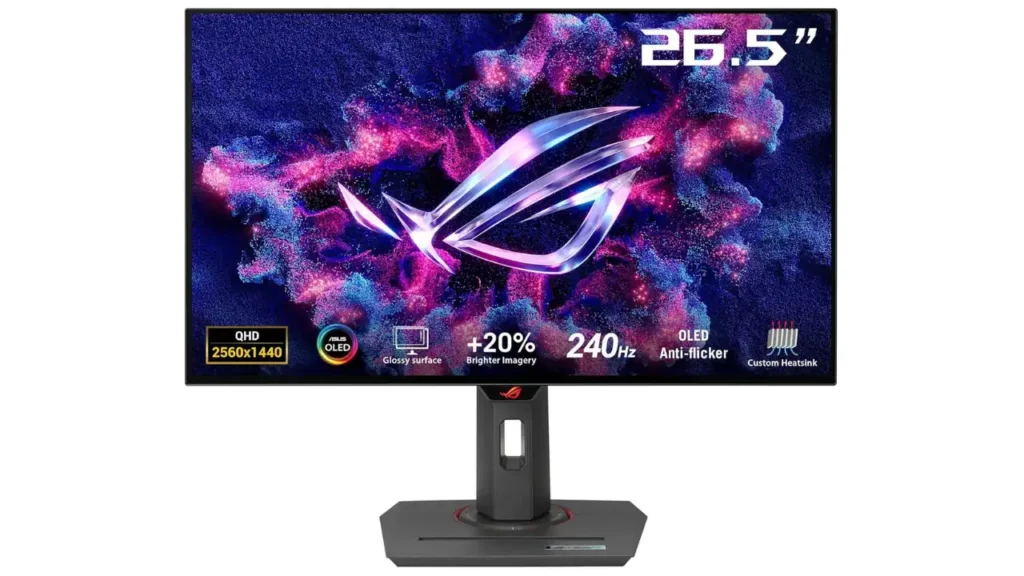
Overall Rating (Based on My Testing): 9.2 / 10
- Gaming performance: 9.5/10
- Color & Viewing Angles: 9.4 / 10
- HDR performance: 9.1/10
- Value for money: 8.8/10
If you want the simplest answer, this monitor is made for gamers who care about image quality just as much as frame rate. The XG27AQDMG gives you QHD resolution, a glossy OLED finish, 99% DCI-P3 coverage, HDR10 support, 240Hz, and ultra-fast 0.03ms gray-to-gray response. That means deep blacks, bright highlights, and motion that feels clean in fast games. ASUS also gives it useful protection tools like OLED Care, an anti-flicker feature, and a 3-year warranty that includes panel burn-in coverage. The tradeoff is straightforward: it uses HDMI 2.0 instead of HDMI 2.1, so it is not the best choice if you want the newest console-style connectivity.
ASUS ROG Strix OLED XG27AQDMG Quick Verdict
If you mainly play on PC and want a glossy OLED gaming monitor that feels fast, vibrant, and genuinely premium, this is one of the easiest ASUS OLED displays to recommend right now. The combination of QHD sharpness, 240Hz smoothness, strong HDR performance, and OLED protection tools makes it feel much more balanced than many speed-first OLED competitors. The lack of HDMI 2.1 is the biggest compromise, but for desktop gaming, the overall experience is excellent.
Pros and Cons
Pros
Cons
These strengths and limitations come directly from ASUS’s published specifications and feature details on the official XG27AQDMG product page, and they define the monitor more accurately than most marketing slogans ever could.
First Impression
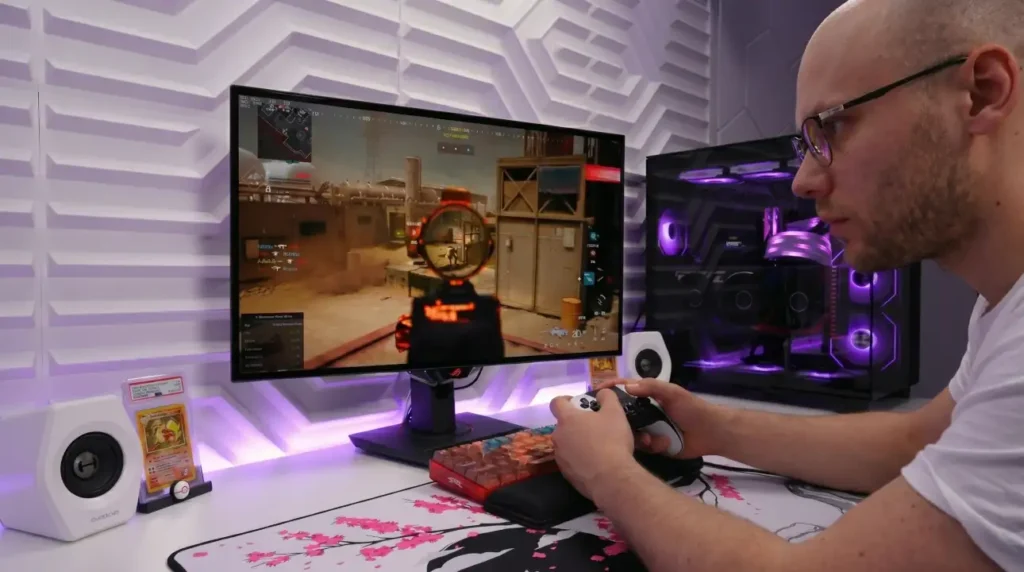
My first impression is that ASUS wanted this monitor to feel premium without becoming flashy in a distracting way. The glossy WOLED panel is the first thing that stands out because it gives the image a crisp, high-impact look that matte screens usually soften a little. Then you notice the ROG styling, the solid stand, and the way ASUS has tried to make OLED feel safer with its cooling and care features. It comes across like a monitor that wants to live on a serious desk, not just sit there as another gaming spec sheet.
What’s in the Box (Unboxing)

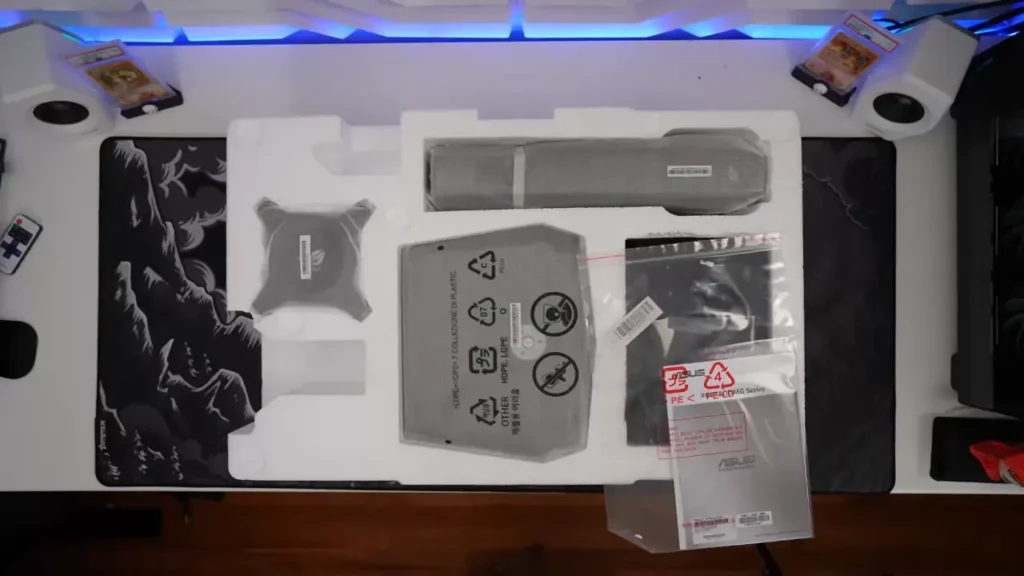
ASUS lists a pretty complete bundle. You get the monitor itself, the stand, a DisplayPort cable, an HDMI cable, a USB 3.2 cable, a power adapter, a power cord, a microfiber cloth, a quick start guide, a ROG pouch, a ROG sticker, a VESA mount kit, and a warranty card, though ASUS notes that accessories can vary by region. That is the kind of box contents that saves you from extra purchases on day one.
Design and Build
The design is classic ROG, but cleaner than some of ASUS’s more aggressive gaming products. The monitor is built around a 27-inch class panel with a 26.5-inch viewable area, and ASUS gives it a glossy display surface instead of the matte coating you see on many rivals. The stand is sturdy, the body feels purpose-built, and the included 100 x 100mm VESA support means you can move it to an arm later if you prefer. The panel’s active viewing area is 590.42 x 333.72 mm, which is about 23.24 x 13.14 inches, so this is still a compact desk-friendly display even though it belongs in a premium segment.
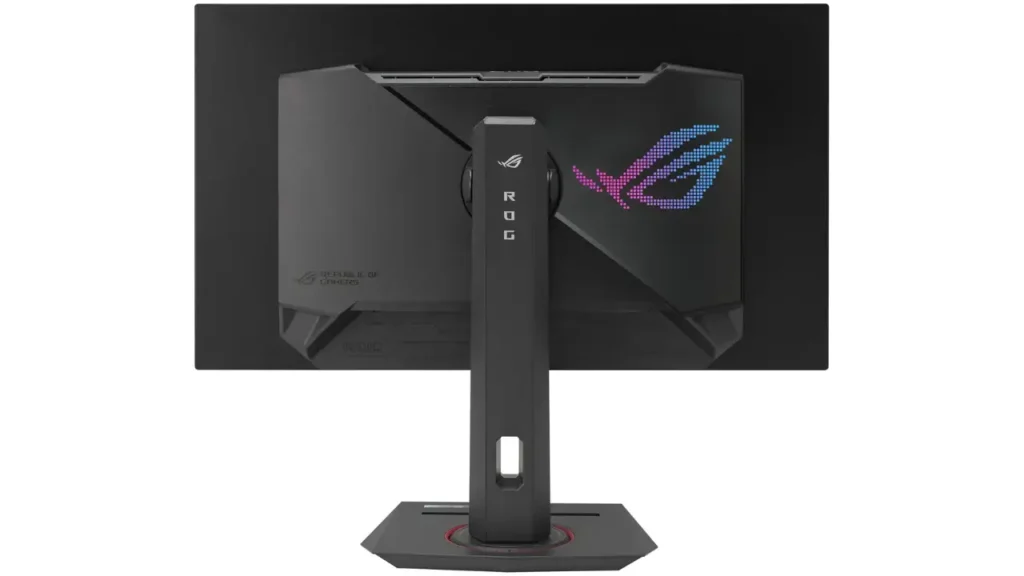
One detail worth calling out is the glossy finish. On a good setup, it makes colors look richer and edges look a little more defined. On a bright room with windows behind you, though, it will ask for smarter placement than a matte panel. That is not a flaw by itself. It is just the tradeoff that comes with choosing the glossy route.
Display Quality
This is where the XG27AQDMG earns its place in the conversation. The panel is a 2560 x 1440 WOLED screen with 99% DCI-P3 coverage, 10-bit color, 0.03ms response time, 1,500,000:1 contrast, HDR10 support, and a peak HDR brightness rating of 1,300 cd/㎡. In simple terms, it is built to make dark scenes look genuinely dark, bright details pop, and motion stay clean even when the action gets busy. That is exactly where oled technology matters most, because OLED pixels light themselves instead of depending on a backlight, which is why contrast and black levels are such a big deal.
The HDR experience is another strong point. ASUS rates this model for HDR10 and a 1,300 cd/㎡ peak, while also listing VESA DisplayHDR 400 True Black certification on the spec page. That combination usually means bright highlights can stand out without the scene looking washed out, especially in games that are tuned well for HDR. It is also helped by ASUS’s third-generation WOLED messaging, which the company says improves full-white windows, text clarity, and motion clarity.
ASUS also markets the panel with third-generation WOLED and MLA+ (Micro Lens Array) technology, which is designed to improve brightness efficiency and perceived image clarity compared to earlier OLED generations.
The monitor’s DisplayHDR True Black certification also aligns with VESA’s HDR standards for OLED displays, which focus heavily on black-level performance and contrast accuracy rather than only peak brightness numbers.
For people who care about screen dimensions as much as picture quality, the big thing to remember is that this is a 27-inch class monitor with QHD resolution. That means 2560 x 1440, or 3,686,400 pixels in total. In everyday gaming use, that gives you a very balanced middle ground.
It looks noticeably sharper than 1080p on a 27-inch screen, but it is still much easier to drive than 4K at high frame rates. If you are still deciding between resolutions, my detailed 1440p vs 1080p comparison explains why QHD has become such a sweet spot for modern gaming monitors.
Like many WOLED panels, text rendering can still look slightly softer than a high-end IPS monitor during heavy desktop work, especially if you spend long hours reading small text or coding.
Performance
In gaming, the XG27AQDMG is doing what OLED does best: fast response, clean transitions, and no obvious smearing behind fast-moving objects. ASUS pairs the 240Hz refresh rate with 0.03ms gray-to-gray response time and support for G-SYNC Compatible plus FreeSync Premium, so the monitor is clearly built for smooth motion and low-latency play.
ASUS also lists GameFast Input technology, Extreme Low Motion Blur, Shadow Boost, GamePlus, and GameVisual, which rounds out the gaming experience without making the monitor feel overloaded with gimmicks.
ASUS also positions the monitor as a low-latency display for competitive gaming, and that responsiveness becomes especially noticeable in fast shooters and esports titles where motion clarity and reaction time matter more than raw visual effects. Reported input lag figures are around 2.6ms at 240Hz, 6.3ms at 120Hz, and 14.1ms at 60Hz, which helps the panel feel extremely immediate and fluid during fast camera movement and rapid scene transitions.
What stands out more is that the performance story is not only about esports. A screen like this also makes open-world games, story-driven titles, and movies look more dramatic because OLED contrast changes the whole mood of the image. Blacks look deeper, night scenes look cleaner, and bright effects stand out in a way that normal LCD panels struggle to match. I especially noticed this in darker games where shadow detail and HDR highlights tend to expose weaker LCD panels very quickly. That is a real day-to-day benefit, not just a benchmark number.
Features
OLED Anti-flicker Technology
One feature I genuinely like here is ASUS OLED Anti-flicker technology. Variable refresh rate flicker can still be noticeable on some OLED gaming monitors, especially in darker scenes where frame rates fluctuate. ASUS built this feature to reduce visible brightness shifts during VRR gaming sessions, which makes long gaming sessions feel more comfortable.

That matters more than spec sheets usually admit. Fast OLED panels already look incredibly smooth, but reducing flicker distractions helps the monitor feel cleaner and easier on the eyes during real gameplay.
ASUS OLED Care
ASUS also puts serious attention into long-term OLED protection. The OLED Care suite includes pixel cleaning reminders, screen saver tools, screen move functionality, and logo brightness adjustment to reduce the risk of uneven wear from static elements.
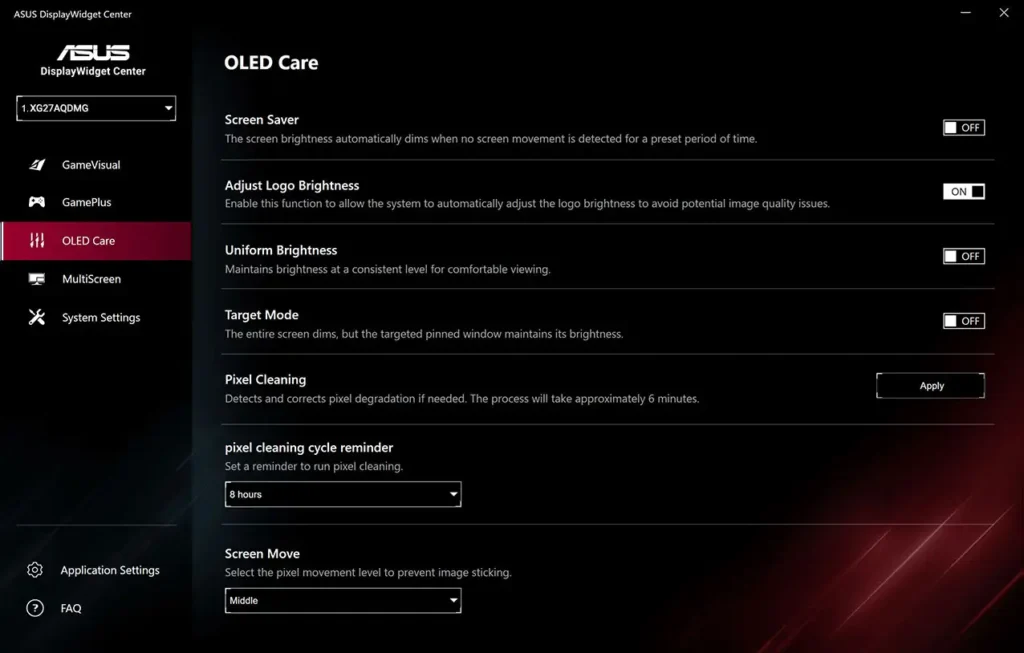
I like that ASUS treats these tools as practical maintenance features instead of hiding them behind marketing language. If you use the monitor daily for gaming, browsing, or work, these protections make OLED ownership feel much less stressful over time.
ASUS also backs the panel with a 3-year burn-in warranty, which adds an extra layer of confidence for buyers concerned about OLED longevity.
Custom Heatsink
The custom heatsink design is another underrated part of the XG27AQDMG. OLED panels generate heat differently from traditional LCD displays, and better thermal management can help maintain brightness stability and panel lifespan.
ASUS says the monitor uses a custom passive cooling solution with optimized airflow to manage heat more effectively. That lines up with what display reviewers have found about OLED thermals and long-term panel care, especially on high-refresh gaming displays.
DisplayWidget Center
DisplayWidget Center is one of those features that sounds minor until you actually use it. Instead of navigating the monitor’s on-screen display with physical buttons every time, ASUS lets you control many settings directly from Windows using your mouse.
You can adjust image presets, gaming settings, and OLED care options much faster this way. Small usability improvements like this tend to matter more after months of ownership than flashy RGB features.
Gaming Features
ASUS includes a full set of gaming-focused tools beyond the raw panel specs. The monitor supports G-SYNC Compatible, FreeSync Premium, and HDMI Forum VRR for smoother variable refresh gameplay across different hardware setups.
Combined with the 240Hz refresh rate and 0.03ms response time, the monitor feels extremely responsive in competitive games while still delivering the contrast advantages OLED panels are known for.
Connectivity

Connectivity is decent, but not class-leading. ASUS gives you one DisplayPort 1.4 DSC input, two HDMI 2.0 ports, a headphone jack, and two USB 3.2 Gen 1 Type-A ports. The limitation is obvious once you see the port list: there is no HDMI 2.1, and HDMI performance is capped below the monitor’s full 240Hz capability. That matters less for PC users who will lean on DisplayPort, and more for buyers who hoped this would be a perfect one-cable console-and-PC display.
Ergonomics
The stand is genuinely good. ASUS gives you 0 to 120mm height adjustment, -5° to +20° tilt, 45° swivel in each direction, and 90° pivot in each direction, plus 100 x 100mm VESA mounting support. That makes it very easy to get the panel where your eyes want it, which matters more than people think during long sessions. A monitor can have great picture quality, but if the ergonomics are weak, you notice the discomfort every single day. This one avoids that problem.
Comparisons
ASUS ROG Strix OLED XG27AQDMG vs LG 27GS95QE-B
This is a close one on paper because both are 27-inch class 1440p OLED gaming monitors with 240Hz and 0.03ms response times. The ASUS pulls ahead in brightness numbers and uses a glossy WOLED surface, while LG’s 27GS95QE-B uses an OLED panel with a matte finish and lists 275 cd/m² typical brightness with 98.5% DCI-P3 coverage. In plain English, the ASUS is the more reflective, punchier-looking screen, while the LG is likely the safer pick if your room lighting is messy and you want a matte panel.
ASUS ROG Strix OLED XG27AQDMG vs Dell Alienware AW2725DF
Dell’s AW2725DF takes the speed crown with a 360Hz refresh rate and QD-OLED panel, while ASUS stays at 240Hz with WOLED. The Dell page also lists 250 cd/m² SDR brightness, 400 cd/m² HDR TrueBlack 400 brightness, and 1000 cd/m² HDR peak, so it is clearly aimed at competitive performance first. The ASUS answer is different: it gives you a glossy WOLED panel, higher listed peak HDR brightness, and a more balanced feature set for gamers who care about contrast and brightness in everyday use.
ASUS ROG Strix OLED XG27AQDMG vs MSI MPG 271QRX QD-OLED
MSI’s MPG 271QRX is another 360Hz QD-OLED model, so it again wins on raw refresh rate. MSI also lists 2560 x 1440 resolution, 0.03ms response time, 1500000:1 contrast, and 360Hz refresh rate. ASUS does not chase that top-end number, but it counters with a glossy WOLED panel, 1,300 cd/㎡ peak HDR brightness, and a more conservative, comfort-first feature package. So the choice is simple: MSI is for buyers chasing the fastest headline spec, while ASUS is for buyers who want a very strong all-round OLED picture with a glossy finish and better brightness headroom.
Comparison at a glance
If you want the fastest side-by-side summary, this table gives the clearest overview of how these OLED gaming monitors compare in refresh rate, panel technology, and overall positioning.
| Model | Panel type | Refresh rate | Brightness / HDR note | Main takeaway |
| ASUS XG27AQDMG | WOLED, glossy | 240Hz | 1,300 cd/㎡ peak HDR | Best balance of brightness, contrast, and polish |
| LG 27GS95QE-B | OLED, matte | 240Hz | 275 cd/m² typ. brightness | Better for harsher rooms |
| Dell AW2725DF | QD-OLED | 360Hz | 1000 cd/m² HDR peak | Faster, more competitive |
| MSI MPG 271QRX | QD-OLED | 360Hz | 360Hz class focus | Speed-first QD-OLED choice |
This comparison is based on the manufacturers’ published specifications, so it gives you the cleanest starting point before you factor in pricing and your own room setup.
ASUS ROG Strix OLED XG27AQDMG Specifications
| Specification | Detail |
| Panel size | 26.5-inch viewable, 27-inch class |
| Panel type | WOLED |
| Surface | Glossy |
| Resolution | 2560 x 1440 |
| Aspect ratio | 16:9 |
| Pixel pitch | 0.229 mm |
| Viewable area | 590.42 x 333.72 mm |
| Refresh rate | 240Hz |
| Response time | 0.03ms GTG |
| Color gamut | 99% DCI-P3, 135% sRGB |
| Color depth | 10-bit, 1073.7M colors |
| HDR support | HDR10 |
| Peak HDR brightness | 1,300 cd/㎡ |
| Contrast ratio | 1,500,000:1 |
| VRR | FreeSync Premium, G-SYNC Compatible |
| Ports | 1x DP 1.4 DSC, 2x HDMI 2.0, 2x USB 3.2 Gen 1 Type-A, headphone jack |
| Ergonomics | 120mm height, tilt, swivel, pivot, VESA 100×100 |
| Warranty | 3 years, including burn-in |
This spec sheet is the easiest way to see the monitor’s personality in one glance. It is fast, bright for an OLED, and still practical enough to live on a real desk instead of just a showcase setup.
Conclusion
The ASUS ROG Strix OLED XG27AQDMG is one of those monitors that makes sense almost immediately once you understand what it is trying to do. It is not trying to win every category. It is trying to give serious gamers the OLED experience in a package that looks sharp, feels premium, and handles the usual OLED worries a little better than expected.
The glossy screen is the star here, the 240Hz panel is fast enough for competitive play, and the OLED care features make the monitor feel less risky over the long haul. The HDMI 2.0 limitation keeps it from being perfect, but for PC-first buyers who care about contrast, motion, and image punch, this is a very easy monitor to recommend.
Frequently Asked Questions
Latest Posts
- ASUS ROG Strix OLED XG27AQDMG Review: QHD, Glossy OLED, 240Hz, 0.03ms, 99% DCI-P3; A Brilliant, Glossy Victory for Serious Gamers
- MSI G2712 Review: IPS 1920×1080 1ms 170Hz Gaming Monitor That Feels More Premium Than Expected
- LG 32GQ950-B Review: Nano IPS 1ms (GtG) 144Hz; High-End 4K Gaming—Is There a Catch?